
You are here:
Capacity Plans
Capacity plans predict what coverage you need to meet demand by job profile and time period. In addition to estimating staff required, a plan can show you how many unassigned and assigned shifts exist and let you create more.
Required Editions

| View supported editions. |
| User Permissions Needed | |
|---|---|
| To view, create, and edit workload histories and intelligent forecasts, and to view and create capacity plans: | Workforce Engagement Analyst |
| To view and create capacity plans, and to create shifts from a capacity plan: | Workforce Engagement Planner |
Short-term and Long-term Plans
You can create short-term and long-term capacity plans. Here’s how they differ.
| Characteristic | Short-term plan | Long-term plan |
|---|---|---|
| What the plan predicts | Number of shifts needed for each job profile in each territory | Number of full-time employees (FTEs) needed by job profile in each territory |
| Maximum plan duration | Up to 12 weeks | Up to 52 weeks |
| Dashboard intervals | Hourly, daily, or weekly | Daily, weekly, or monthly |
Both types of plans predict coverage for the specified date range. It’s up to you, however, to translate plan recommendations to actual shifts and staffing.
What Can You Learn from a Short-term Plan?
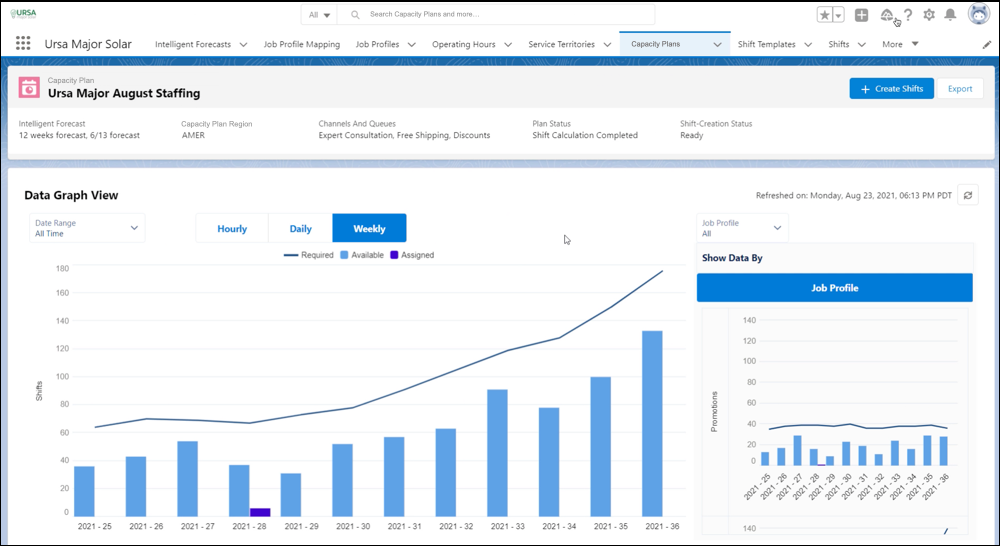
A short-term plan predicts how many agents you need, how many shifts are available, and how many shifts are assigned for a given timeframe. The dashboard shows these estimates.
- Staff Required
The total number of staff required for the forecasted workload by job profile and service territory. When the number of job profiles increases, Staff Required increases. That’s because we split the workload across job profiles equally, calculate the required staff for each job profile separately, and then round up to the nearest whole number. If the workload is small, an increase in job profiles can result in a jump in the number of staff required.
- Staff Available
The number of agents that you need to cover forecasted demand based on shift duration, job profile, and service territory. When you create a capacity plan, you define a default shift duration for each job profile. Workforce Engagement calculates Staff Available for the time period as the total unassigned shift hours that match the job profile and service territory divided by the profile’s default shift duration. For example, given an unassigned 16-hour shift and a default shift duration of 8 hours for a profile, Workforce Engagement predicts that you need 2 staff available.
- Staff Assigned
The number of agents assigned to cover forecasted demand based on shift duration, job profile, and service territory. Staff Assigned uses the same calculation as Staff Available; it looks at existing shifts and divides the total hours by the default shift duration. However, Staff Assigned only considers shifts that have a status of Assigned or Confirmed.
- Gap
The difference between Staff Required and Staff Available.
A short-term plan helps you to identify where and when to create more shifts. You can create shifts by hand or with templates. Or Workforce Engagement can add shifts directly from a plan using the Create Shifts button.
What Can You Learn from a Long-term Plan?
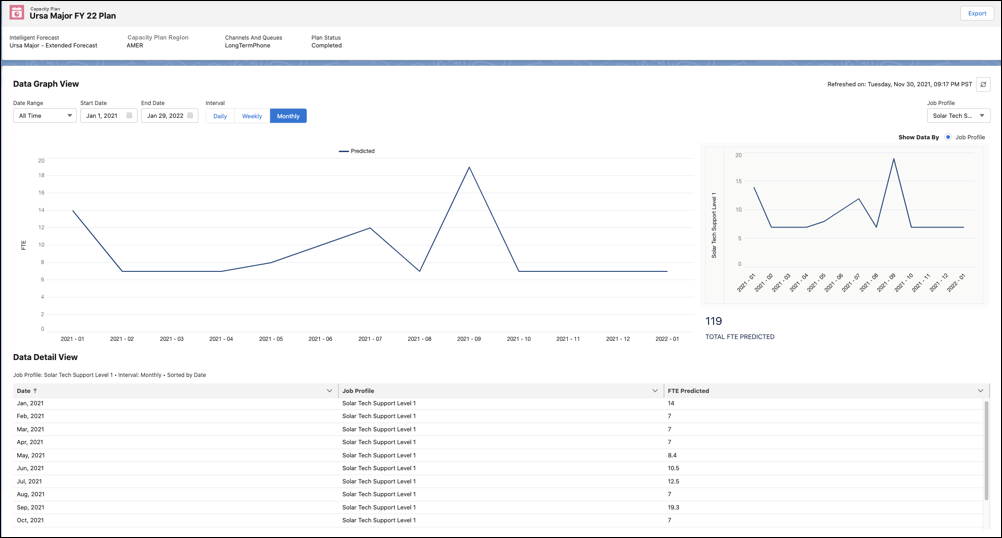
A long-term plan informs hiring, training, and budgeting decisions. It predicts the number of full-time employees (FTEs) that are required to meet the forecasted workload. You can view the data by date range, job profile, and queue.
Dashboard Considerations
The data breakdown includes a row for each time interval even if there are no required, available, or assigned staff or FTEs predicted for that interval. Each interval has one or more rows according to the number of shift templates for the interval. In addition, there’s a row for each shift in the interval without a template.
- Admin Checklist for Capacity Plan Setup
Format your data so that your team can create a capacity plan. The steps differ depending on whether you’re using an Omni-Channel queue-based routing workflow or a non-Omni workflow. - Capacity Plan Glossary
To make sense of all the data going into your capacity plan, read this glossary. Refer to it as you move through the plan setup steps. - Create a Capacity Plan
Create a short-term capacity plan to predict how many shifts you need to provide coverage. Or to predict staffing requirements, build a long-term capacity plan. - Set Average Handle Times
Average handle times indicate the length of a typical customer interaction. Workforce Engagement uses average handle times to estimate staffing needs in a capacity plan. - Optimized vs. Baseline Capacity Plan
If the capacity plan optimization engine exceeds its one-hour-per-job-profile time limit, we return plan data that isn’t fully optimized. We call this data baseline capacity plan data. - Export Your Capacity Plan
Export your capacity plan as a CSV file.
