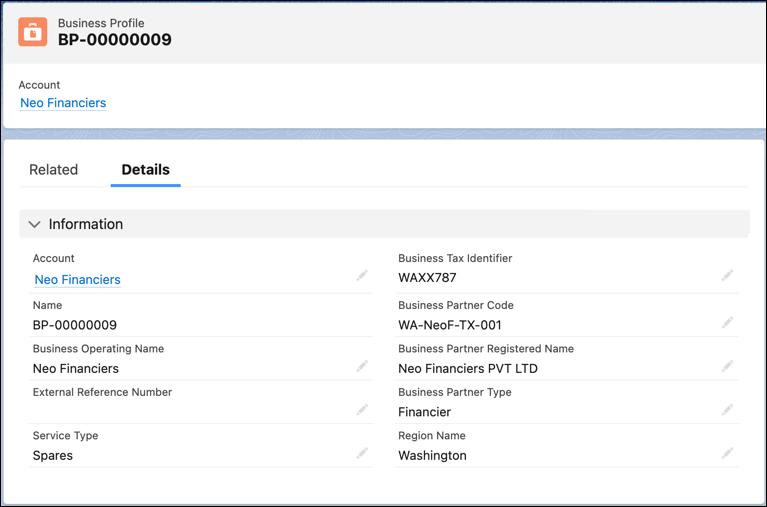
In Automotive Cloud, you can model all stakeholders for an automotive company as Account
records. To capture additional information about each stakeholder account, primarily dealers,
create Business Profile records. Each dealer can have a Business Profile record where you can add
details, such as the type of services provided by the dealer, and the registered name and code of
the account.
Required Editions
Available in: Enterprise, Unlimited, and Developer
Editions.
User Permissions Needed
To create business profiles:
Automotive Foundation permission set
Make sure your admin has defined picklist values for the Region field on the Business Profile
object in Object Manager. The admin can also add picklist values for Service Type and Business
Partner Type.
From the App Launcher, find and select Business Profiles.
Click New.
Search for and select an account.
Enter a name for the business profile.
For Business Operating Name, enter the name that’s registered for the business.
For Business Partner Code, enter the official code that’s registered for the
business.
For Business Partner Registered Name, enter the legal name of the business partner.
For External Reference Number, enter the ID of the business partner as on the external data
source.
For Business Partner Type, select the type of role associated with the business partner:
Customer
Financier
Sales Dealer
Service Dealer
For Service Type, select all the types of services that the business partner provides, such
as Spare Parts Sales, Sales, Repair & Maintenance, or Consultation.
For Business Tax Identifier, enter the unique code that’s assigned to a business by the
revenue department for tax reporting.
For Region, select the operational region or territory of the partner.
For Service Territory, select a dealer’s operating location.
If you use Automotive Scheduler capabilities for scheduling test drives and service
appointments, this is a required step.
Save your changes.
Example
Neo Motors has multiple car dealerships across North America. Neo Motors wants to capture
additional information about each primary dealer account. Here's how a Neo Motors admin can add
details about each dealer account:
From the App Launcher, search and select Business Profiles.
Click New.
Specify these values, and then save the changes:
Account: Dream Dealers New York North America
Name: BP-00045
Business Partner Code: NA_Dream_Dealers_NY_001
Business Operating Name: New York Dealer 001
Business Partner Type: Sales Dealer
Business Tax Identifier: ABX3456
Business Partner Registered Name: Dream Dealers Motors NY
Service Type: Vehicle Sales, and Spare Parts
Sales
We use three kinds of cookies on our websites: required, functional, and advertising. You can choose whether functional and advertising cookies apply. Click on the different cookie categories to find out more about each category and to change the default settings.
Privacy Statement
Required Cookies
Always Active
Required cookies are necessary for basic website functionality. Some examples include: session cookies needed to transmit the website, authentication cookies, and security cookies.
Functional Cookies
Functional cookies enhance functions, performance, and services on the website. Some examples include: cookies used to analyze site traffic, cookies used for market research, and cookies used to display advertising that is not directed to a particular individual.
Advertising Cookies
Advertising cookies track activity across websites in order to understand a viewer’s interests, and direct them specific marketing. Some examples include: cookies used for remarketing, or interest-based advertising.