
Create Document Types for Address Update Service Process
Set up document types that let your users select a supporting documentation type that confirms the client’s new address.
Required Editions
| Available in: Lightning Experience |
| Available in: Professional, Enterprise, and Unlimited Editions |
| User Permissions Needed | |
|---|---|
| To set up Address Update service process: | Industries Service Process, Industry Service Excellence, OmniStudio, Document Checklist, Business Rules Engine Case, Service Catalog Request, and Document Checklist Items objects Read, Create, Edit, Delete, View All Records Decision Matrix, Decision Matrix Columns, Decision Matrix Rows, Decision Matrix Versions, Expression Set, Expression Set Object Aliases, Expression Set Step Relationships, Expression Set Versions objects Read, Create, Edit, Delete, View All Records AND Financial Services Cloud Extension OR FSC Service OR Financial Services Cloud Basic OR Financial Services Cloud Standard |
| To use Address Update service process: | Industries Service Process, Industry Service Excellence, OmniStudio, Document Checklist, and Business Rules Engine Case, Service Catalog Request, and Document Checklist Items objects: Read, Create, Edit, Delete Decision Matrix, Decision Matrix Columns, Decision Matrix Rows, Decision Matrix Versions, Expression Set, Expression Set Object Aliases, Expression Set Step Relationships, Expression Set Versions objects: Read, View All Records AND Financial Services Cloud Extension OR Financial Services Cloud Basic OR Financial Services Cloud Standard |
-
Turn on Document Checklist.
- In Setup, in the Quick Find box, enter Document Checklist, then click Document Checklist.
- Turn on Checklist Items with Attachments.
-
Create document types.
- In Setup, in the Quick Find box, enter Document Type, then click Document Type.
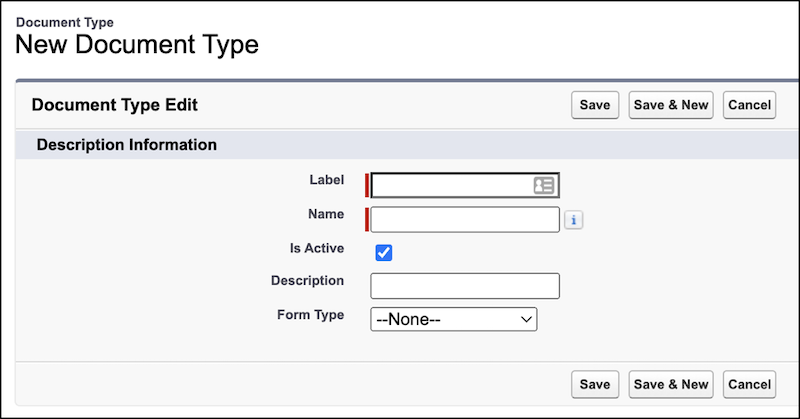
- Click New Document Type.
-
Enter a Label, Name, Description, and click Save.
- To add more document types, repeat these steps as needed.
