
You are here:
Customizing the Leads to Review Component
Leads to Review lets channel managers review deals that partners register from their Experience Cloud sites. Learn about the default functionality for Leads to Review and review some considerations for Salesforce admins who want to customize it.
| Available for channel managers in Lightning Experience in Enterprise, Performance, Unlimited, and Developer Editions with Sales or Service. You must have at least one PRM add-on license. |
About Leads to Review
Leads to Review is a Lightning Web Component that’s included with supported Partner Relationship Management add-on licenses. Salesforce admins can give channel managers access to the Leads to Review component by adding it to the Channel Management Console or any other Lightning app meant for managing leads.
Leads to Review shows a list of leads, each with an action menu. The default experience displays the first five leads from the Leads Created by Partners This Month list view. Each lead includes an action menu that lets channel managers approve or reject the deal for the assigned partner.
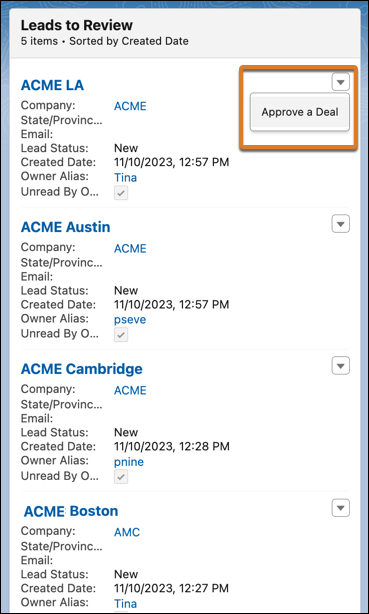
To learn more about how Leads to Review works, see Monitoring Channel Business from the Channel Management Console.
Customizing the Component
You can customize this behavior from Lightning App Builder.
- The list view that displays leads to channel managers
- How many leads display in a single view (up to 10)
- Which flow-based actions are available for the channel manager from the action menu
- Who can see the component on their console, by filtering visibility by user or user permissions.
If you decide to customize the component, keep these considerations in mind.
- The default list view, Leads Created by Partners This Month, shows only leads that are related to partner accounts. If your company doesn’t use partner accounts, consider using a different list view to show inbound leads from partners.
- You can customize the actions available on the action menu using flows built with Flow Builder. Leads to Review supports only flows in which the Lead ID field is used as a flow variable, and that the variable is available for input from outside of the flow.
