
You are here:
Learn About Action Plans
Understand what Actions Plans are and how you can use them in Admissions Connect to define application requirements.
- What Are Action Plans?
Admissions Connect uses Action Plans to define application requirements, such as core application details, transcripts, and letters of recommendation. In some cases, you create Action Plans for requirements that apply to a very specific type of applicant, like an international transfer student. But more often, a single requirement applies to multiple applicant scenarios, which means that a single Action Plan can be used for multiple applicants—you don't need to define it multiple times. An Action Plan for transcripts is an example of a requirement that works for nearly all students. - How Are Action Plans Created?
Action Plans and Action Plan Items are created from Action Plan Templates and Action Plan Template Items. Think of an Action Plan Template as the master copy of an Action Plan. When you assign an Action Plan, you specify the Action Plan Template to use and its details are applied to a unique instance of an Action Plan. That way, applicants can have their own instance of the master copy. - How Do Action Plans Display Requirements?
To display Action Plans in the Admissions Connect components, you create Application Material Mapping records for your Action Plan Templates and Action Plan Template Items. These mapping records specify the order in which the requirements display in the Application Checklist and Reviewer Application Reader components. The details you specify for each Application Material Mapping record depends on what you create. Just keep in mind that the mapping records determine how the requirements are displayed to your verifiers and reviewers.
What Are Action Plans?
Admissions Connect uses Action Plans to define application requirements, such as core application details, transcripts, and letters of recommendation. In some cases, you create Action Plans for requirements that apply to a very specific type of applicant, like an international transfer student. But more often, a single requirement applies to multiple applicant scenarios, which means that a single Action Plan can be used for multiple applicants—you don't need to define it multiple times. An Action Plan for transcripts is an example of a requirement that works for nearly all students.
Each application requirement is an Action Plan with at least one or more child Action Plan Items. The Action Plan Items define a specific task or document. Action Plans are assigned to Application records to let admissions staff and applicants know what requirements must be completed and submitted. An Application can be assigned multiple Action Plans. A first-year applicant might have six Action Plans, and a transfer applicant only four.
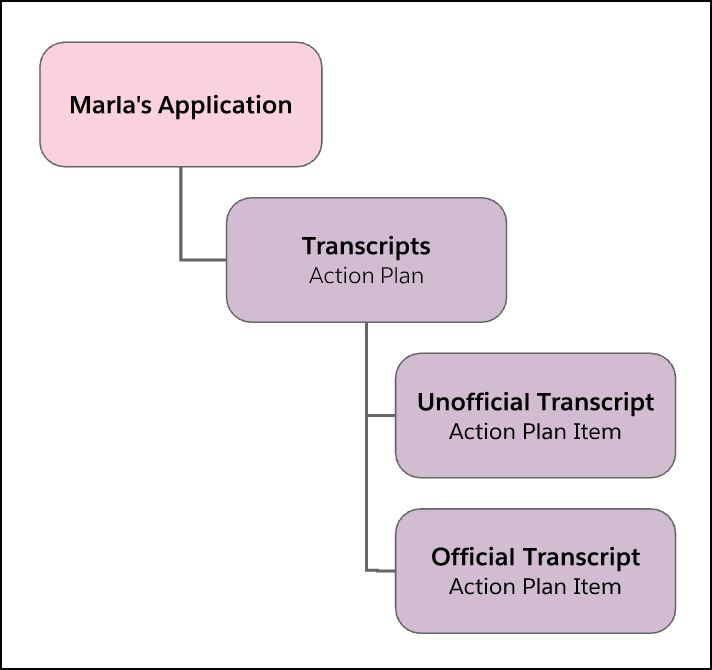
Let's look at a requirement to submit transcripts. The Action Plan is labeled Transcripts and has two child Action Plan Items labeled Unofficial Transcript and Official Transcript. This Action Plan would be one of many Action Plans assigned to an Application.
How Are Action Plans Created?
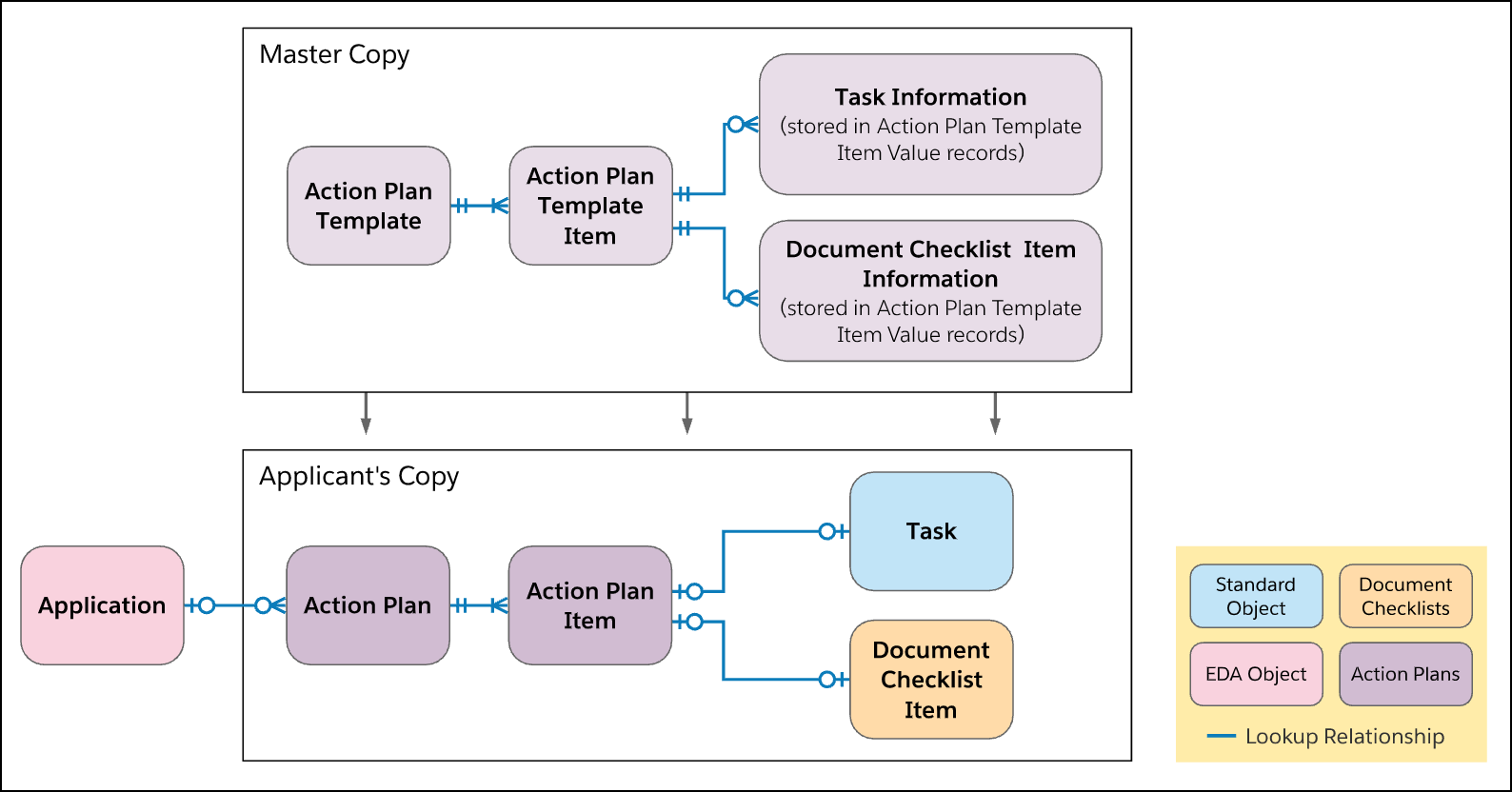
Action Plans and Action Plan Items are created from Action Plan Templates and Action Plan Template Items. Think of an Action Plan Template as the master copy of an Action Plan. When you assign an Action Plan, you specify the Action Plan Template to use and its details are applied to a unique instance of an Action Plan. That way, applicants can have their own instance of the master copy.
An Action Plan Template Item can either be a Document Checklist Item or a Task. The Document Checklist Item and Task information is stored in Action Plan Template Item Value records. These records act as staging records for the Task and Document Checklist Items since these objects don't have an equivalent of a master copy. When you create your Action Plan Templates in the app, you won't see any mention of Action Plan Template Item Value because it's all done behind the scenes.
Each Action Plan Template must have at least one Action Plan Template Item. You'll probably have Action Plan Templates with multiple Action Plan Template Items that are a mix of Document Checklist Items and Tasks.
-
Document Checklist Items specify an application requirement as a document. These records allow applicants to upload documents, such as PDFs and images. Document Types are used to identify the type of document that is uploaded.
-
Tasks specify an application requirement as data. These records allow you to collect and display field-level data for a specific object. Think of Tasks as the questions on your application or the form-field information you want answered, like date of birth and other basic applicant details. Field sets define what fields to display, and Application Material Type records map the Task to an Action Plan Item. You can even display related data records, such as an applicant's Education History records.
Here's how the Action Plan Template and Action Plan objects work together.
How Do Action Plans Display Requirements?
To display Action Plans in the Admissions Connect components, you create Application Material Mapping records for your Action Plan Templates and Action Plan Template Items. These mapping records specify the order in which the requirements display in the Application Checklist and Reviewer Application Reader components. The details you specify for each Application Material Mapping record depends on what you create. Just keep in mind that the mapping records determine how the requirements are displayed to your verifiers and reviewers.
So here's how everything comes together. An applicant's Action Plan records are created from Action Plan Template records. The Action Plan Items that are Tasks display data and the Action Plan Items that are Document Checklist Items store documents, like PDFs. For each Action Plan Template and Action Plan Template Item record there's a matching Application Material Mapping record.
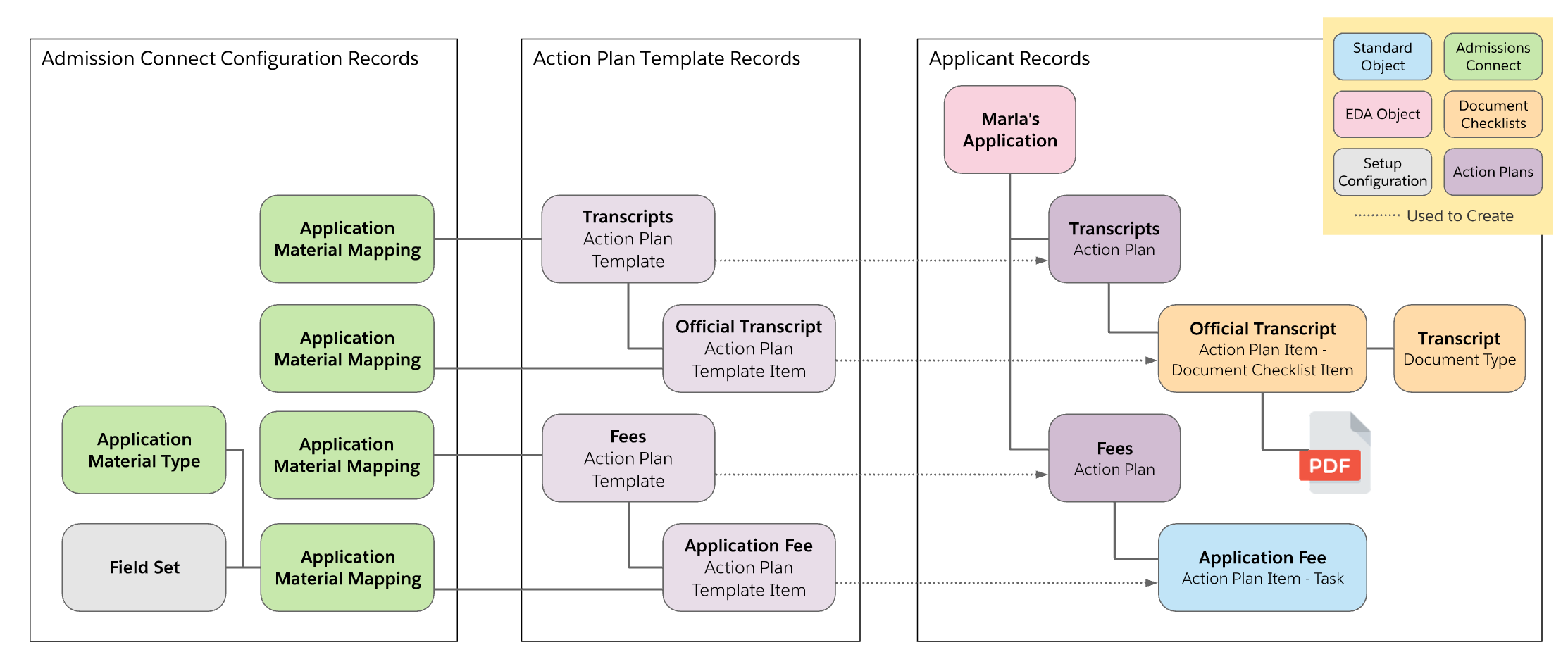
The status of Document Checklist Items and Tasks determines the status displayed in Admissions Connect components. For example, when an applicant uploads their transcripts and it's approved, the status of the Document Checklist Item updates in the app.
Now you're ready to Plan Your Application Requirements
