
You are here:
Object Models for Accounting Sets
Accounting sets enable you to specify which objects and fields store your source data and how to generate transaction journal records from it. It's a flexible approach that lets you map your financial data model to a logical data model, supporting from one to four objects, including the Fund Account object. Each accounting set represents a set of financial data, such as revenue from gifts or expenses from fees.
| Available in: Lightning Experience |
| Available in: Enterprise, Performance, Unlimited, and Developer Editions with Accounting Subledger |
All object models require similar data, but depending on the model that you choose, the source field that contains the required data varies. For details about mapping source fields to accounting set fields, including which source object contains the source field in each object model, see Map Your Source Data to Accounting Sets.
- One-Object Model
The one-object model offers the greatest flexibility. Use it to create your own all-in-one custom or standard object that incorporates all relevant information within a single record, without using an object hierarchy. - Two-Object Model
The two-object model is similar to the one-object model, except that it expects the fund account information to be on a separate, related record. - Three-Object Model
The purpose of the other two objects in this model is to allow for splitting between one or more funds via an allocation object. - Four-Object Model
The four-object model accommodates complex structures with multiple payments or expenses rolling up to a single record.
One-Object Model
The one-object model offers the greatest flexibility. Use it to create your own all-in-one custom or standard object that incorporates all relevant information within a single record, without using an object hierarchy.
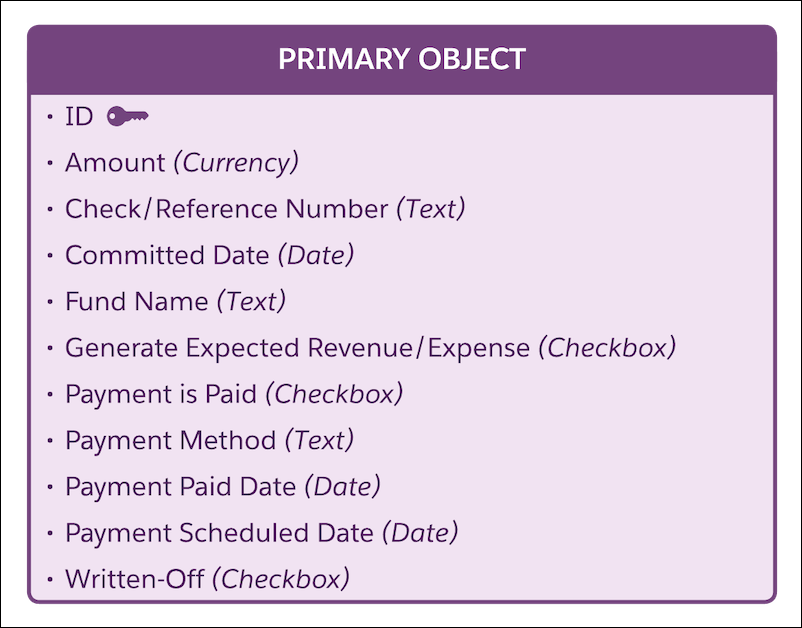
Best used when: All required information about a financial transaction, including the fund information, is on the primary object, and each record is related to a single fund.
Two-Object Model
The two-object model is similar to the one-object model, except that it expects the fund account information to be on a separate, related record.
The primary object contains all the other required data about a financial transaction; it's designed to look up to the fund account record (shown in this diagram as the fund object).
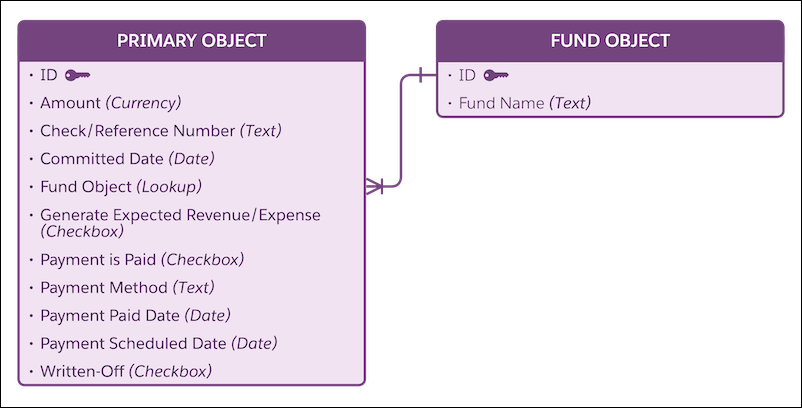
The two-object model allows the fund information to be shared across records. For example, if you have a fund named Athletics Scholarships Fund, instead of repeating this information on each record, you can reference a single record containing the fund information. Any transaction journal records generated use the fund information from the related record. Another common example is a general expenses account.
Best used when: All required financial information, except for the fund information, is on the primary object, and the fund information is on a single record related by a lookup to the primary object.

Three-Object Model
The purpose of the other two objects in this model is to allow for splitting between one or more funds via an allocation object.
Like the two-object model, most of the information in the three-object model is on the primary object record. The secondary object looks up to a specific fund object record and specifies the amount allocated to that fund.
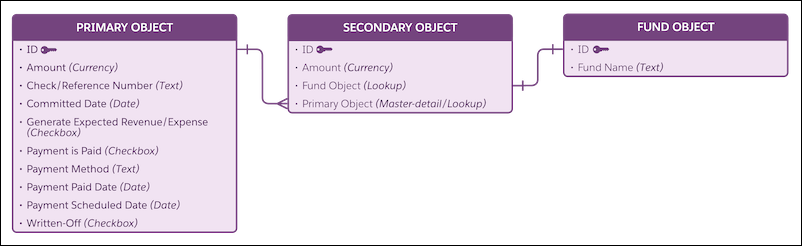
Best used when: You have a single transaction that you sometimes want to split by multiple funds. All required financial information, except for the fund information, is on the primary object. The secondary object represents an allocation—including its amount—to a specific fund.
Four-Object Model
The four-object model accommodates complex structures with multiple payments or expenses rolling up to a single record.
In a four-object model, the primary object represents a summary of the overall financial commitment. The secondary object represents the individual transactions. The four-object model has fund allocations for the secondary object. The tertiary object, representing these allocations, specifies both an amount for the allocation and the fund that it's allocated to. The fund object represents a fund account record.
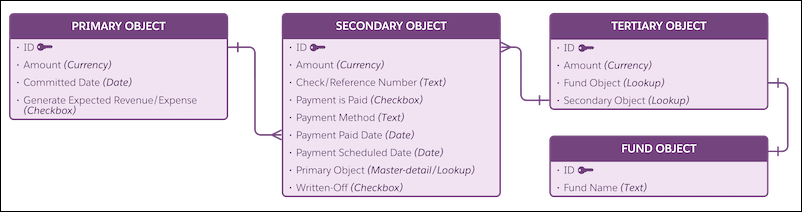
Best used when: A complex record structure rolls up to a single primary object parent record, with multiple related payment types split across one or more fund accounts. For example, your institution manages donations as groups of related transactions, such as recurring gifts, or pledges broken down into installments.
