You are here:
Affiliation
Affiliation represents an affiliation between a Contact and an Account.
- Sample Uses for Affiliation
The Affiliation object represents Contact-to-Account affiliations, which means that Affiliation records relate individual Contacts to Account entities. Affiliations are essential for tracking involvement in activities and organizations, on or off campus, both in the present and in the past. - Sample Uses for Affiliation
The Affiliation object represents Contact-to-Account affiliations, which means that Affiliation records relate individual Contacts to Account entities. Affiliations are essential for tracking involvement in activities and organizations, on or off campus, both in the present and in the past. - Configure Affiliation
Set up Affiliation data for your educational institution and learn about the steps required to maintain the data. - Create an Affiliation Record
Capture how learners relate to your educational institution by creating Affiliation records. - View a Contact's Affiliations
On a Contact record, look in the Affiliated Accounts related list to see Affiliations. - View a Contact's Primary Affiliations
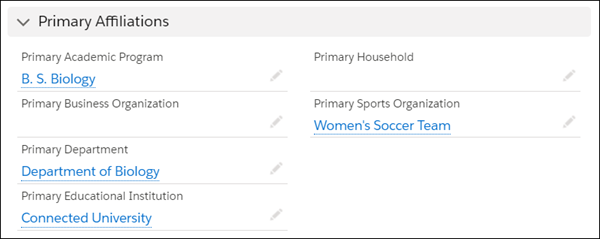
On a Contact record, look in the Primary Affiliations section to see the special subset of Affiliations that are considered primary. Primary Affiliations are organized by record type—Primary Academic Program, Primary Department, Primary Business Organization, and so on. The exact fields and layout depend on your org's configuration.
Sample Uses for Affiliation
The Affiliation object represents Contact-to-Account affiliations, which means that Affiliation records relate individual Contacts to Account entities. Affiliations are essential for tracking involvement in activities and organizations, on or off campus, both in the present and in the past.
-
University—Track students' Affiliations with an Academic Program Account like B.S. in Biology or to a Sports Organization Account like Women’s Soccer Team. Track faculty Affiliations with a University Department like the Biology Department.
-
K-12—Track students' Affiliations with an Academic Program like After-School Care or Extracurricular Activities. Track teachers', staff members', and administrators' Affiliations with an Educational Institution Account, such as a school district or a school.
-
Any educational institution—When a Contact has more than a single Affiliation per record type, you can have one, and only one, Primary Affiliation to represent a Contact's special connection to a specific organization. For example, a Primary Affiliation can connect a student to the department of her major.
At this time, an Affiliation can't be used to relate an Account to another Account.
Sample Uses for Affiliation
The Affiliation object represents Contact-to-Account affiliations, which means that Affiliation records relate individual Contacts to Account entities. Affiliations are essential for tracking involvement in activities and organizations, on or off campus, both in the present and in the past.
-
University—Track students' Affiliations with an Academic Program Account like B.S. in Biology or to a Sports Organization Account like Women’s Soccer Team. Track faculty Affiliations with a University Department like the Biology Department.
-
K-12—Track students' Affiliations with an Academic Program like After-School Care or Extracurricular Activities. Track teachers', staff members', and administrators' Affiliations with an Educational Institution Account, such as a school district or a school.
-
Any educational institution—When a Contact has more than a single Affiliation per record type, you can have one, and only one, Primary Affiliation to represent a Contact's special connection to a specific organization. For example, a Primary Affiliation can connect a student to the department of her major.
At this time, an Affiliation can't be used to relate an Account to another Account.
- Affiliated Account
We sometimes refer to the Account side of the Contact-to-Account relationship as an affiliated Account.
Affiliated Account
We sometimes refer to the Account side of the Contact-to-Account relationship as an affiliated Account.
This term helps us distinguish between two types of Accounts:
-
Accounts that have Contacts affiliated with them, such as an educational institution, sports organization, or business organization.
-
Container Accounts that have Contacts related to them, such as an administrative or household Account.
Configure Affiliation
Set up Affiliation data for your educational institution and learn about the steps required to maintain the data.
- Initial Configuration for Affiliation
While the Affiliation object itself comes preconfigured and doesn't require additional configuration beyond your own preferred customizations, it's essential to understand how to manage Affiliation data and configure related settings. Review these resources to make sure you have the full picture. - Keep Up with Affiliation Updates
Consider these updates, depending on which version of Education Data Architecture you originally installed.
Initial Configuration for Affiliation
While the Affiliation object itself comes preconfigured and doesn't require additional configuration beyond your own preferred customizations, it's essential to understand how to manage Affiliation data and configure related settings. Review these resources to make sure you have the full picture.
Keep Up with Affiliation Updates
Consider these updates, depending on which version of Education Data Architecture you originally installed.
| If Installed Before Version | Configuration Task |
|---|---|
You can't edit Accounts if Record Type Validation is enabled and your language isn't set to English. To edit Accounts, choose an option.
|
Create an Affiliation Record
Capture how learners relate to your educational institution by creating Affiliation records.
-
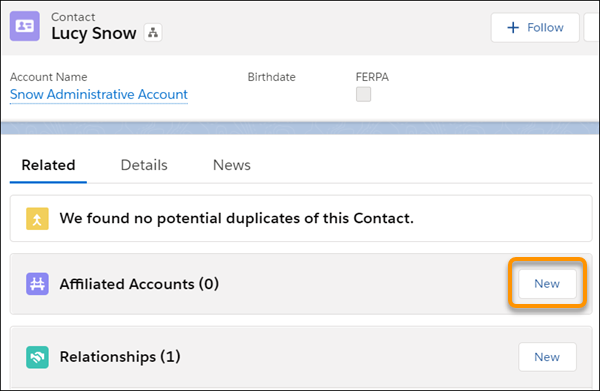
From the Contact record that you're creating an Affiliation record from, click New in the Affiliated Accounts related list.
In this example, Lucy Snow's Contact record is the starting point for creating an Affiliation with the Department of English, the academic department that administers Lucy's major.
-
Enter relevant details, noting these fields in particular.
- Organization—Start typing the name of the affiliated Account (Department of English in our example), then select it if you see it suggested. If the Account record doesn't exist yet, click New Account to create it now.
-
Primary—If the Affiliation deserves a primary designation, select the Primary field.
In our example, this departmental Affiliation represents Lucy majoring in English, and the Account record for the Department of English has a University Department record type. Consider these scenarios when deciding whether to select the Primary field.
Scenario Primary Designation for the Departmental Affiliation Lucy is majoring in English (single course of study) When creating the Department of English as an affiliated Account record, select Primary. Lucy is majoring in English and minoring in Biology You've created the Department of English affiliated Account record and marked it Primary. When creating the Department of Biology as an affiliated Account (a separate Account record), don't select Primary. Lucy changes her major from English to Biology Edit the affiliated Account record for the Department of Biology and mark it Primary. Doing so automatically updates the Department of English affiliated Account record to remove its primary designation. Lucy is double majoring in English and Biology When creating the affiliated Account records for each major department, decide which one to treat as primary, because a Contact can have only one Primary Affiliated Account. You can pick only one for each affiliated Account record type, whether University Department, Academic Program, Education Institution, and so on.
 Tip You can, however, see Lucy's multiple Program Enrollment records indicating that she’s pursuing multiple courses of study. The Program Enrollment records are typically created or updated automatically along with Academic Program records.
- Click Save.
As you can see from this departmental Affiliation example, creating and editing Affiliation records can trigger automatic updates to other Affiliation records. Creating, editing, and deleting Program Enrollment records can also trigger automatic updates to Affiliation records, and vice versa. The specifics depend on your org's configuration.
View a Contact's Affiliations
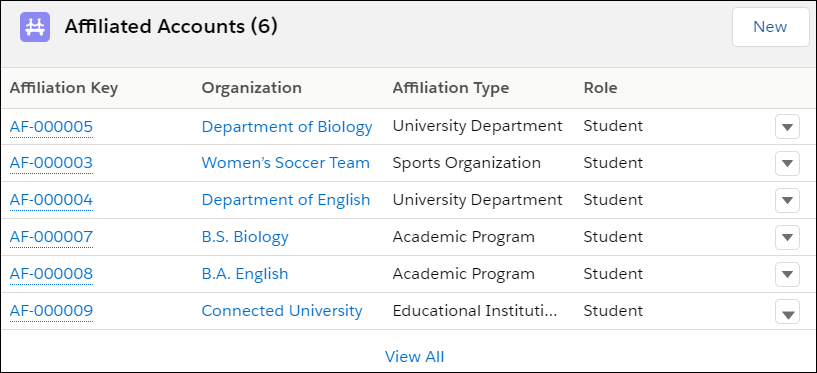
On a Contact record, look in the Affiliated Accounts related list to see Affiliations.
For details, including an indication of which ones are Primary Affiliations, click View All to go to the list view (or click the Affiliated Accounts related list heading).
View a Contact's Primary Affiliations
On a Contact record, look in the Primary Affiliations section to see the special subset of Affiliations that are considered primary. Primary Affiliations are organized by record type—Primary Academic Program, Primary Department, Primary Business Organization, and so on. The exact fields and layout depend on your org's configuration.