
You are here:
Deploy a Custom Apex Class in the TDTM Framework for EDA
Follow these steps to create Apex classes that use the TDTM design for EDA.
Education Data Architecture (EDA) relies heavily on Apex to implement much of its functionality. Salesforce.org products use one trigger per object and Table-Driven Trigger Management (TDTM) to control the execution of Apex classes. You should familiarize yourself with the TDTM architecture if you’re developing custom Apex code, or integrating an external system with Salesforce. You don’t need to create new triggers for common standard objects such as Contacts and Accounts, or for EDA custom objects. TDTM is extensible. When you write your own code, you only need to write Apex classes within the TDTM framework. You can create custom triggers and classes that work within the TDTM framework for your custom objects as well.

- Summary of Steps
Here's an overview of the steps to deploy your custom Apex class in the TDTM framework. - Technical Overview
In TDTM design, our triggers call theTDTM_TriggerHandlerclass and pass it all the environment information. - Create an Apex Class
Here's an example of a custom class that follows the TDTM design: - Create a Test Class
After creating your custom Apex class, write your test class. - Create a Trigger Handler Record
When you create a custom class of your own, you must also create aTrigger_Handler__crecord that references the class.
Summary of Steps
Here's an overview of the steps to deploy your custom Apex class in the TDTM framework.
- Create your Apex class. The class must:
- Use
Global, notPublicaccess modifier. - Extend the
hed.TDTM_Runnableclass. - Override the
TDTM_Runnablerun method, which returns ahed.TDTM_Runnable.DmlWrapperand takes the following parameters:-
List<SObject> newlist -
List<SObject> oldlist -
hed.TDTM_Runnable.Action triggerAction -
Schema.DescribeSObjectResult objResult
-
-
Use
DMLWrapperfor efficient DML operations.
- Use
- Write your test class.
- Add a Trigger Handler record with the appropriate field data.

_TDTM as the suffix for your class (example: OPP_MyAwesomeClass_TDTM.cls)Technical Overview
In TDTM design, our triggers call the TDTM_TriggerHandler
class and pass it all the environment information.
The actual business logic that needs to run when an action occurs on a record is stored in classes. We created a custom object, Trigger_Handler__c, to store which classes should run for each object, along with the related actions. In this object, we also define whether the class is active or inactive, in which order it should execute for the same object, and other settings. The Trigger Handler then calls these classes when appropriate, which provides the advantage of running all the DML operations at the end of execution through the DmlWrapper
class. For more information about the Trigger Handler object, read Manage Trigger Handlers.
Not every Salesforce object has a TDTM trigger. View the TDTM triggers we include in the EDA package here: https://github.com/SalesforceFoundation/EDA/tree/main/force-app/main/default/triggers. Keep in mind that these Trigger Handlers don't appear in the Trigger Handlers tab. They trigger EDA-specific TDTM handlers that are Active. EDA doesn't have product-specific TDTM handlers for these objects.
If you create your own custom objects, or want to run a TDTM class on a standard object that doesn't have a trigger provided by the package, you can create a trigger within the TDTM framework. Use the TDTM_Global_API global class and reference the hed namespace. Here’s an example code snippet:
trigger TDTM_MyCustomObject on MyCustomObject__c (after delete, after insert, after undelete,after update, before delete, before insert, before update) {

hed.TDTM_Global_API.run(Trigger.isBefore, Trigger.isAfter, Trigger.isInsert, Trigger.isUpdate, Trigger.isDelete, Trigger.isUndelete, Trigger.new, Trigger.old, Schema.SObjectType.MyCustomObject__c);
}
Create an Apex Class
Here's an example of a custom class that follows the TDTM design:
// Trigger Handler Class on CampaignMember, to reset any Contact's HasOptedOutOfEmail field

global class CM_ClearEmailOptOut_TDTM extends hed.TDTM_Runnable {

   // the Trigger Handler’s Run method we must provide
   global override hed.TDTM_Runnable.DmlWrapper run(List<SObject> newlist, List<SObject> oldlist,
       hed.TDTM_Runnable.Action triggerAction, Schema.DescribeSObjectResult objResult) {

       hed.TDTM_Runnable.dmlWrapper dmlWrapper = new hed.TDTM_Runnable.DmlWrapper();

       if (triggerAction == hed.TDTM_Runnable.Action.AfterInsert) {
           list<ID> listConId = new list<ID>();

           for (CampaignMember cm : (list<CampaignMember>)newlist) {
               if (cm.ContactId != null) {
                   listConId.add(cm.ContactId);
               }
           }
           list<Contact> listCon = [select Id, HasOptedOutOfEmail from Contact where Id in :listConId];
           for (Contact con : listCon) {
               con.HasOptedOutOfEmail = false;
           }
           dmlWrapper.objectsToUpdate.addAll((list<SObject>)listCon);
       }
       return dmlWrapper;
   }
}
Note that because the class is external, you need to declare the class and its method global, and use the hed prefix when calling classes inside the EDA package. If you use the public identifier instead, you won’t get an error, but you won’t see the expected behavior either. It will appear as if the class doesn’t exist or is inactive.
Additionally, if the class you are writing is inside another managed package, include the package prefix when entering the class name in the Class__c field of the Trigger Handler record. In our example, if CM_ClearEmailOptOut_TDTM was inside a managed package with prefix foo, its name should be entered as foo.CM_ClearEmailOptOut_TDTM.
Create a Test Class
After creating your custom Apex class, write your test class.
- By default, test classes can’t see data in your org. Information
about your Trigger Handler record resides in the Trigger Handler object and as a
result, you must load the default Trigger Handlers into memory using the
TDTM_Global_APIclass andgetTdtmTokenmethod.List<hed__TDTM_Global_API.TdtmToken> tokens = hed.TDTM_Global_API.getTdtmConfig();Read more about this globally exposed class and its methods at EDA Codebase Documentation.
- Add information about your Trigger Handler. For example:
tokens.add(new hed.TDTM_Global_API.TdtmToken('MyAccAwesomeClass_TDTM', 'Account', 'AfterInsert;AfterUpdate;AfterDelete', 2.00)); - Pass your Trigger Handler configuration as a parameter of the
setTdtmConfigmethod:hed.TDTM_Global_API.setTdtmConfig(tokens); -
Insert your data and test your Trigger Handler:
// setup our test data...
test.startTest();
// do some operations...
test.stopTest();
// validate our results...
Here’s an example of a test class that follows the TDTM design:
@isTest
public class MyTriggerHandler_TEST {

   @isTest
   static void testCMTrigger() {

       // first retrieve default EDA trigger handlers
       List<hed.TDTM_Global_API.TdtmToken> tokens = hed.TDTM_Global_API.getTdtmConfig();

       // Create our trigger handler using the constructor
    tokens.add(new hed.TDTM_Global_API.TdtmToken('MyAccAwesomeClass_TDTM', 'Account', 'AfterInsert;AfterUpdate;AfterDelete', 2.00));

       // Pass trigger handler config to set method for this test run
      hed.TDTM_Global_API.setTdtmConfig(tokens);

       // setup our test data...
       test.startTest();
       // do some operations...
       test.stopTest();
       // validate our results...
   }
}
Create a Trigger Handler Record
When you create a custom class of your own, you must also create a Trigger_Handler__c record that references the class.
Read Manage Trigger Handlers for more information.
There must be a Trigger_Handler__c record for each class managed by TDTM. Take a look at the Trigger Handler tab to see the list of Trigger_Handler__c records in your org.
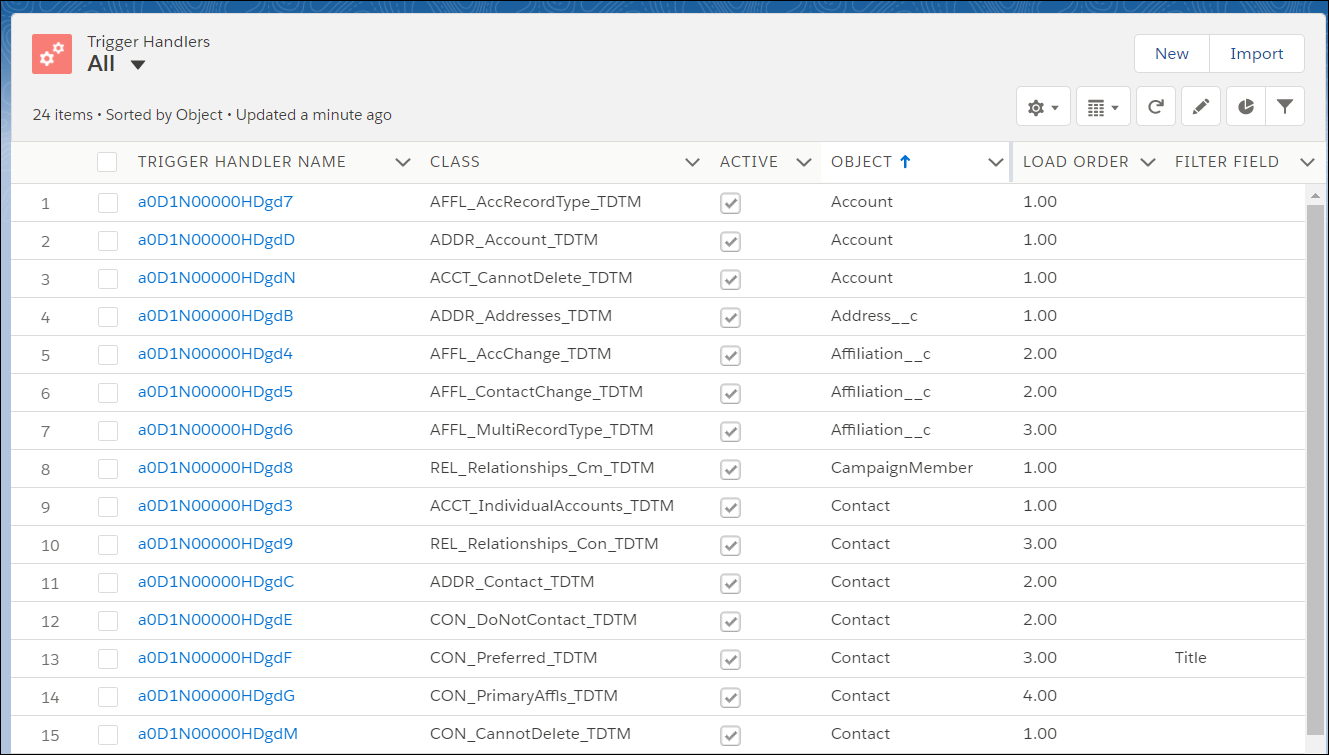
Load Order is important in TDTM. If you want your code to fire after EDA packaged code, choose a number after the last number used for your object. For example, you could use 2 for a custom Account class. You can also use decimals if you want your code to run between two other classes. For example, you could use 2.5 for a custom Contact class.
