
You are here:
Disable Trigger Handlers for EDA
To successfully run custom code, a large data import, or an external integration, you sometimes need to disable TDTM Trigger Handlers.
- Disable Trigger Handlers
Review examples of when you can disable trigger handlers. - Disable Trigger Handlers for All Users
You typically disable a Trigger Handler for all users if you have a custom process or custom code that replace functionality. You may also disable a Trigger Handler for all users if you have a use case that requires that the standard behavior of an Apex class not occur for all users. - Disable Trigger Handlers for Specific Users
In cases where you have a custom integration with another system, or need to perform periodic imports of data where you don't need certain Trigger Handlers to run, you can disable a Trigger Handler for specific users. - Disable Trigger Handlers with Field Criteria
You can disable a Trigger Handler based on the value of a field found on the object that the Trigger Handler is associated with, or a field value on a related record. - Disable Trigger Handlers with Apex
Sometimes it's necessary to temporarily disable Trigger Handlers only during the execution of Apex code. NPSP offers two ways to achieve this depending on whether you want to disable specific Trigger Handlers or all Trigger Handlers at once. - Disable Trigger Handlers
Review examples of when you can disable trigger handlers. - Disable Trigger Handlers for All Users
You typically disable a Trigger Handler for all users if you have a custom process or custom code that replace functionality. You may also disable a Trigger Handler for all users if you have a use case that requires that the standard behavior of an Apex class not occur for all users. - Disable Trigger Handlers for Specific Users
In cases where you have a custom integration with another system, or need to perform periodic imports of data where you don't need certain Trigger Handlers to run, you can disable a Trigger Handler for specific users. - Disable Trigger Handlers with Field Criteria
You can disable a Trigger Handler based on the value of a field found on the object that the Trigger Handler is associated with, or a field value on a related record. - Disable Trigger Handlers with Apex
Sometimes it's necessary to temporarily disable Trigger Handlers only during the execution of Apex code. NPSP offers two ways to achieve this depending on whether you want to disable specific Trigger Handlers or all Trigger Handlers at once.
Disable Trigger Handlers
Review examples of when you can disable trigger handlers.
- Temporarily disable certain Apex classes when inserting a large volume of records with data that is already structured in its final format.
- Disable Address-related Apex code when inserting or updating Contacts through a scheduled ETL job that always runs as a specific User.
It's helpful to know what each of the Apex classes do, so that you
know which Trigger Handlers to disable. Visit
for a description of the Apex classes managed by TDTM
(designated by _TDTM extension in the
name.) Note that there are some classes that are not managed by TDTM, such as utility
and settings classes.

Disable Trigger Handlers for All Users
You typically disable a Trigger Handler for all users if you have a custom process or custom code that replace functionality. You may also disable a Trigger Handler for all users if you have a use case that requires that the standard behavior of an Apex class not occur for all users.
To disable a Trigger Handler:
- Click the Trigger Handler tab. If you don't see it, find it in the App Launcher .
Click
 in the row for the Trigger Handler you want to disable, and select Edit.
- Deselect the Active checkbox.
- For all NPSP EDA-packaged Trigger Handlers, select the User Managed checkbox. Important You must select User Managed to prevent the Trigger Handler from being reactivated during the next package update.
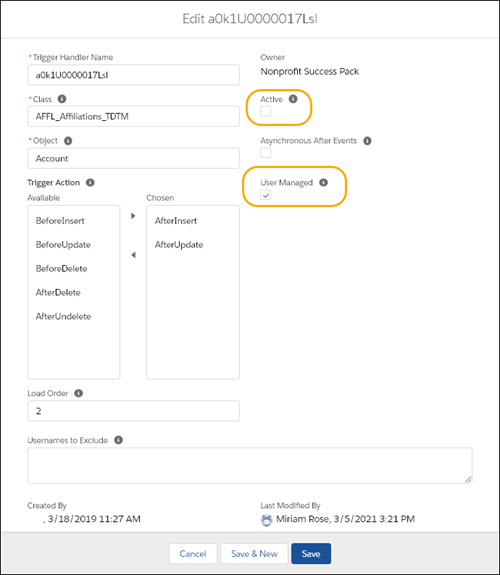
- Click Save.
To re-activate a Trigger Handler:
Select the Active checkbox.
Deselect User Managed.
Click Save.
For more information on editing Trigger Handlers, see .
Disable Trigger Handlers for Specific Users
In cases where you have a custom integration with another system, or need to perform periodic imports of data where you don't need certain Trigger Handlers to run, you can disable a Trigger Handler for specific users.
For example, let's say you have an external data source that already supplies an Account for Contacts. During the integration, you wouldn't want to run the code that creates Accounts (the ACCT_IndividualAccounts_TDTM class.) To stop that code from executing when the import runs, you would exclude the integration user from the Trigger Handler record for the ACCT_IndividualAccounts_TDTM class.

To disable Trigger Handlers for specific users:
- Click the Trigger Handler tab. If you don't see it, find it in the App Launcher.
Click
in the row for the Trigger Handler you want to disable, and select Edit.Enter one or more usernames, separating each with a semicolon, in the Usernames to Exclude field. For example, integration@user.org;tester@user.org
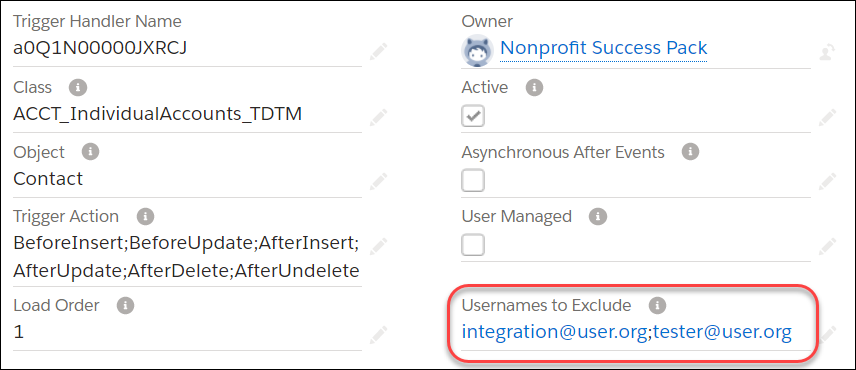
Click Save.
Disable Trigger Handlers with Field Criteria
You can disable a Trigger Handler based on the value of a field found on the object that the Trigger Handler is associated with, or a field value on a related record.
The EDA Trigger Handler object contains two fields, Filter Field and Filter Value. Together, they allow you to disable a Trigger Handler when the value of a given field is present on a record.
For example, let's say that if a Contact's Title = Board President, you don't want the standard email and phone fields to update when the custom email and phone fields such as Home Phone, Work Phone, University Email, change. You plan to manage the standard email and phone fields manually in this example.

Find the Trigger Handler that controls this aspect of the platform automation.
The Class field often provides a clue, but you can also read the EDA Codebase Documentation for more
details. In our example, the Trigger Handler we want is CON_Preferred_TDTM.
When working with Filter Field and Filter Value:
- You can use only one field and one value for Filter Field & Filter Value.
- Use the API Name for Filter Field (such as
FirstName,MailingCity,Citizenship__c). - If you use an EDA packaged custom field, do not include the namespace prefix. For example use
Citizenship__cnothed__Citizenship__c. - If you use a third-party packaged custom field, DO include the namespace prefix.
- For Filter Value, the match is an exact character match. There aren't options for conditionals such as contains, starts with, and so on. However, the text is not case sensitive. New York City and new york city are evaluated the same way.
- For checkbox fields, use True or False in the Filter Value field.
- Fields on related records can be used in Filter Field. For example, on a Contact Trigger Handler, you can use
Account.BillingCity. - Leave Filter Value blank if you want to filter on a blank (null) value.
- Compound fields such as Address and Geolocation are not supported.
Disable Trigger Handlers with Apex
Sometimes it's necessary to temporarily disable Trigger Handlers only during the execution of Apex code. NPSP offers two ways to achieve this depending on whether you want to disable specific Trigger Handlers or all Trigger Handlers at once.
Disable Trigger Handlers
Review examples of when you can disable trigger handlers.
- Temporarily disable certain Apex classes when inserting a large volume of records with data that is already structured in its final format.
- Disable Address-related Apex code when inserting or updating Contacts through a scheduled ETL job that always runs as a specific User.
It's helpful to know what each of the Apex classes do, so that you
know which Trigger Handlers to disable. Visit
for a description of the Apex classes managed by TDTM
(designated by _TDTM extension in the
name.) Note that there are some classes that are not managed by TDTM, such as utility
and settings classes.
Disable Trigger Handlers for All Users
You typically disable a Trigger Handler for all users if you have a custom process or custom code that replace functionality. You may also disable a Trigger Handler for all users if you have a use case that requires that the standard behavior of an Apex class not occur for all users.
To disable a Trigger Handler:
- Click the Trigger Handler tab. If you don't see it, find it in the App Launcher .
Click
in the row for the Trigger Handler you want to disable, and select Edit.- Deselect the Active checkbox.
- For all NPSP EDA-packaged Trigger Handlers, select the User Managed checkbox. Important You must select User Managed to prevent the Trigger Handler from being reactivated during the next package update.
- Click Save.
To re-activate a Trigger Handler:
Select the Active checkbox.
Deselect User Managed.
Click Save.
For more information on editing Trigger Handlers, see .
Disable Trigger Handlers for Specific Users
In cases where you have a custom integration with another system, or need to perform periodic imports of data where you don't need certain Trigger Handlers to run, you can disable a Trigger Handler for specific users.
For example, let's say you have an external data source that already supplies an Account for Contacts. During the integration, you wouldn't want to run the code that creates Accounts (the ACCT_IndividualAccounts_TDTM class.) To stop that code from executing when the import runs, you would exclude the integration user from the Trigger Handler record for the ACCT_IndividualAccounts_TDTM class.
To disable Trigger Handlers for specific users:
- Click the Trigger Handler tab. If you don't see it, find it in the App Launcher.
Click
in the row for the Trigger Handler you want to disable, and select Edit.Enter one or more usernames, separating each with a semicolon, in the Usernames to Exclude field. For example, integration@user.org;tester@user.org
Click Save.
Disable Trigger Handlers with Field Criteria
You can disable a Trigger Handler based on the value of a field found on the object that the Trigger Handler is associated with, or a field value on a related record.
The EDA Trigger Handler object contains two fields, Filter Field and Filter Value. Together, they allow you to disable a Trigger Handler when the value of a given field is present on a record.
For example, let's say that if a Contact's Title = Board President, you don't want the standard email and phone fields to update when the custom email and phone fields such as Home Phone, Work Phone, University Email, change. You plan to manage the standard email and phone fields manually in this example.
Find the Trigger Handler that controls this aspect of the platform automation.
The Class field often provides a clue, but you can also read the EDA Codebase Documentation for more
details. In our example, the Trigger Handler we want is CON_Preferred_TDTM.
When working with Filter Field and Filter Value:
- You can use only one field and one value for Filter Field & Filter Value.
- Use the API Name for Filter Field (such as
FirstName,MailingCity,Citizenship__c). - If you use an EDA packaged custom field, do not include the namespace prefix. For example use
Citizenship__cnothed__Citizenship__c. - If you use a third-party packaged custom field, DO include the namespace prefix.
- For Filter Value, the match is an exact character match. There aren't options for conditionals such as contains, starts with, and so on. However, the text is not case sensitive. New York City and new york city are evaluated the same way.
- For checkbox fields, use True or False in the Filter Value field.
- Fields on related records can be used in Filter Field. For example, on a Contact Trigger Handler, you can use
Account.BillingCity. - Leave Filter Value blank if you want to filter on a blank (null) value.
- Compound fields such as Address and Geolocation are not supported.
Disable Trigger Handlers with Apex
Sometimes it's necessary to temporarily disable Trigger Handlers only during the execution of Apex code. NPSP offers two ways to achieve this depending on whether you want to disable specific Trigger Handlers or all Trigger Handlers at once.
