
You are here:
Getting Started: Salesforce Fundamentals for Education
Get acquainted with Salesforce terminology, your product(s), and the basics of using Salesforce for Higher Education.
- Get Started: Salesforce Fundamentals for Education
There are so many ways to learn about Salesforce. How you approach it depends on your learning style and preferences. Want to watch a live webinar and ask questions to Salesforce experts? Check out our webinar series. Want to learn online on your own time? Try Trailhead. Want to read through detailed documentation, get one-on-one assistance, or talk to your peers? We've got you covered on all fronts! - Webinars
Sign up for webinars to learn about Salesforce for Education. - How Salesforce Organizes your Data
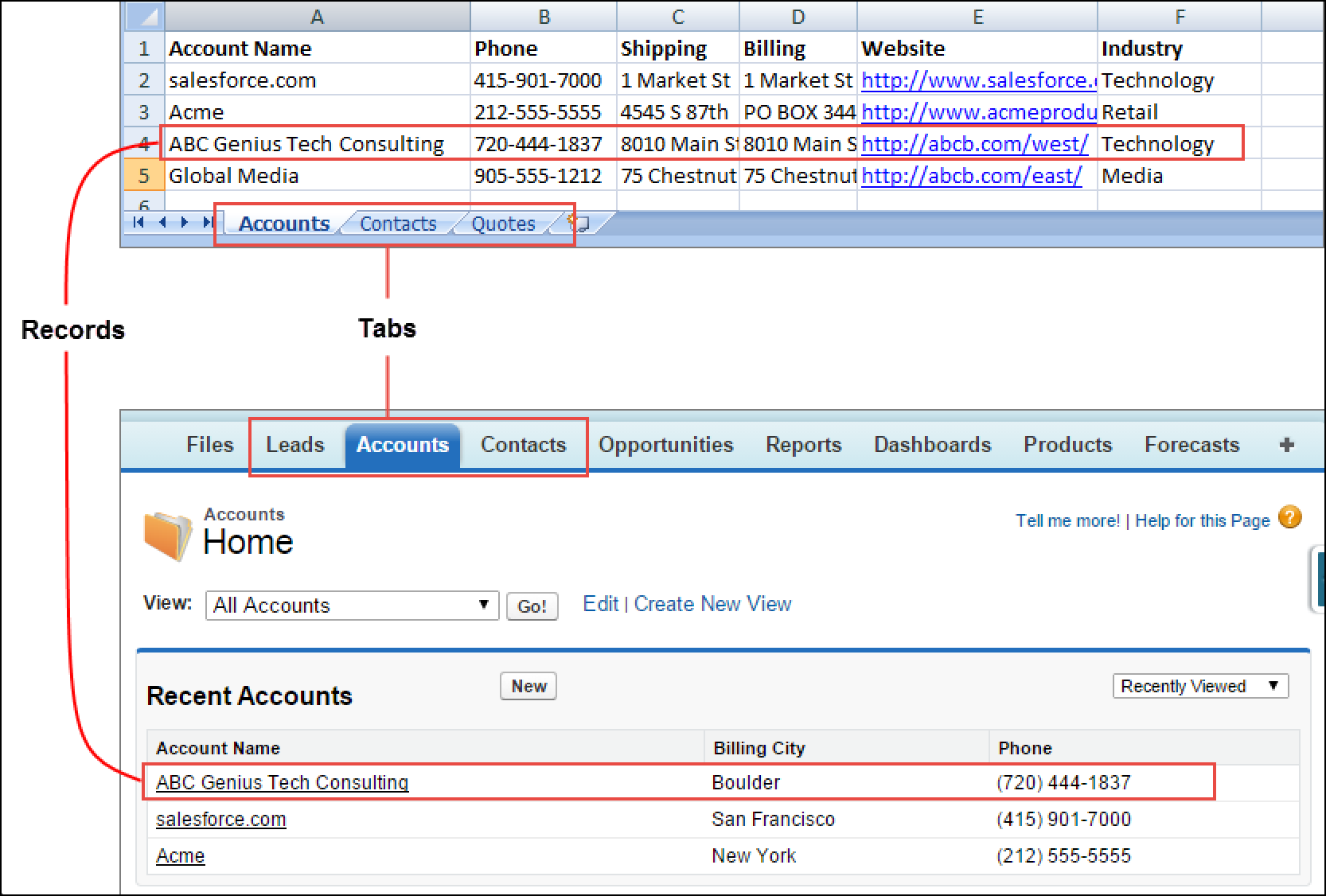
Salesforce organizes your data into objects and records. Think of an object as a tab on a spreadsheet and a record like a single row of data. - Translating the Salesforce Standard Objects
Learn how Salesforce standard objects support your institution’s data model. - Education Data Architecture
Education Data Architecture (EDA) is an "App" that sits on top of your Enterprise Edition and provides the basic foundation for a Connected Campus. Built in collaboration with Salesforce.org partners and customers, EDA provides out-of-the-box functionality to organize your data in Salesforce. It helps institutions of all sizes connect with students, alumni, parents, and faculty in all kinds of ways. EDA uses standard Salesforce objects such as accounts and contacts and custom objects such as relationships and affiliations to track all kinds of connections. These tracked and organized connections make it simple to find the information you need in Salesforce. - EDA Account Model
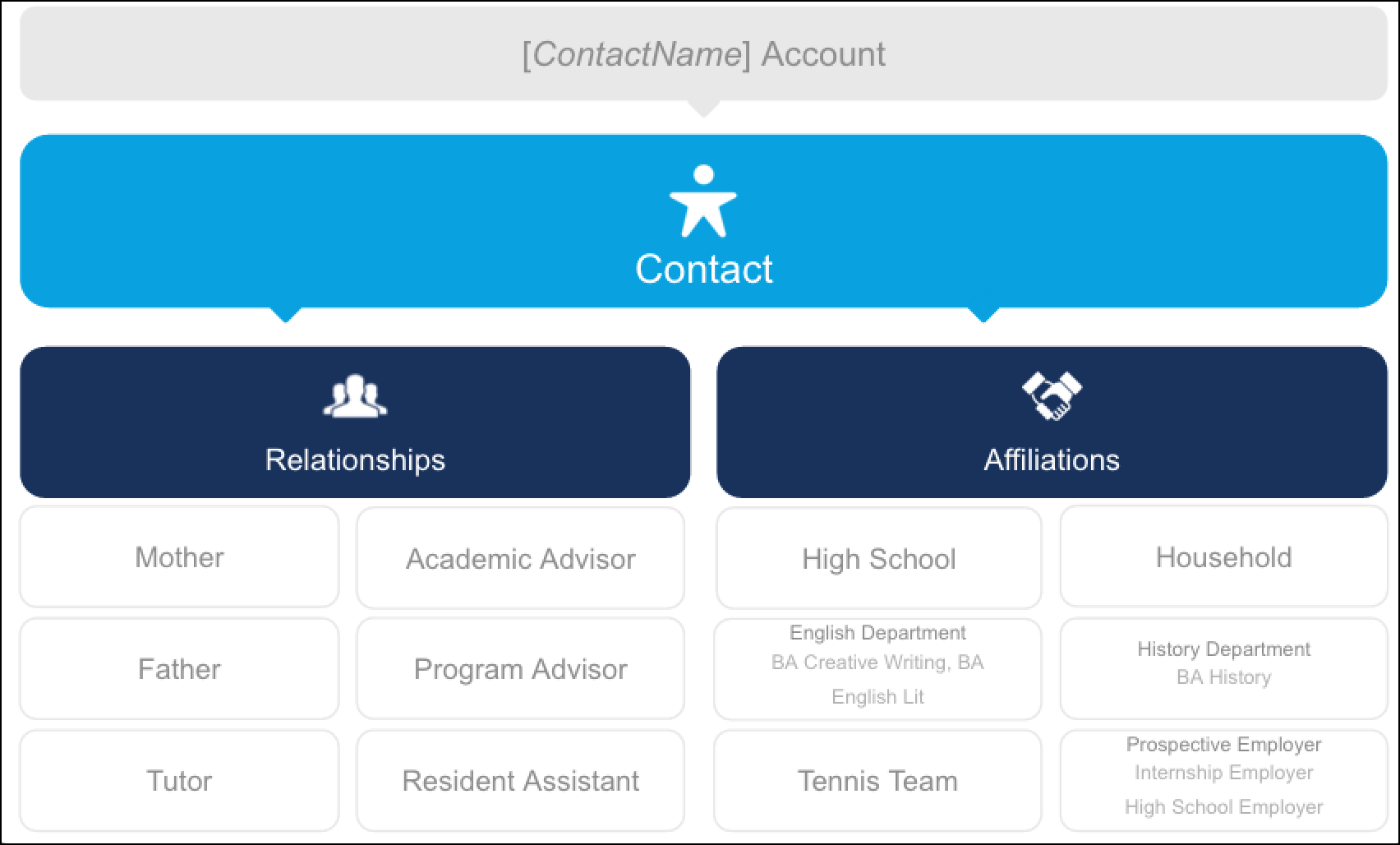
In the Education Data Architecture (EDA) Account model, the standard Salesforce Account object acts as a kind of container account — referred to as the “Administrative Account” — with a single contact (often a student) associated with it. The relationship between the Account and Contact is 1-to-1. That is, for each contact you create in EDA, you also have a unique Administrative Account. As part of the EDA Account Model, EDA offers two important custom objects that work in conjunction with your contacts: Relationships, which help you track relationships between contacts Affiliations, which help you track affiliations between contacts and other accounts. - Understanding Salesforce Editions and Products
A Salesforce edition is a selected set of features and functionalities that also specifies the amount of customization possible, as well as the data and file storage capacity, and the API access available. - Get Oriented in Salesforce
Check out the resources to familiarize yourself with Salesforce for Education navigation. - Your Support Team
Every Salesforce Foundation customer has access to a Sales Cloud Standard Success Plan which includes basic training to get you started. You also get access to community-based best practices and web-based support to help solve technical issues. If you are interested in enhanced support, resources, and training to drive adoption, then you may purchase a Premier Success. If you are interested in pricing for Premier Success, please reach out to us via the Contact Me form. - Quicklinks
Check out resources available to you to help you get started with Customer Relationship Management (CRM). - Understand Your Product
Check out resources to learn about Salesforce products for education. - Get Oriented
Check out the available resources to familiarize yourself with Salesforce for Education navigation. - Get Help
Check out the available resources to get help from peers or Salesforce experts.
Get Started: Salesforce Fundamentals for Education
There are so many ways to learn about Salesforce. How you approach it depends on your learning style and preferences. Want to watch a live webinar and ask questions to Salesforce experts? Check out our webinar series. Want to learn online on your own time? Try Trailhead. Want to read through detailed documentation, get one-on-one assistance, or talk to your peers? We've got you covered on all fronts!
We have an amazing collection of resources below designed to help you get started & be successful with Salesforce. So keep on reading...and have fun learning!
Webinars
Sign up for webinars to learn about Salesforce for Education.
- Get Started Webinar Series for Higher Education
CRM stands for "Customer Relationship Management." CRM technology allows you to manage relationships with your constituents (including students, alumni, staff, parents, employers, and more) and track data related to all of your interactions with those constituents. It also helps teams collaborate, both internally and externally, gather insights from social media, track important metrics, and communicate via email, phone, social, and other channels.
Get Started Webinar Series for Higher Education
CRM stands for "Customer Relationship Management." CRM technology allows you to manage relationships with your constituents (including students, alumni, staff, parents, employers, and more) and track data related to all of your interactions with those constituents. It also helps teams collaborate, both internally and externally, gather insights from social media, track important metrics, and communicate via email, phone, social, and other channels.
A CRM like Salesforce allows an educational institution to have visibility into every aspect of its relationship with a student – from financial aid information to courses and grade data. And as opposed to this information being locked away in various systems scattered across campus --- it’s all in one place. So at any point in time, staff and faculty have a holistic snapshot of a student’s standing with the school and can use that information to engage in personalized and powerful ways.
CRM is not new to education. Many institutions have adopted departmental CRM solutions to aid in their recruiting and advancement efforts. However, many of these solutions are not integrated with one another and/or with other institution-wide systems, making it more difficult to track and report on the institution's efforts. Increasingly, institutions are moving toward a centralized CRM solution to fulfill the diverse needs of a complex academic community.
Check out this video: Power the Future-Ready Institution
Salesforce is a single place to create, view and update your constituent data from anywhere on any device to drive lasting engagement with your customers. You don't have to install software to access Salesforce. You just need an internet connection and a web browser (or mobile App).
Of course, building a CRM system isn't just about choosing the right technology, but also having the right business plan in place for a successful implementation. Check out The Ultimate Guide to Campus-Wide CRM and the Planning for Success Webinar for more information.
How Salesforce Organizes your Data
Salesforce organizes your data into objects and records. Think of an object as a tab on a spreadsheet and a record like a single row of data.
Salesforce comes with standard objects already set up and ready for use. Salesforce was originally designed as a "Business-to-Business" (B2B) application to help companies improve their sales processes and maximize their sales. In the traditional B2B scenario, every company keeps track of their accounts (the other companies they are selling to). Each account has people associated with it (contacts), as well as other things like "deals" (opportunities), cases, tasks, and the like. How all these things relate to and interact with each other in Salesforce is known as an account model. With Salesforce, the account model is flexible and in the education world, of course, we keep track of things a bit differently.
Translating the Salesforce Standard Objects
Learn how Salesforce standard objects support your institution’s data model.
- Leads
"Prospects" | The Leads object can be used to store data about any individual who might have an interest in your institution, but who have not yet become engaged (in whatever way you define): student prospects, donor prospects, vendor prospects, etc. - Contacts
"Individuals" | The Contacts object can be used to store information about any individual who interacts with your university including students, alumni, parents, staff, athletic ticket holders, and other constituents. - Accounts
In education, accounts can act as a container account for a single student and all their interactions with your school or they can be used to relate groups of Contacts from companies, departments, athletic teams or other institutions. In Salesforce, every contact must be connected to an account. - Opportunities
"Transactions" | The Opportunity object can be used to manage financial transactions between contacts and accounts and your organization. This could include tuition or other payments, donations, grants, ticket and merchandise sales and lots more. - Campaigns
"Calls-to-Action" | The Campaigns object can be used to track any tactic where you are asking a contact for a response. Some common examples might include student recruitment events, fundraising campaigns, class enrollments, etc.
Leads
"Prospects" | The Leads object can be used to store data about any individual who might have an interest in your institution, but who have not yet become engaged (in whatever way you define): student prospects, donor prospects, vendor prospects, etc.
Contacts
"Individuals" | The Contacts object can be used to store information about any individual who interacts with your university including students, alumni, parents, staff, athletic ticket holders, and other constituents.
Accounts
In education, accounts can act as a container account for a single student and all their interactions with your school or they can be used to relate groups of Contacts from companies, departments, athletic teams or other institutions. In Salesforce, every contact must be connected to an account.
Education Data Architecture
Education Data Architecture (EDA) is an "App" that sits on top of your Enterprise Edition and provides the basic foundation for a Connected Campus. Built in collaboration with Salesforce.org partners and customers, EDA provides out-of-the-box functionality to organize your data in Salesforce. It helps institutions of all sizes connect with students, alumni, parents, and faculty in all kinds of ways. EDA uses standard Salesforce objects such as accounts and contacts and custom objects such as relationships and affiliations to track all kinds of connections. These tracked and organized connections make it simple to find the information you need in Salesforce.
EDA functionality is adapted even further to meet the needs of K-12 constituents with the K-12 Architecture Kit. Developed specifically to connect schools and districts to people, processes and data, the K-12 kit helps manage students holistically and collaboratively. Through school-specific page layouts and additional custom objects such as Attendance, Behavior Involvement, and Behavior Response, the K-12 Architecture Kit is designed to enhance student success and family engagement.
Learn more about Education Data Architecture (EDA) and read up on the K-12 Architecture Kit .
EDA Account Model
In the Education Data Architecture (EDA) Account model, the standard Salesforce Account object acts as a kind of container account — referred to as the “Administrative Account” — with a single contact (often a student) associated with it. The relationship between the Account and Contact is 1-to-1. That is, for each contact you create in EDA, you also have a unique Administrative Account. As part of the EDA Account Model, EDA offers two important custom objects that work in conjunction with your contacts: Relationships, which help you track relationships between contacts Affiliations, which help you track affiliations between contacts and other accounts.
Learn more about Education Data Architecture (EDA).
Understanding Salesforce Editions and Products
A Salesforce edition is a selected set of features and functionalities that also specifies the amount of customization possible, as well as the data and file storage capacity, and the API access available.
With the Power of Us license donation program, Salesforce.org customers receive 10 Sales Cloud Lightning and Service Cloud Lightning Enterprise Edition licenses at no cost. A license is attached to a single user, so with 10 licenses, you could have 10 users logged on to your Salesforce org at one time. If you need additional licenses or products, you can purchase them at a deep discount from Salesforce.org. In addition to your 10 EE licenses, you may have also chosen an App that will help you manage the student lifecycle. On the Salesforce.org website, you can choose between three trials - the standard Enterprise Edition, the Nonprofit Starter Pack or the Education Data Architecture (EDA). Knowing what edition and what app you are using will be vital information for you to know as you review Salesforce documentation, log a tech support ticket, or ask for help from the community.
Get Oriented in Salesforce
Check out the resources to familiarize yourself with Salesforce for Education navigation.
- Navigating Salesforce
Access the Trailhead module to learn about Salesforce basics. - Trailhead: Free, Interactive Learning Paths for Salesforce
Trailhead is a free, interactive learning path through the basic building blocks of the Salesforce Platform. Test your knowledge of the platform while earning points and badges to celebrate your achievements.
Trailhead: Free, Interactive Learning Paths for Salesforce
Trailhead is a free, interactive learning path through the basic building blocks of the Salesforce Platform. Test your knowledge of the platform while earning points and badges to celebrate your achievements.
Start with the CRM Essentials trail.
Your Support Team
Every Salesforce Foundation customer has access to a Sales Cloud Standard Success Plan which includes basic training to get you started. You also get access to community-based best practices and web-based support to help solve technical issues. If you are interested in enhanced support, resources, and training to drive adoption, then you may purchase a Premier Success. If you are interested in pricing for Premier Success, please reach out to us via the Contact Me form.
Quicklinks
Check out resources available to you to help you get started with Customer Relationship Management (CRM).
- What is CRM
Learn about Customer Relationship Management (CRM) and cloud computing.
What is CRM
Learn about Customer Relationship Management (CRM) and cloud computing.
- Trailhead Trail: CRM Essentials
- What is Cloud Computing?
Get Oriented
Check out the available resources to familiarize yourself with Salesforce for Education navigation.
- Getting Started: Navigating Salesforce
- Trailhead Trail: Salesforce User Basics
Get Help
Check out the available resources to get help from peers or Salesforce experts.
- Community
Access community resources to connect with other Salesforce for Education enthusiasts and learn from their experiences. - Salesforce
Learn about the Sales Cloud Standard Success Plan for your educational institution, technical support access, and training options. - Consulting Partners
Find a partner to help you implement Salesforce for your educational institution.
Community
Access community resources to connect with other Salesforce for Education enthusiasts and learn from their experiences.
-
Log into the Trailblazer Community
- Sector: Higher Ed Chatter Group
- EDA Chatter Group
Salesforce
Learn about the Sales Cloud Standard Success Plan for your educational institution, technical support access, and training options.
