
You are here:
Model Certifications and Credentials
Keep track of an individual's achievements using the Academic Certification and Credential objects.
- Model Certifications and Credentials
A student's GPA or a list of courses they took aren't the only ways to measure success. Most institutions want to see a broader and more comprehensive picture of each student. What did they achieve outside of the classroom, as well as in it? Were they recognized in other ways beyond a report card? Keeping track of similar information for faculty and employees is also a priority for most institutions. What licenses does an individual need to maintain for accreditation? What other certifications do my staff hold? You can track all of this information using the Academic Certification and Credential objects. - Academic Certifications Versus Credentials
First, let's go over the differences between Academic Certification and Credential. - Track a Contact's Achievements
You can use the Academic Certification and Credential objects with the Educational History and Program Enrollment objects to get a complete understanding of a student's achievements. You can see that the student earned a degree from a specific institution by completing a program of study. - See Achievements on the Contact Record
Looking in the Education History section of Shay's Contact record, we can see the diplomas and degrees that he previously earned. Each Educational History record lists a certification that was earned from an educational institution. - Add Credentialing Identifier Field to Account and Contact Objects
Some credentials have an International Resource Identifier that uniquely identifies the credential. You can create a custom field for Credentialing Identifier and add it to the Account and Contact page layouts.
Model Certifications and Credentials
A student's GPA or a list of courses they took aren't the only ways to measure success. Most institutions want to see a broader and more comprehensive picture of each student. What did they achieve outside of the classroom, as well as in it? Were they recognized in other ways beyond a report card? Keeping track of similar information for faculty and employees is also a priority for most institutions. What licenses does an individual need to maintain for accreditation? What other certifications do my staff hold? You can track all of this information using the Academic Certification and Credential objects.
Academic Certifications Versus Credentials
First, let's go over the differences between Academic Certification and Credential.
- Academic Certification
- Represents a diploma, degree, or academic certificate that a student has earned. These records are associated with a Contact's Education History record. Here are some examples of certifications.
-
A high school diploma from Trailblazer Academy
-
A B.A. in Music from Connected University
-
A certificate acknowledging completion of a teacher training program
-
- Credential
- Represents an industry or organizational achievement. It’s a one-and-done certification that has no parts to it. Credentials can be a badge, a non-credit certification, or a license. These records are associated with a Contact’s Attribute record. Here are some examples of credentials.
-
A badge issued by your institution for a specific achievement
-
A teaching certificate issued by a state
-
A bus driver's Commercial Driver's License (CDL)
-
Track a Contact's Achievements
You can use the Academic Certification and Credential objects with the Educational History and Program Enrollment objects to get a complete understanding of a student's achievements. You can see that the student earned a degree from a specific institution by completing a program of study.
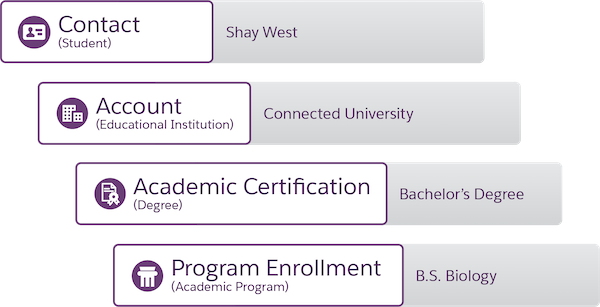
For example, Shay West earned a Bachelor's Degree from Connected University in Biology. Here's how these different objects work together to create a complete story of Shay's achievements.
-
Shay West is a Contact.
-
Connected University is an Account with the Educational Institution record type.
-
Bachelor's Degree is an Academic Certification with the Degree record type.
-
B.S. in Biology is a Program Enrollment with the Academic Program record type.
See Achievements on the Contact Record
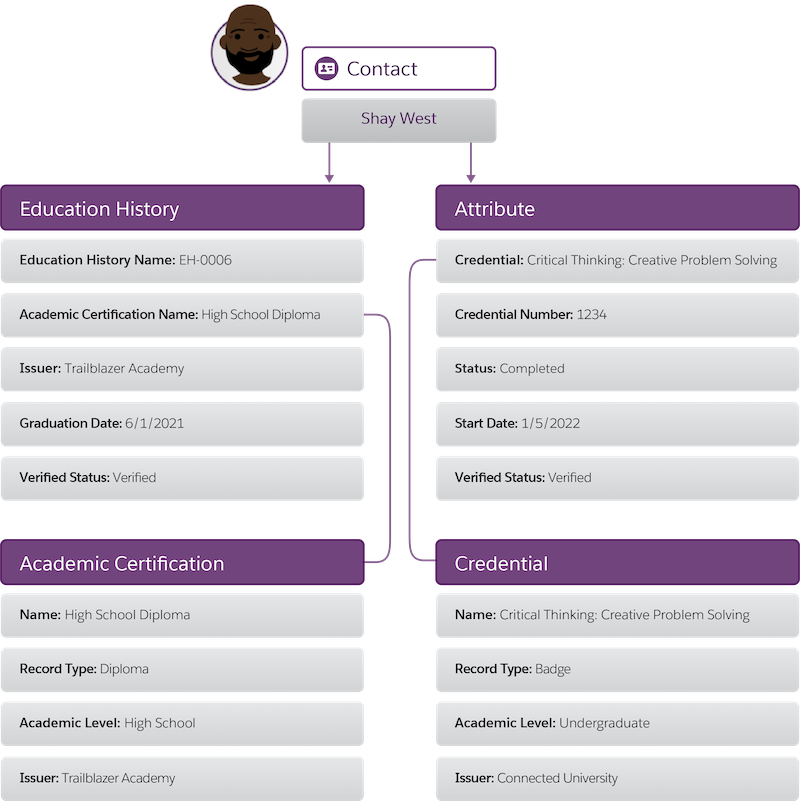
Looking in the Education History section of Shay's Contact record, we can see the diplomas and degrees that he previously earned. Each Educational History record lists a certification that was earned from an educational institution.
Likewise, in the Attributes section of Shay's Contact record, we can see other Credentials, such as badges, certifications, and licenses. Each Attribute record lists a credential that was earned from an educational institution.
Add Credentialing Identifier Field to Account and Contact Objects
Some credentials have an International Resource Identifier that uniquely identifies the credential. You can create a custom field for Credentialing Identifier and add it to the Account and Contact page layouts.
To add Credentialing Identifier to your page layouts:
-
Click
 , then click Setup.
 -
Click the Object Manager tab.
-
Click the object that you want to add Credentialing Identifier to.
-
Click Fields & Relationships, and then click New.
-
Click Text, and then click Next.
-
In the Field Label field, enter Credentialing Identifier.
-
In the Length field, enter 255.
-
In the Field Name field, enter Credentialing_Identifer.
-
In the Description and Help Text fields, enter An International Resource Identifier that uniquely identifies an Account for credentialing purposes.
-
Check the Do not allow duplicate values box.
-
Make sure Treat "ABC" and "abc" as duplicate values (case insensitive) is selected.
-
Check the Set this field as the unique record identifier from an external system box and click Next.
-
Select the profiles that you want to add Credentialing Identifier to and click Next.
-
Select the page layouts that you want Credentialing Identifier to be on and click Save.
