You are here:
Model Faculty, Staff, and Student Contacts
Use the data stored in the Contact object and custom objects to understand your students, faculty, and staff.
- Model Faculty, Staff, and Student Contacts
Faculty, staff, administrators, and students are modeled with the Contact object, which is a standard Salesforce object augmented with education-specific fields, such as Financial Aid Applicant and Primary Language. Custom objects in EDA store other Contact-related data, such as a person's connections on and off campus, notable attributes, the languages they speak, and so on. - Contacts and Their Affiliations
The Affiliation object lets you model an affiliation between a Contact and an Account that the person has a meaningful connection with. - Contacts and Their Container Accounts
Now consider the example of a student, Stacey Bergen. - Common Approaches to Container Accounts
In primary and secondary education, Household Accounts are more common. Tracking data about a student's household can be as important as tracking data about students themselves, because family relationships are central to K-12 student success. - Choose a Default Account Model for Contacts
Decide whether Administrative or Household is the better container Account choice for modeling your student data, and set that type as the default account model. - Considerations for Faculty and Staff Container Accounts
After choosing a preferred container Account type for students, decide whether it's also the right type for faculty and staff Contacts who work at your institution. While you're not required to use the same type of container Account for both types of Contacts, doing so simplifies data management because the Default Account Model setting takes care of creating the correct type of container Account for all faculty, staff, and student Contacts. - Contacts and Their Relationships
The Relationship object tracks how someone is connected to someone else. In other words, a Relationship record relates one Contact record to another. EDA offers a preconfigured set of Relationship values that mostly represent familial relationships—Parent, Grandparent, Guardian, and the like. While they're most relevant for tracking data about students' families and households, you can create custom Relationship values for all types of Contacts. - Contacts' Attributes and Credentials
The Attribute object lets you track students' significant attributes, and faculty and staff members' licenses, certifications, and professional endorsements. - Contacts' Language Proficiency
Track Contacts' fluency with languages using the Language and Contact Language objects.
Model Faculty, Staff, and Student Contacts
Faculty, staff, administrators, and students are modeled with the Contact object, which is a standard Salesforce object augmented with education-specific fields, such as Financial Aid Applicant and Primary Language. Custom objects in EDA store other Contact-related data, such as a person's connections on and off campus, notable attributes, the languages they speak, and so on.
When you've built out your data model and populated it with data, EDA can help you weave together biographic and demographic data from the Contact object with selected data from Contact-related objects. The result? A unified student record that helps you see, understand, and serve the whole person behind the data.
Contacts and Their Affiliations
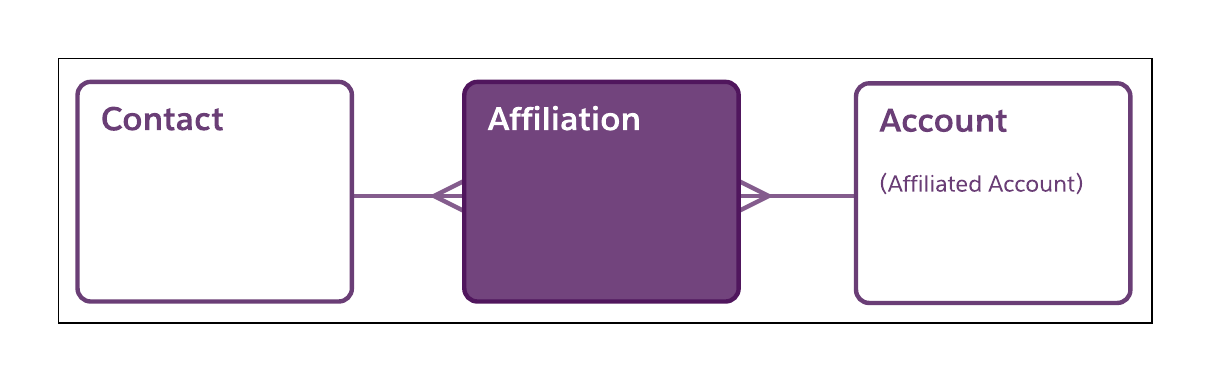
The Affiliation object lets you model an affiliation between a Contact and an Account that the person has a meaningful connection with.
For a faculty or staff member, an Affiliation record often represents a professional affiliation with an administrative, academic, or operational department that you've already modeled as an Account record. Similarly, for a student, Affiliations represent academic, social, or professional connections with some of those same departments, as well as other on- and off-campus Accounts. We call Accounts that represent Affiliations affiliated Accounts.
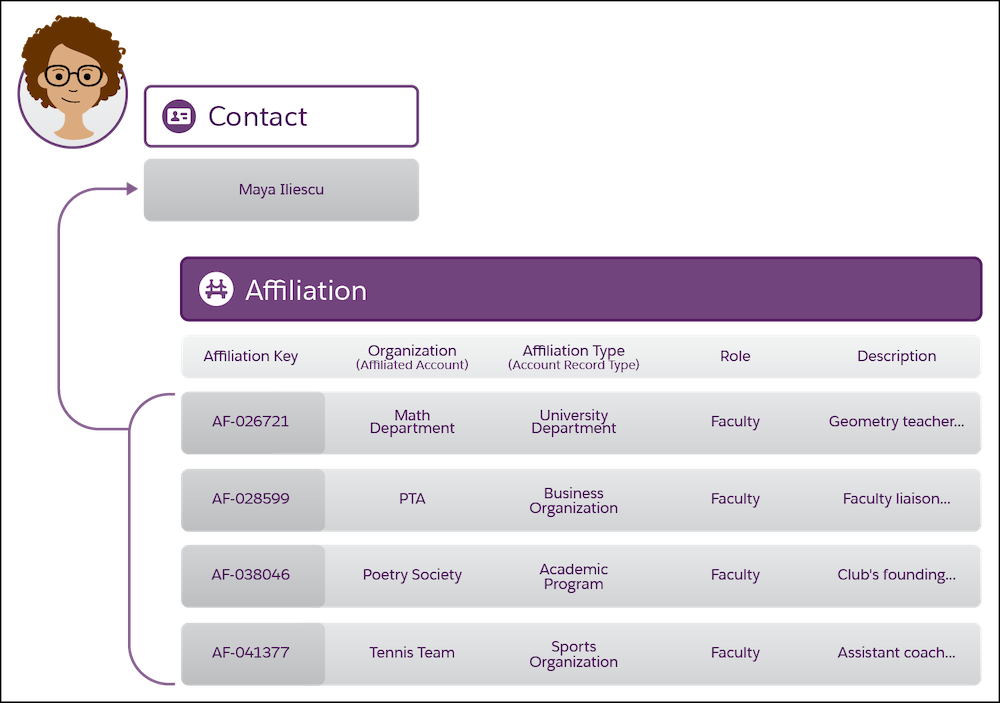
Consider the example of faculty member, Maya Iliescu, at Daisy Bates Academy. Maya has responsibilities in several areas, which are represented by these Affiliation records related to her Contact record.
Affiliation records
| Affiliation Key | Organization (Affiliated Account) | Affiliation Type (Account Record Type) | Role | Description |
|---|---|---|---|---|
| AF-026721 | Math Department | University Department | Faculty | Geometry teacher since 2014. |
| AF-028599 | PTA | Business Organization | Faculty | Faculty liaison on Curriculum Committee. |
| AF-038046 | Poetry Society | Academic Program | Faculty | Club's founding sponsor. |
| AF-041377 | Tennis Team | Sports Organization | Faculty | Assistant coach (temporary sub). |
Maya has ties to external organizations, too. She's on the board of a community nonprofit and a member of the National Council of Teachers of Mathematics. If you create Account records for these external entities, you can relate them to Maya's Contact record as affiliated Accounts, as well.
Contacts and Their Container Accounts
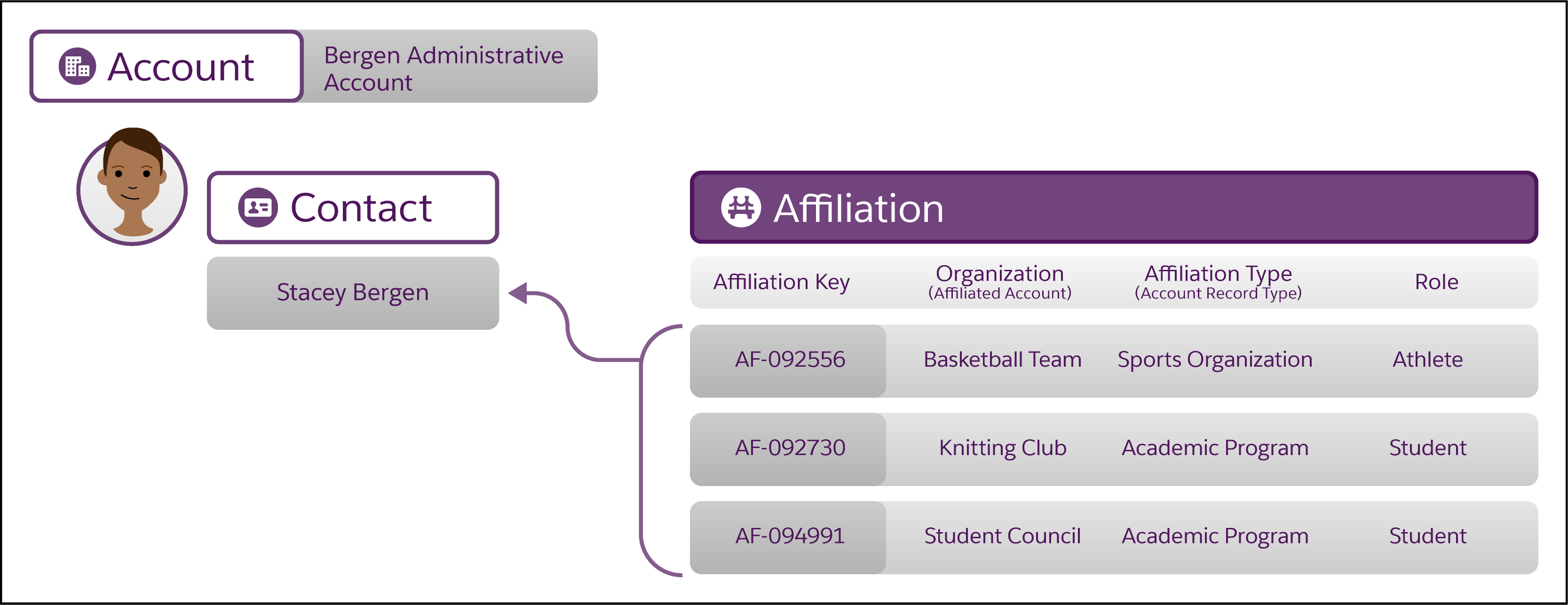
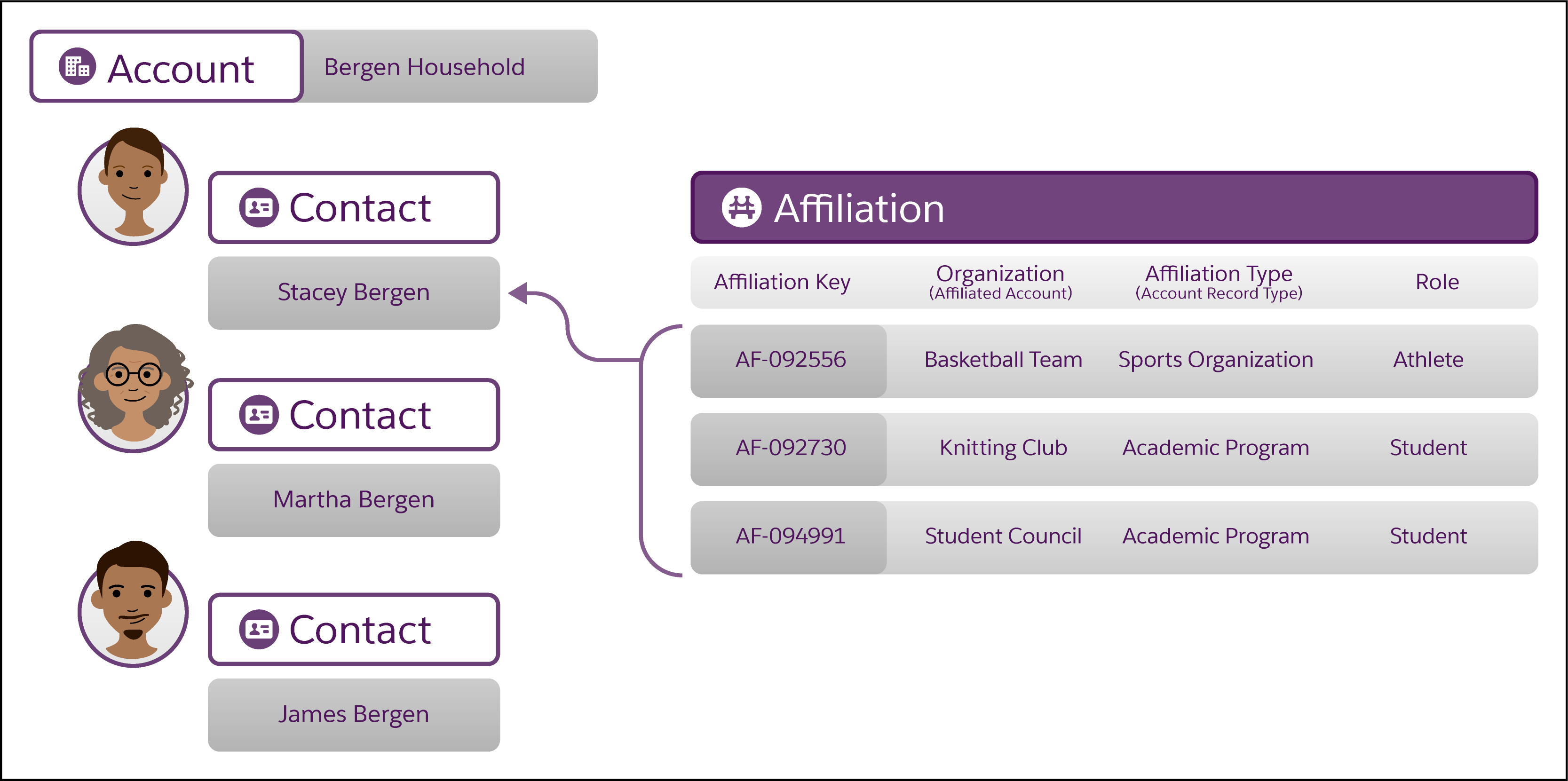
Now consider the example of a student, Stacey Bergen.
Similar to math teacher Maya, Stacey's Contact record is related to several affiliated Accounts, including the Basketball Team, the Knitting Club, and Student Council. Stacey's Contact record is also associated with a container Account, which is a specialized Account type distinct from an affiliated Account.
A container Account is required because the Salesforce data model requires certain data about Contacts to be stored at the higher level of the Account, for security and other technical reasons. A container Account serves as the parent record of its associated Contact record and is required, whereas an affiliated Account is related to the Contact record and optional. In other words, it’s OK if Stacey’s Contact doesn’t have affiliated Accounts but Stacey’s Contact must have a parent Account.
EDA offers two kinds of container Accounts, each one an Account record type.
- Administrative Account
-
You can think of an Administrative Account as the Account-level representation of a Contact. An Administrative Account is a parent to one and only one Contact. The Administrative Account record for our student Stacey could be named, for example, Bergen Administrative Account. This Account that contains Stacey's Contact record is different from Stacey's affiliated Accounts, which are all related to her Contact record.
- Household Account
-
A Household Account functions just like its name suggests, to represent the household a Contact belongs to. Unlike the Administrative Account's one-to-one relationship, a Household Account is typically a parent to multiple Contacts besides the student, such as the Contact's parents or guardians, siblings, and other household members—they're all Contacts, too. Our student Stacey lives with her grandmother, Martha, and her father, James. Their Household Account record could be named, for example, Bergen Household. This Account that contains Stacey's Contact record is different from Stacey's affiliated Accounts, which are all related to her Contact record.
Common Approaches to Container Accounts
In primary and secondary education, Household Accounts are more common. Tracking data about a student's household can be as important as tracking data about students themselves, because family relationships are central to K-12 student success.
In higher education, Administrative Accounts are more common because while family data is still important, it’s secondary to data about the student as an independent adult. After graduation, though, Household Accounts are sometimes preferred for modeling an alum as they take their next steps in life, which can include building a household of their own.
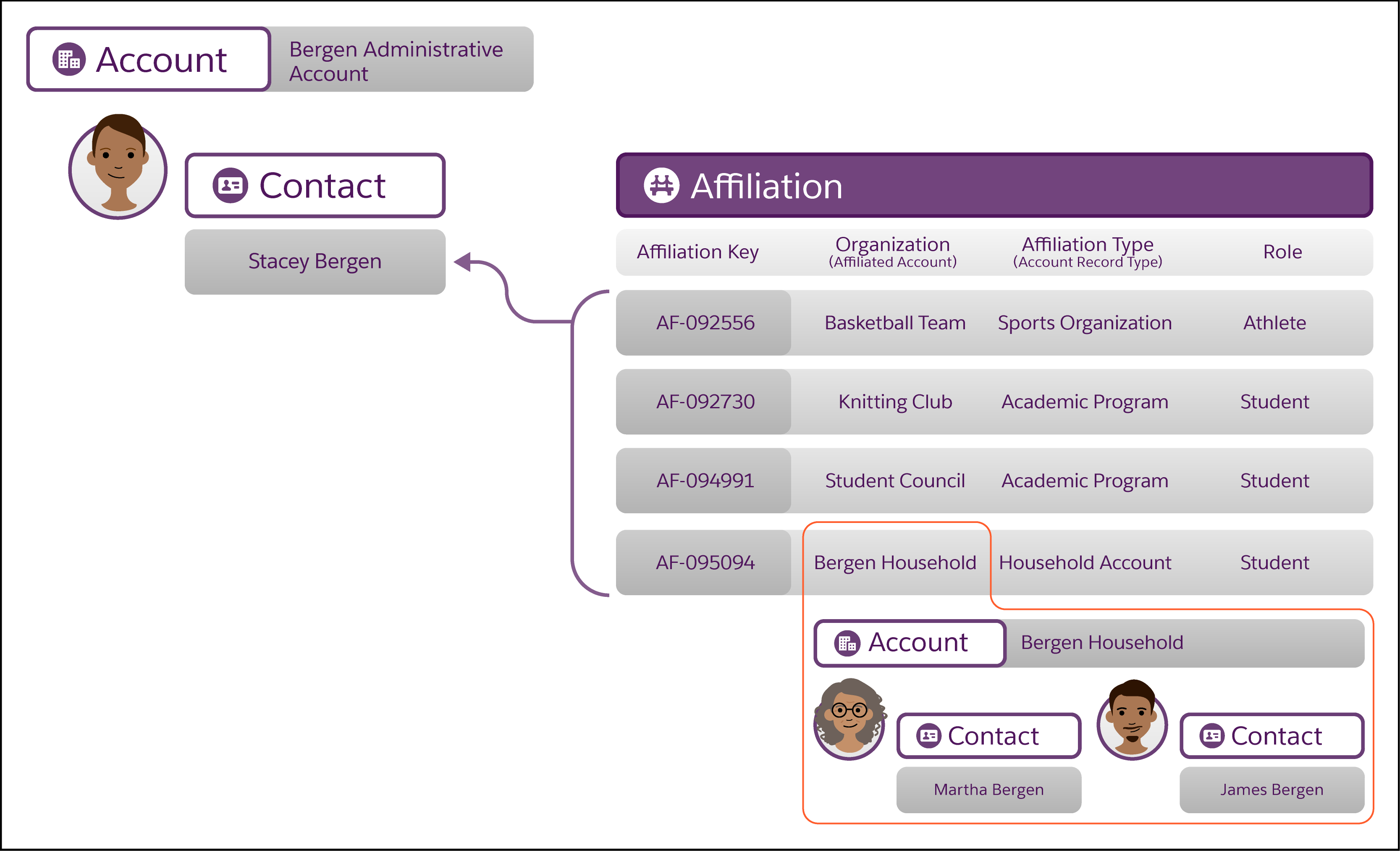
Institutions using Administrative container Accounts for student Contacts often ask how they can also model a student's membership in a household. A common solution is to:
-
Create a Household Account record for the household. For example, Bergen Household.
-
For other members of the household, such as parents or guardians, create their Contact records under the household, with the household as the parent Account for these Contacts.
-
Create an Affiliation record that relates the student's Contact record to the household's Account record.
Choose a Default Account Model for Contacts
Decide whether Administrative or Household is the better container Account choice for modeling your student data, and set that type as the default account model.
The default account model determines:
-
The type of container Account created automatically for every new independent Contact—that is to say, a Contact who isn't under an existing container Account.
-
The naming and renaming of container Accounts, which happens automatically when Contacts change their names or household memberships, based on the choice of Administrative or Household and your Account naming customizations.
-
Your options for managing address data for Contacts and Accounts, which is stored in the Address object. Household Accounts offer more flexibility than Administrative Accounts to track multiple addresses for a single household and for different household members.
Although it's required that you choose Administrative or Household as your default account model, it's fine to have some Contacts with Administrative Accounts and others with Household Accounts within the same EDA org. It's also possible to change the type of container Account for a Contact, such as changing from Administrative to Household when a student graduates from college.
See Also:
Configure Account Model Settings
Considerations for Faculty and Staff Container Accounts
After choosing a preferred container Account type for students, decide whether it's also the right type for faculty and staff Contacts who work at your institution. While you're not required to use the same type of container Account for both types of Contacts, doing so simplifies data management because the Default Account Model setting takes care of creating the correct type of container Account for all faculty, staff, and student Contacts.
In some cases, though, a different container Account type can make sense for faculty and staff. Let's say that Household Accounts is the default account model for students, but you prefer Administrative Accounts for faculty and staff because it's a lighter-weight, less data-intensive account model. This approach is fine, as long as you design your business processes accordingly. A mix of Account types means that you must avoid automatically creating container Accounts for non-student Contacts—in our example, make sure to create their Administrative Accounts manually.
Whatever you decide, we recommend reviewing important details about data storage and security considerations in Configure Account Model Settings.
Contacts and Their Relationships
The Relationship object tracks how someone is connected to someone else. In other words, a Relationship record relates one Contact record to another. EDA offers a preconfigured set of Relationship values that mostly represent familial relationships—Parent, Grandparent, Guardian, and the like. While they're most relevant for tracking data about students' families and households, you can create custom Relationship values for all types of Contacts.
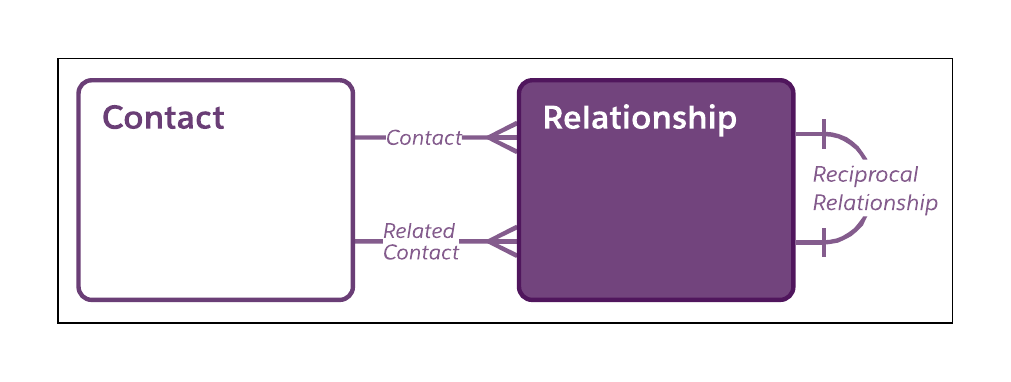
For Relationships specific to faculty and staff, decide whether it's useful to create custom Relationship values such as Mentor Teacher or Classroom Aide. If you do create any custom values, remember to create values for both sides of the Relationship. The EDA data model requires that every Relationship (such as Mentor Teacher) have a reciprocal Relationship (such as Mentee Teacher).
Contacts' Attributes and Credentials
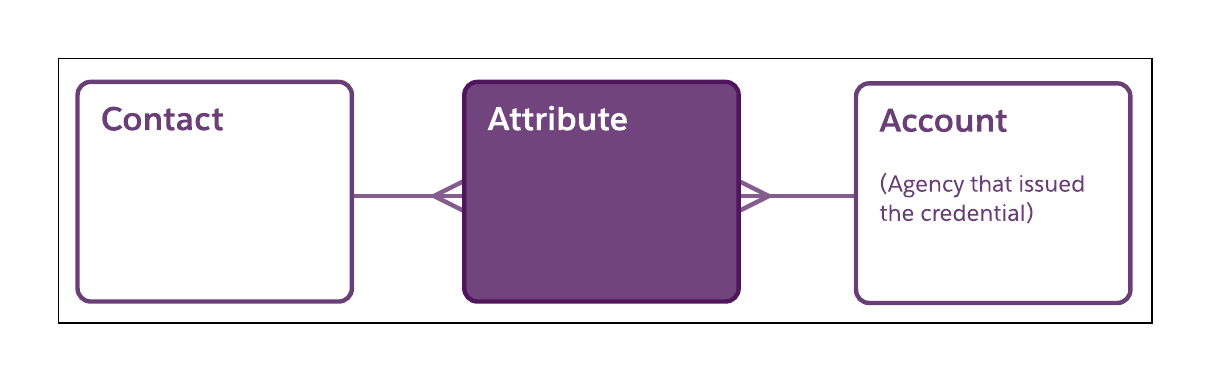
The Attribute object lets you track students' significant attributes, and faculty and staff members' licenses, certifications, and professional endorsements.
The preconfigured Student Characteristic record type is designed for tracking data such as students' family considerations, Individualized Education Program participation, and so on. The preconfigured Credential record type is designed for faculty and staff, and is especially useful for tracking requirements of certificated or professionally licensed staff.
Contacts' Language Proficiency
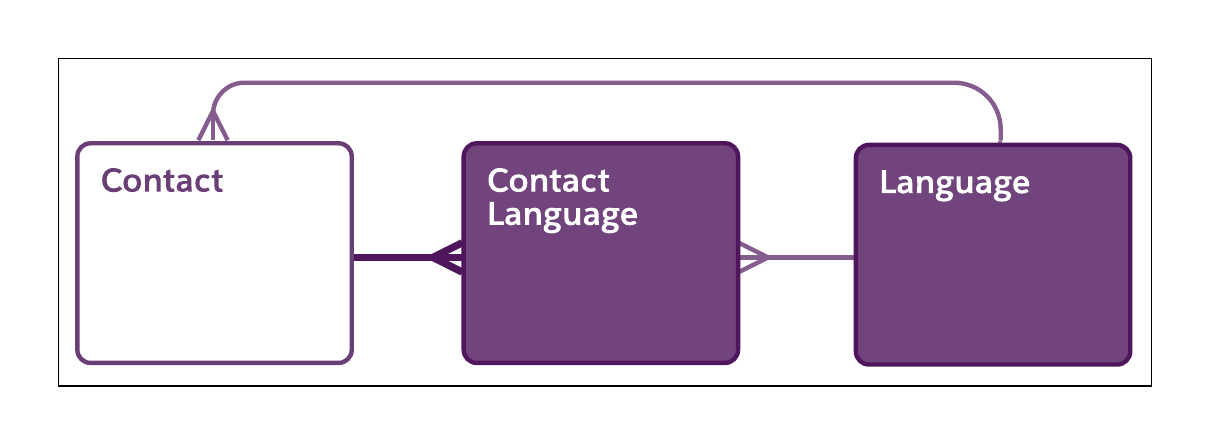
Track Contacts' fluency with languages using the Language and Contact Language objects.
The Language object contains records for the languages spoken by your campus population and the languages used for instruction. The Contact Language object tracks an individual Contact's fluency with a language, and can track whether it's the Contact's primary language.