
You are here:
Program Enrollment
Program Enrollment represents a student's (Contact's) enrollment in an Academic Program (Account).
- Sample Uses for Program Enrollment
Track students' past and present Program Enrollments to see the arc of their educational journeys, as they explore courses of study and commit to majors, minors, or specialized programs. - Configure Program Enrollment
Set up Program Enrollment data for your educational institution and learn about the steps required to maintain it. - Create a Program Enrollment Record
Creating a Program Enrollment record represents enrolling a Contact in an Academic Program. Typically, your institution has already created a series of Account records with the Academic Program record type to represent all of the programs on offer. - Things to Know About Maintaining Program Enrollment Data
After a Contact's newly created Program Enrollment record is saved, an Affiliation record between the Contact and the Academic Program is created automatically (if one didn't already exist). These Program Enrollment and Affiliation records are automatically kept in sync thereafter. For example, if the student changes majors, departments, or even colleges, and Program Enrollment records are updated, deleted, or created anew, those changes can trigger automatic updates to Affiliation records, and vice versa.
Sample Uses for Program Enrollment
Track students' past and present Program Enrollments to see the arc of their educational journeys, as they explore courses of study and commit to majors, minors, or specialized programs.
-
University—Track enrollments in undergraduate, graduate, and continuing education programs that grant degrees or credentials.
-
K-12—Track enrollments in academic, support, and recreational programs at a school or district level.
Configure Program Enrollment
Set up Program Enrollment data for your educational institution and learn about the steps required to maintain it.
- Initial Configuration for Program Enrollment
While the Program Enrollment object comes preconfigured and doesn't require additional configuration beyond your own preferred customizations, it's essential to understand how to manage Program Enrollment data and configure related settings. Review these resources to make sure you have the full picture. - Keep Up with Program Enrollment
Consider these updates, depending on which version of Education Data Architecture you originally installed.
Initial Configuration for Program Enrollment
While the Program Enrollment object comes preconfigured and doesn't require additional configuration beyond your own preferred customizations, it's essential to understand how to manage Program Enrollment data and configure related settings. Review these resources to make sure you have the full picture.
-
EDA K-12 Architecture Kit comes with default automation that keeps Program Enrollment records in sync with both Academic Program Account records and Affiliation records. For details, see Configure Affiliations Settings.
-
Various Table-Driven Trigger Management (TDTM) rules control the creation, update, and deletion of Program Enrollment records and related records. Review the classes affecting the Program Enrollment object in Apex Class Descriptions for EDA.
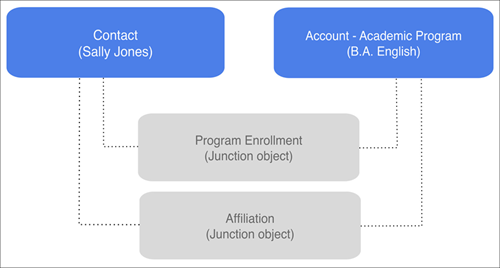
Program Enrollment is a junction object that relates the Contact and Account objects—specifically, relating a student Contact with an Academic Program (Account record type). For example, let's say that an institution's undergraduate English major is represented by an Academic Program record called B.A. English. When a student declares her major as English and officially enrolls in the major, a Program Enrollment record is created to relate her Contact record to the B.A. English Academic Program record.
Keep Up with Program Enrollment
Consider these updates, depending on which version of Education Data Architecture you originally installed.
| If Installed Before Version | Configuration Task |
|---|---|
| Add the Education History field to your page layouts, as needed. For more information, see Add Custom Fields and Picklist Values. |
Create a Program Enrollment Record
Creating a Program Enrollment record represents enrolling a Contact in an Academic Program. Typically, your institution has already created a series of Account records with the Academic Program record type to represent all of the programs on offer.
From the Contact record that you're adding enrollment information to, click New in the Program Enrollments related list.
Enter relevant details, such as enrollment-related dates and standing in the Academic Program.
Note these fields in particular.
Program—Start typing the name of the Academic Program, and select it when you see it suggested.
Eligible to Enroll—Select this field to indicate that this Contact can enroll in Courses.
 Tip This field can be useful in a SIS (Student Information System) integration with Education Data Architecture. Perhaps the SIS populates a student's registration information in the Program Enrollment record, and automatically selects Eligible to Enroll to indicate that the student is an active record, eligible to enroll.
Program Plan—If the field is visible, leave it blank. After you've saved this record, we automatically fill in the Program Plan that's designated as Primary for the Academic Program. If you don't see it filled in after saving, that either means that the Program hasn't designated a primary Program Plan or perhaps your institution has disabled this automatic feature.
Credits Attempted, Credits Earned, and GPA—Use these fields to store calculated, cumulative data. Education Data Architecture doesn't provide rollup calculations out of the box because institutions vary a lot in how they prefer to calculate overall credits or GPA. We let you customize your own approach, such as using Flow or custom code to recalculate the values upon individual record updates for a Contact or in a batch process.
- Click Save.
Things to Know About Maintaining Program Enrollment Data
After a Contact's newly created Program Enrollment record is saved, an Affiliation record between the Contact and the Academic Program is created automatically (if one didn't already exist). These Program Enrollment and Affiliation records are automatically kept in sync thereafter. For example, if the student changes majors, departments, or even colleges, and Program Enrollment records are updated, deleted, or created anew, those changes can trigger automatic updates to Affiliation records, and vice versa.
For more information about Program Enrollments and Affiliations, see Program Enrollments In Parallel with Affiliations.
