You are here:
Manage Disbursements
Set up disbursements in Grants Management to track outgoing funds.
- Create a Disbursement
A Disbursement helps schedule and track outgoing funds to funding recipients. It’s important to note this doesn’t perform the act of disbursement, such as depositing funds into a recipient's bank account.
Create a Disbursement
A Disbursement helps schedule and track outgoing funds to funding recipients. It’s important to note this doesn’t perform the act of disbursement, such as depositing funds into a recipient's bank account.
-
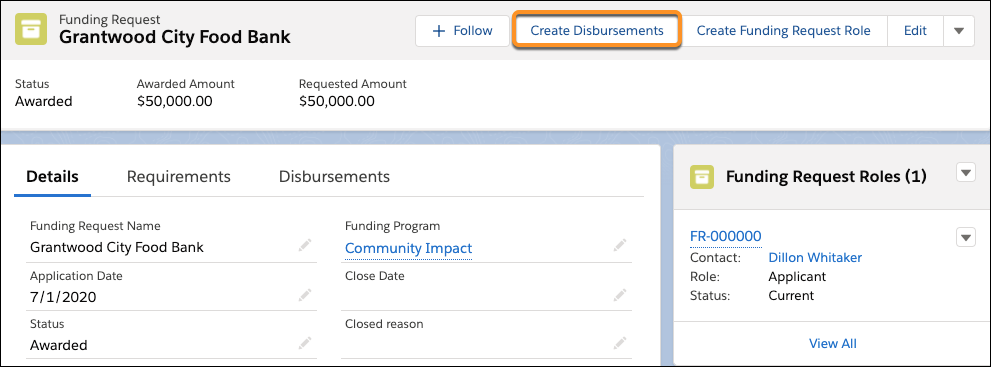
While viewing a Funding Request that has an Awarded Amount, click Create Disbursements.
-
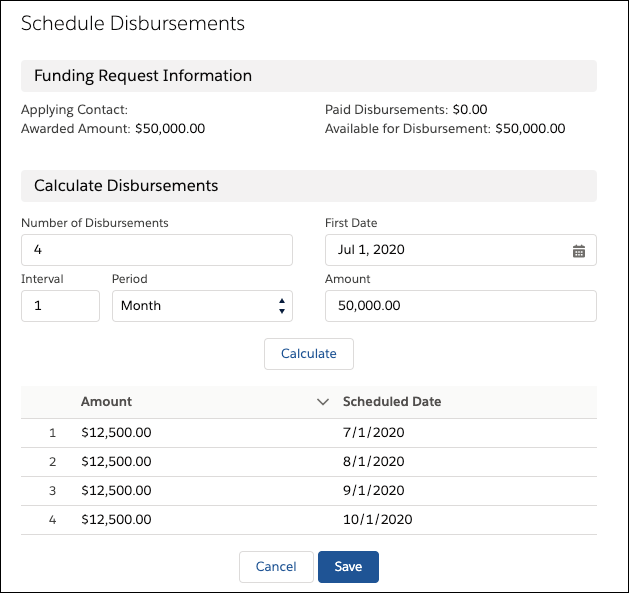
Enter the Number of Disbursements. For example, enter 4 for four separate payments to the awardee.
-
Select the disbursement frequency in Interval and Period. For example, an Interval of 1 and Period of Month indicates one payment every month for 4 months.
-
Select a First Date when the initial disbursement begins.
-
Enter the total Amount of the Funding Request to disburse, if different from the Amount Awarded. You can’t disburse funds greater than the Amount Awarded, but you can disburse less.
-
Click Calculate to calculate a disbursement schedule based on the Number of Disbursements, Interval, Period, First Date, and Amount fields.
-
Click Save.