You are here:
Address
Address represents a home, seasonal, or other address for a Contact or Account.
- Sample Uses for Address
- Configure Address
Keep the Address object up to date. - Create an Address Record
Create an address record from the Addresses related list for an account or contact. - Edit Addresses
Update an address record from the Addresses related list for an account or contact. - Mark an Address as Inactive
When someone moves and doesn’t provide an updated address, or when an address shouldn’t receive mail for some other reason, mark the address as inactive. - Specify a Seasonal Address
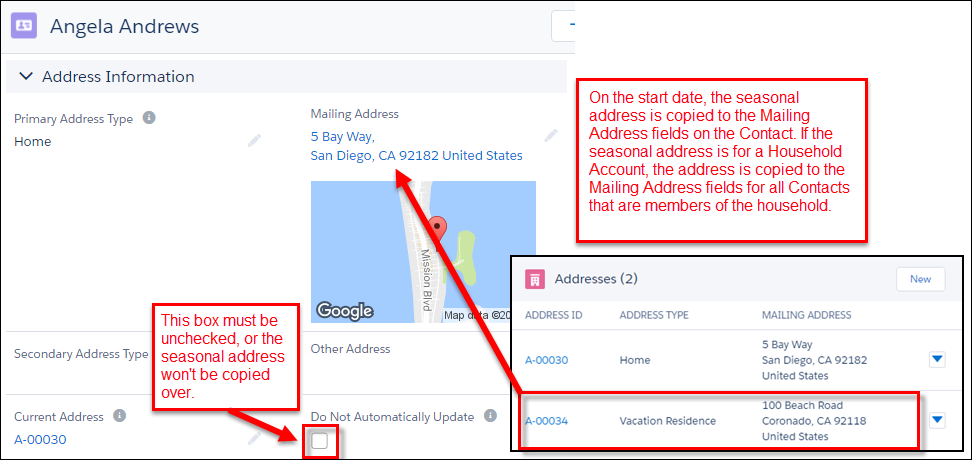
You can set up a Seasonal Address with start and end dates for a Contact or Account, so that the Seasonal Address is automatically set as the Mailing Address at the specified start date. When the end date is reached, Salesforce copies the original Address back to the Address fields.
Sample Uses for Address
-
University—Track a student's address during the school year separately from their permanent home address.
-
K-12—Track the two household addresses that a student splits time between.
-
Any educational institution—Track a seasonal address for a household separate from its primary residence.
Create an Address Record
Create an address record from the Addresses related list for an account or contact.
Edit Addresses
Update an address record from the Addresses related list for an account or contact.

Mark an Address as Inactive
When someone moves and doesn’t provide an updated address, or when an address shouldn’t receive mail for some other reason, mark the address as inactive.
-
For a Household and other types of Account, navigate to the Account with the address that you want to update. In the Addresses related list, click the action menu for the Address and select Edit. Select Inactive and save your changes.
-
For a Contact, navigate to the Contact with the address you want to update. In the Addresses related list, click the action menu for the Address and select Edit. Select Inactive and save your changes.
Specify a Seasonal Address
You can set up a Seasonal Address with start and end dates for a Contact or Account, so that the Seasonal Address is automatically set as the Mailing Address at the specified start date. When the end date is reached, Salesforce copies the original Address back to the Address fields.
To set up a Seasonal Address:
- Create a new address for the Contact or Account, and enter the Address information.
- Enter the Seasonal Information: Seasonal Start Month, Seasonal Start Day, Seasonal Start Year, Seasonal End Month, Seasonal End Day, and Seasonal End Year. Note that you can leave the year fields blank if you want the Seasonal Address to replace the current Address at the same time every year.
- Click Save.
- When the Seasonal Address start date is reached, Salesforce automatically copies the Address to the Address fields on the Contact or Account record. If it's a Household Account, Salesforce also copies the seasonal address to the Mailing Address for all related Contacts who don't have Do Not Automatically Update enabled.