
You are here:
Represent Classes and Other Programs
Identify how to set up courses and other programs in your school in the K-12 Architecture Kit.
Elijah is ready to start third grade! He turned things around with the extra help he received at the end of second grade, and the staff at Valley Elementary want him to continue to shine. Let’s see how the school sets up the classes and programs that help him continue to learn and grow.
- The Basics of Classes and Programs
Use academic program accounts to represent classes, programs, and activities. - Describe Your School's Infrastructure
So far so good! Valley Elementary has defined its Courses. But what times of the year are these Courses offered? What days, times of day, and in which rooms or spaces are they held? - A Closer Look at Classes and Programs
The Course Offering object uses term, time block, and facility records to create a specific instance of a course. - Connect Students to Courses
Use the Course Connection object in K-12 Architecture Kit to associate a student with a course offering. - Let's Review How K-12 Architecture Kit Represents Classes and Programs
Congratulations! We've given you a whole lot of information, and we realize following along can be challenging. Let's review what you've learned about the way Valley Elementary sets up grades, classes, and programs at their school. They used:
The Basics of Classes and Programs
Use academic program accounts to represent classes, programs, and activities.
Earlier, we talked about different kinds of Accounts including Household Accounts (a container for people who live in the same household) and Educational Institution Accounts (a container for staff who work at the same place). For organizing data about classes and after-school programs, Valley Elementary uses yet another type of Account, Academic Program Accounts. Think of these Accounts as containers for classes and activities. For example, Valley Elementary uses six different Academic Program Account records to represent each grade from Kindergarten through fifth, and a single Schoolwide Assistance Academic Program Account record to represent support programs such as their after-school program.
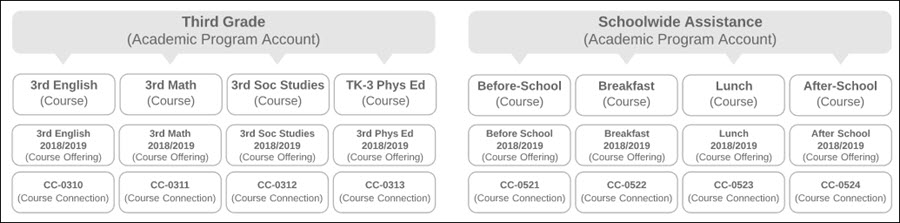
The classes and activities themselves are represented by Courses. Here's a look at some of the Courses that are available at Valley Elementary and the way they organize them under Academic Program Accounts.

- When school staff define the third-grade Courses offered, they create a Course record for every class and associate it with the Third Grade Academic Program Account record.Note In elementary schools, Courses tend to be grade-level specific, so organizing them under grade-level specific Academic Program Accounts makes sense. However, if you're at a middle or high school, you might organize Courses under subject matter-specific Academic Department Accounts. For example, a high school might organize all of their school's biology Courses under a record called Biology Academic Department Account. It's entirely up to you to decide what suits your school's needs best.
-
When staff define the support programs the school offers, they create additional Course records for each program and associate them with the Academic Program Account record called Schoolwide Assistance.

Describe Your School's Infrastructure
So far so good! Valley Elementary has defined its Courses. But what times of the year are these Courses offered? What days, times of day, and in which rooms or spaces are they held?
Before building out the specific instances of Courses students can enroll in, Valley Elementary also defines:
-
The periods of time during a school year when Courses are offered; we call these Terms.
-
The periods of time during a school day when Courses can be held; we call these Time Blocks.
-
The places where Courses are held; we call these Facilities.
Let's see how Valley Elementary sets up some of these records.
Terms
A Term can be a quarter, a semester, or some other academic period that Courses are offered. Since Valley Elementary is on the semester system, they create two Term records (Semester I 2018/2019 and Semester II 2018/2019). They also create a top-level Term record to represent the entire school year. The semester Terms are nested under the school year Term. Creating these different records allows the school to report on data for an entire school year, or for just a specific semester.
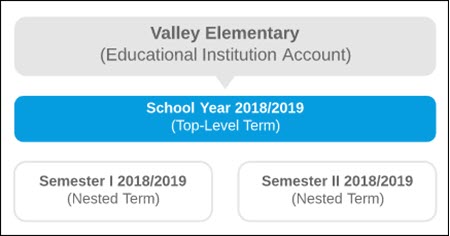
Terms are associated with an Account—in this case, the Valley Elementary Educational Institution Account. If Terms were the same for all schools in the Valley School District, we could associate Terms with the Valley School District Account instead, but since the high school follows a trimester schedule, we associate Terms with their school’s Account.
Time Blocks
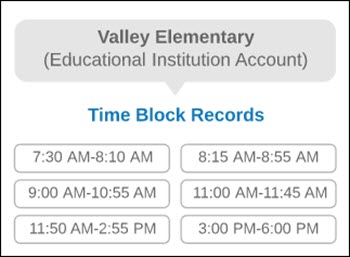
Time Block records define the periods of time when activities might occur at Valley Elementary. The school can use these records to connect Courses to specific blocks of time when they're offered. Let’s take a look at a sampling of some of their Time Block records.
Facilities
Facility records define the places where activities occur. The school can use these records to identify specific activity or Course locations. Here’s a small sampling of some of their Facility records.
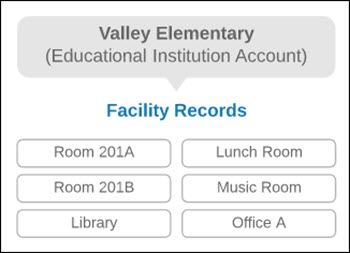
Notice that Valley Elementary associates Facility records for the individual locations directly with the Valley Elementary Account. Alternatively, they could have created a top-level Facility record called Valley Elementary Campus and nested individual locations under it. This might be helpful at large campuses with multiple structures.
A Closer Look at Classes and Programs
The Course Offering object uses term, time block, and facility records to create a specific instance of a course.
We've learned a lot about the different elements that factor into planning for Courses. Now, let's see how it all comes together. We get a little into the weeds with a closer look at how K-12 Architecture Kit manages these details, but don’t worry, we’ll surface for air soon.
Let’s think about the first day students (and teachers) show up to a class. There are certain bits of information they’ll surely need to know, and K-12 Architecture Kit can be set up to capture it all. Questions might include: If I’m a teacher, who are my students? If I’m a student, who’s my teacher? In what room is the Course I’m teaching or attending? What time does the Course start?
All of this information is collected in records that we call Course Offerings.
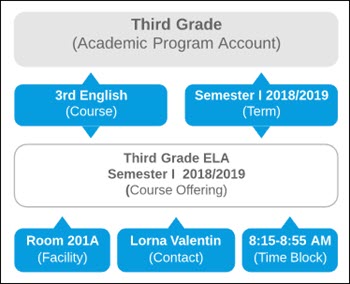
Course Offerings are specific instances of Courses. They’re what students enroll in. For example, 3rd English is a Course that’s offered every school year, but Third Grade ELA Semester I 2018/2019 is the Course Offering (a specific instance of the 3rd Grade Course) that students can enroll in this semester of this year.
Many details are captured in a Course Offering, including the:
-
Term it’s offered (Semester I 2018/2019).
-
Time Block when it’s held (8:15 AM-8:55 AM).
-
Person (Contact) who’s teaching it (Mrs. Valentin).
-
Facility where it’s held (Room 201A, which happens to be Mrs. Valentin’s home room).
Let's see what these pieces look like when they're all connected to each other.
Connect Students to Courses
Use the Course Connection object in K-12 Architecture Kit to associate a student with a course offering.
When Elijah signs up for the third grade, here's what happens.
-
The staff specify Elijah's current grade level.
-
They enroll him in classes.
-
They re-enroll him in the after-school program and school-provided meals.
Let's take a closer look at what's actually happening here and at the data records that represent his actual enrollment. We can actually view all of the records that represent him directly from Elijah's Contact record.
-
Elijah's Contact record shows related Grade Enrollments—records that track past and present grade levels. To indicate that he's entering the third grade, staff specify a Current Grade Level of Third Grade on his Contact record, which sets the status of his second grade Grade Enrollment record to "former."
-
His Contact record also shows related Course Connections—records that link a Contact to a Course Offering. Elijah’s Course Connections look like this.
Let's Review How K-12 Architecture Kit Represents Classes and Programs
Congratulations! We've given you a whole lot of information, and we realize following along can be challenging. Let's review what you've learned about the way Valley Elementary sets up grades, classes, and programs at their school. They used:
-
Academic Program Accounts to help organize Courses and other school programs and activities.
-
Courses to represent classes and activities offered by the school.
-
Course Offerings to represent the times and places where a specific instance of a Course is offered, including the person teaching the Course.
-
Course Connections to actually enroll students in Course Offerings.
