
You are here:
Add or Remove a Contact
Learn how to add or remove constituent records from a household account record.

- Household Account Model: Contacts Overview
Nonprofit, Education, and Membership organizations rely on constituents to create strong and vibrant communities. These individuals might support or subscribe to an organization on their own or collectively, with a spouse and other family members. NPSP refers to these collectives as Household Accounts. - Add a New Contact and Household
Adding a new Contact in Nonprofit Success Pack effectively creates a new Household. Here is the basic workflow for creating a new Contact and Household. - Add a Contact to an Existing Household
Sometimes you need to add a spouse or a child as a new Contact for Households that already exist in your Salesforce org. These Contacts may or may not already exist in Salesforce. - Remove a Contact from a Household
Occasionally you might want to remove a Contact from a Household.
Household Account Model: Contacts Overview
Nonprofit, Education, and Membership organizations rely on constituents to create strong and vibrant communities. These individuals might support or subscribe to an organization on their own or collectively, with a spouse and other family members. NPSP refers to these collectives as Household Accounts.
NPSP automatically connects every constituent Contact record to a Household Account, even if that Household only contains a single member. You can add additional Contacts to existing Households, or remove Contacts as necessary.
Add a New Contact and Household
Adding a new Contact in Nonprofit Success Pack effectively creates a new Household. Here is the basic workflow for creating a new Contact and Household.
- Click the down arrow on the Contacts tab, then click New Contact.
- Enter all relevant Contact details for your new Contact (including phone numbers, emails, and addresses), but leave the Account Name field blank (1). Leaving the Account Name field blank is the key step to creating a new Household.
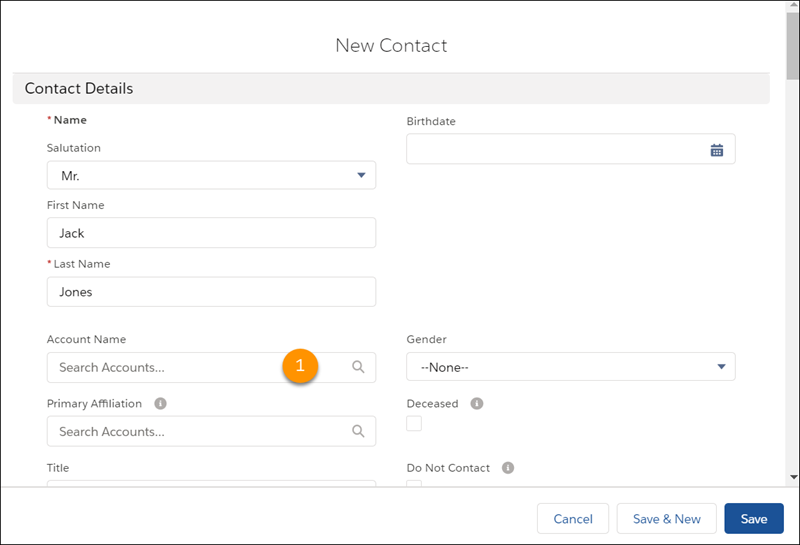
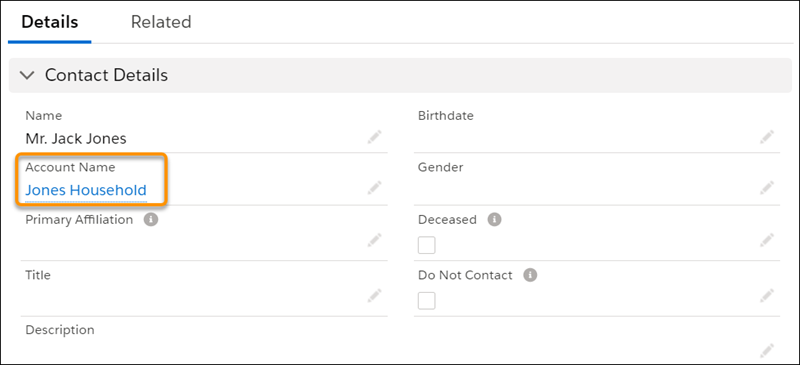
- When you're finished, click Save. Salesforce automatically creates a new Household, and derives the name of the new Household from the name of the new Contact. Salesforce formats the Household name according to the specifications in your Household Name Settings ( ).
Add a Contact to an Existing Household
Sometimes you need to add a spouse or a child as a new Contact for Households that already exist in your Salesforce org. These Contacts may or may not already exist in Salesforce.
- Search for the Household you're interested in (for example, “Davidson Household”), or click the Accounts tab to see a list of recently viewed Accounts.
- Click the Account Name of the Household Account you want to add the Contact to.
- On the Account page, click Related.
- Find the Contacts related list and click New.
- Fill out the Contact information.
- Save the Contact record.
When a household has more than one Contact, NPSP doesn't automatically update the Household Account owner when you update the owner of one of the Contacts.
Remove a Contact from a Household
Occasionally you might want to remove a Contact from a Household.
- In NPSP, search for the Household you're interested in (for example, “Jones Household”), or click the Accounts tab to see a list of recent Accounts.
- Click the Account Name.
- On the Account detail page, click Manage Household.
- Click the Delete
 icon on the Contact card.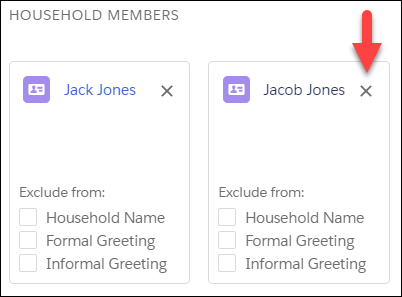
- Click Save.
The Contact is no longer a member of this Household, but still exists in Salesforce. In fact, Salesforce automatically creates a new Household for this Contact. To delete a contact from Salesforce entirely (rarely recommended), navigate to the Contact record and click the Delete button. If the Contact is the last remaining member of their Household, Salesforce automatically deletes the Household.
