You are here:
Configure Matching Gifts
Find out more about configuring matching gifts.
- About Matching Gifts
Use Matching Gifts to track a donation that a corporation made as a match for a donation from one of their employees. - Enable Matching Gift Fields
Assign field-level security to fields relating to gifts, then add the fields and related lists to page layouts to set up Matching Gifts. - Enable Find Matched Gifts Button
The Find Matched Gifts button allows users to find and associate employee-donated gifts with employer-matched gifts. - Enable Opportunity Picklist Values for Matching Gift Record Type
Set up the picklist values for the Matching Gift record type so you can select accurate matching gift statuses. - Create Opportunity Contact Role Values
Opportunity Contact Role picklist values identify the role type of the contact.
About Matching Gifts
Use Matching Gifts to track a donation that a corporation made as a match for a donation from one of their employees.

Matching Gifts use the following objects:
-
Opportunity (standard object): Track the Primary Contact for a donation. Use a Matching Gift record type on Opportunity to track Matching Gifts.
-
Opportunity Contact Role (standard object): Select roles defined as soft credits.
-
Account (standard object): Track information about the organization that is giving the Matching Gift.
-
Contact (standard object): Display soft credit rollup fields. Also provides access to fields required on the Find More Gifts page.
Feature Release Information
This feature was released in NPSP version 3.63 (2/3/2016). If you started using NPSP before this date, or this feature isn't configured in your org, complete these steps. To find your NPSP installation date, see Find Your NPSP Installation Date and Version.
Enable Matching Gift Fields
Assign field-level security to fields relating to gifts, then add the fields and related lists to page layouts to set up Matching Gifts.
Assign Field-Level Security
Assign Read and Edit permissions for following fields to your System Administrator and other relevant profiles and permission sets. (See Verify Access for a Particular Field for general instructions on how to configure field access.)
Account fields:
- Matching Gift Administrator Name
- Matching Gift Amount Max
- Matching Gift Amount Min
- Matching Gift Annual Employee Max
- Matching Gift Comments
- Matching Gift Company
- Matching Gift Email
- Matching Gift Info Updated
- Matching Gift Phone
- Matching Gift Percent
- Matching Gift Request Deadline
Contact fields:
- Account Name
- First Soft Credit Amount
- First Soft Credit Date
- Largest Soft Credit Amount
- Largest Soft Credit Date
- Last Soft Credit Amount
- Last Soft Credit Date
- Number of Soft Credits
- Number of Soft Credits Last N Days
- Number of Soft Credits Last Year
- Number of Soft Credits This Year
- Number of Soft Credits Two Years Ago
- Reports To (access required for the Find Matched Gifts page on an Opportunity)
Opportunity Object:
- Matching Gift
- Matching Gift Account
- Matching Gift Employer
- Matching Gift Status
Add Fields to Page Layouts
Add the fields listed above to these page layouts:
-
Add Accounts fields to the Organization Layout.
-
Add Contact fields to the Contact Layout.
-
Add Opportunity fields to the Donation Layout.
Add Related Lists to Page Layouts
Add the Matched Gifts related list to the Matching Gift Layout on the Opportunity object.
For more information on adding fields to page layouts, read Customize Page Layouts with the Enhanced Page Layout Editor.
Enable Opportunity Picklist Values for Matching Gift Record Type
Set up the picklist values for the Matching Gift record type so you can select accurate matching gift statuses.
To enable picklists for the Matching Gifts record type:
- Click
 , then click Setup.
 - Click the Object Manager tab.
- In the list of objects, click Opportunity.
- Click Record Types.
- Click Matching Gift.
- Scroll to the Picklists Available for Editing section.
- Click Edit to the left of Matching Gift Status.
- Add all Available Fields to the Selected Fields side by clicking the right-facing arrow.
- Click Save.
Create Opportunity Contact Role Values
Opportunity Contact Role picklist values identify the role type of the contact.
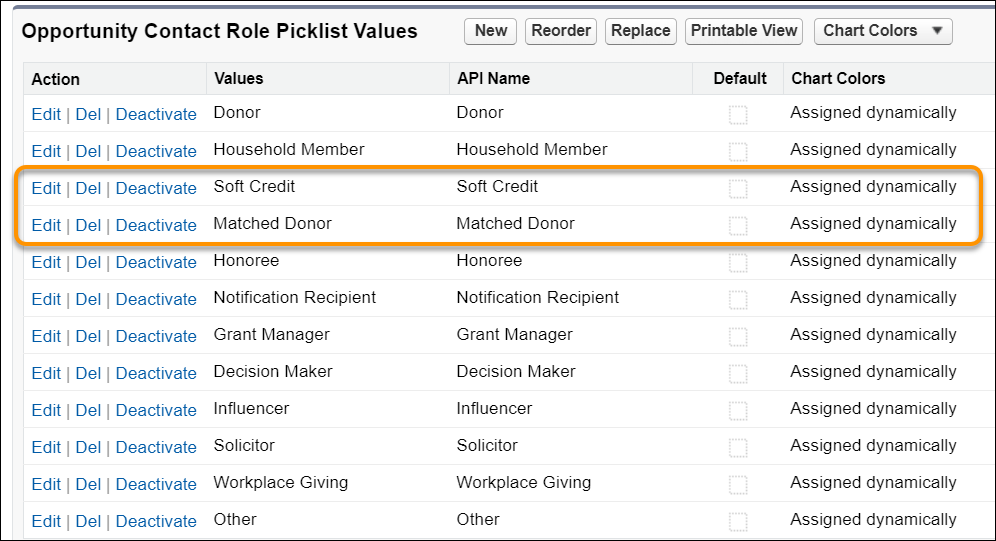
Add these Opportunity Contact Role values if they don't already exist. (For more information, see Add or Manage Contact Roles in Salesforce Help & Training.)
- Soft Credit
- Matched Donor