
You are here:
Configure Tribute Gifts
Make customizations to page layouts and picklists so that NPSP tributes work properly.
- About Tribute Gifts
NPSP Tribute Gifts feature allows you to track data about a donation given in honor of or in memory of someone, such as who the honoree is, and the constituents who should be notified about the donation. - Set Field-Level Security
Make sure you have access to the tribute-related fields on Opportunity. - Configure Picklist Values
Add values to the Notification Preference and Tribute Type picklists on the Donation record type. - Set up Automatic Opportunity Contact Roles
You can have the Nonprofit Success Pack automatically create contact roles when you fill in the Honoree Contact or Notification Contact fields. Be aware of how the contact role logic works when a contact is eligible for more than one role (such as Household Member, or other soft credit).
About Tribute Gifts
NPSP Tribute Gifts feature allows you to track data about a donation given in honor of or in memory of someone, such as who the honoree is, and the constituents who should be notified about the donation.
Feature Release Information
This feature was released in NPSP version 3.61 (1/6/2016).

Set Field-Level Security
Make sure you have access to the tribute-related fields on Opportunity.
Verify access for the following Opportunity fields for each profile:
- Honoree Contact
- Honoree Information
- Honoree Name
- Notification Message
- Notification Preference
- Notification Recipient Contact
-
Notification Recipient Email
- Notification Recipient Information
- Notification Recipient Name
-
Tribute Notification Date
-
Tribute Notification Status
-
Tribute Type
To check field access:
- From Setup, enter Profiles in the Quick Find box, then click Profiles.
- Click the name of the Profile you want to set field-level security for.
- In the Field-Level Security section, click View next to Opportunity.
- Make sure the profile has the correct level of access to the Tribute fields. If not, click Edit and select the checkbox, then click Save.
For more information on setting field-level security, see Verify Access for a Particular Field.
Configure Picklist Values
Add values to the Notification Preference and Tribute Type picklists on the Donation record type.
- From Setup, click the Object Manager tab.
- In the list of objects, click Opportunity.
- Click Record Types.
- Click Donation.
- Click Edit next to Notification Preferences under Picklists Available for Editing.
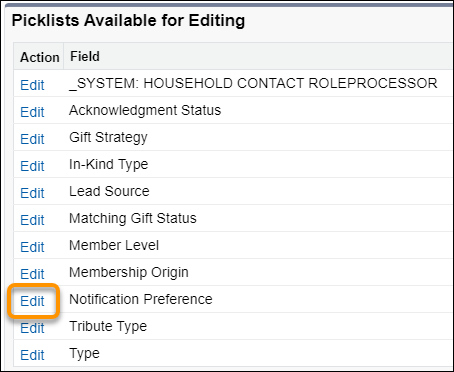
- Add all values from the Available Values to the Selected Values.
- Click Save.
- Repeat the above steps for the Tribute Type picklist.
For more information on how to add picklist values to record types, see Create Record Types.
Set up Automatic Opportunity Contact Roles
You can have the Nonprofit Success Pack automatically create contact roles when you fill in the Honoree Contact or Notification Contact fields. Be aware of how the contact role logic works when a contact is eligible for more than one role (such as Household Member, or other soft credit).
Learn more in NPSP Logic for Creating Opportunity Contact Roles.
- Go to the NPSP Settings tab, click .
- Enter Honoree for Honoree Opportunity Contact Role and Notification Recipient for Notification Recipient Opp Contact Role. Leaving these settings blank disables automatic contact role creation for these fields.
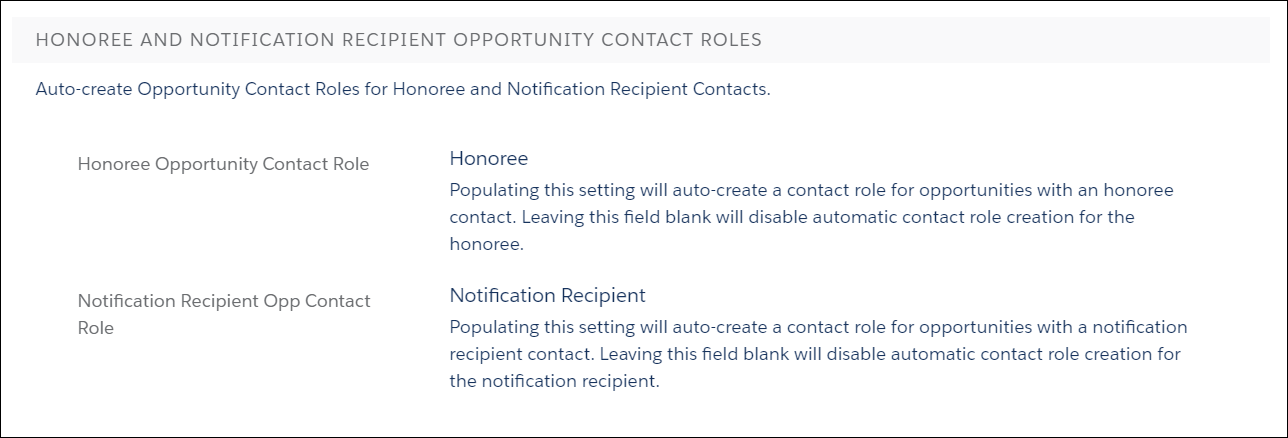
For these roles to apply as soft credits, there is some setup required. If you're using Customizable Rollups, you set the Contact Roles in a filter group and apply them to the rollups themselves. Learn more in Customizable Rollups Overview and Configure Soft Credit Rollups.
