You are here:
Create an Affiliation with an Organization
Use Affiliations in NPSP to track constituent relationships with organizations, including board memberships, employment, and foundation relationships.

- Affiliations Overview
Your biggest champions are constituents who donate money or volunteer their time. As you identify the people who are deeply dedicated to your mission, you'll likely want to know more about them. In NPSP, track this information using Affiliations. - Create an Affiliation
Use affiliations to track a constituent's connections to multiple organizations. - Modify an Affiliation
When a constituent attains a new position, steps down, or joins a new organization, modify their Affiliations to track these changes. - Manage Multiple Affiliations
Manage and track a constituent's affiliations with multiple organizations. - Change a Contact's Primary Affiliation
Primary Affiliations indicate which organizations are most important for a Contact. Change a Contact's Primary Affiliation by editing the existing Affiliation record, or change the Primary Affiliation field on the Contact. - Manage Affiliations From the Account Object
Just like on a Contact record, you can find Affiliation information when looking at the Account record.
Affiliations Overview
Your biggest champions are constituents who donate money or volunteer their time. As you identify the people who are deeply dedicated to your mission, you'll likely want to know more about them. In NPSP, track this information using Affiliations.
Your biggest champions are constituents who donate money or volunteer their time. As you identify the people who are deeply dedicated to your mission, you'll likely want to know more about them, including their:
-
Current or former board membership
-
Volunteer experience
-
Donor-Advised Funds (DAF) participation
-
Family foundation involvement
-
Work history
In NPSP, track this information using Affiliations.
Affiliations link individuals (Contacts) with Organization Accounts. Organization accounts are broadly used for any organization or business, such as grant makers, corporations, vendors, government institutions, and more.
With Affiliations, you can track a Contact's current and former involvement with organizations over time as people move to new jobs or join boards at different organizations.
Affiliations are used in other areas of NPSP as well. Use the Primary Affiliation Contact field to track which organization is the most important for that person. Configure Affiliations to automatically create soft credits for the donor when you receive donations from their donor-advised fund or family foundation.
Create an Affiliation
Use affiliations to track a constituent's connections to multiple organizations.
Let's look at an example of Affiliations in action. Hamilton Partners is a new nonprofit, focused on tackling sustainable business practices in the private sector. Its founder, Riley Hamilton, has deep connections in the nonprofit world—including important board memberships. We want to make sure Riley's robust background is reflected in the database.
Let's create an Affiliation to connect Riley Hamilton to Hamilton Partners:
-
Find the Contact record you want to work with.
-
Click Related, then find the Organization Affiliations related list.
-
Click New.
-
Enter and select Hamilton Partners in the Organization field.
-
Enter any other information you have for the Affiliation record:
-
Role = Describe the person's organizational role. For example, Founder.
-
Status = Indicates whether the Affiliation is current or former.
-
Start Date and End Date = Timeframe for this Affiliation.
-
Related Opportunity Contact Role = Automatically creates a soft credit for the affiliated Contact when you enter a donation from this Organization Account. Learn more in Automated Soft Credits.
-
Primary = Indicates that this is the most important Affiliation for this Contact.
-
Description = Enter any additional notes about this Affiliation.
-
-
Save the Affiliation record. The new Affiliation appears in the Related list for Riley's Contact record and on the Hamilton Partner's Organization Account record.
Now, we can see Riley's current role at Hamilton Partners, along with the rest of their Affiliations. Here's how this information can help in our relationship building:
-
We know Riley's work experience.
-
We can easily check and identify potential conflicts of interest.
-
We can see if listed affiliated organizations have special arrangements, like matching gift policies.
Modify an Affiliation
When a constituent attains a new position, steps down, or joins a new organization, modify their Affiliations to track these changes.
Affiliations can change over time. Whether a constituent attains a new position, steps down, or joins a new organization, modify their Affiliations to track these changes.
To edit an existing Affiliation:
-
Find the Contact record you want to work with.
-
Click Related, find the Affiliation to wish to modify, then click Edit.
-
Update the Affiliation information as needed.
-
Save the Affiliation record
Manage Multiple Affiliations
Manage and track a constituent's affiliations with multiple organizations.
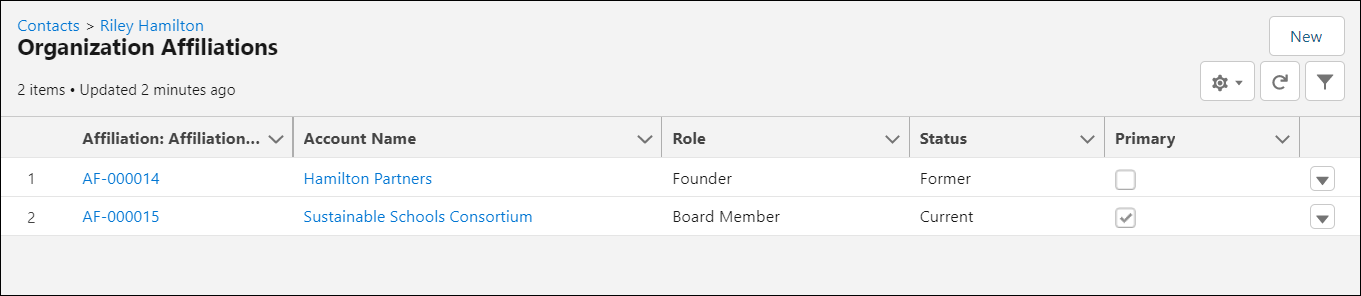
Riley has joined the Sustainable Schools Consortium as a board member and is involved in several committees. He'll still continue working with Hamilton Partners, but now will spend more time at Sustainable Schools going forward.
To reflect this change in NPSP, let's create a new Affiliation for Sustainable Schools, and make it Riley's Primary Affiliation:
-
Find the Contact record you want to work with.
-
Click Related, then find the Organization Affiliations related list.
-
Click New.
-
In the Organization field, click New Account.
-
Populate the Organization Account information.
-
Save the record.
-
-
Enter the relevant information for the new Affiliation.
-
Select the Primary checkbox.
-
Save the Affiliation record.
Now both Affiliations are shown in the Organization Affiliations related list on Riley's record.
Change a Contact's Primary Affiliation
Primary Affiliations indicate which organizations are most important for a Contact. Change a Contact's Primary Affiliation by editing the existing Affiliation record, or change the Primary Affiliation field on the Contact.
Primary Affiliations indicate what organizations are most important for a Contact. If you set an Affiliation to Primary and there's an existing Primary Affiliation for that Contact record, NPSP automatically switches the existing Primary Affiliation Status to Former and deselects the Primary checkbox.
Change a Contact's Primary Affiliation by editing the existing Affiliation record, or change the Primary Affiliation field on the Contact. Here's how:
-
Find the Contact record you want to work with.
-
Click Edit.
-
Clear the existing Primary Affiliation (if there is one).
-
Search for and select an Organization Account in the Primary Affiliation field.
-
Save the Contact record.
A Contact can only have one Primary Affiliation record at a time, though a single Organization Account may be designated as the Primary Affiliation for multiple Contacts.
Manage Affiliations From the Account Object
Just like on a Contact record, you can find Affiliation information when looking at the Account record.
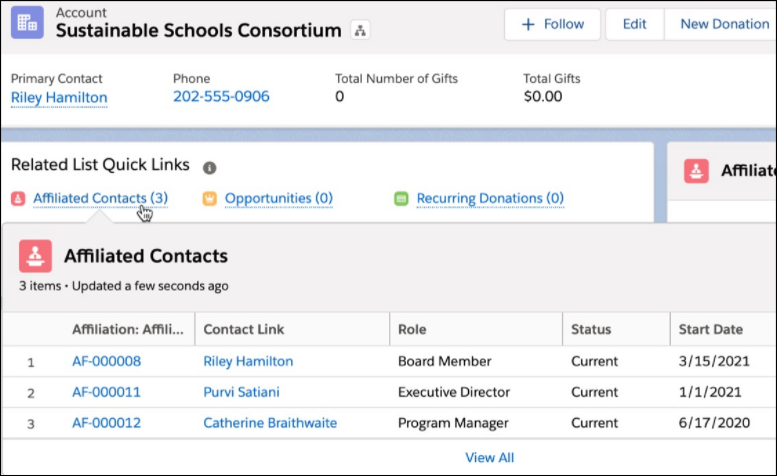
Just like on a Contact record, you can find Affiliation information when looking at the Account record. Interested in reaching out to the Account's primary point-of-contact? Want to see if you have any matching gift information on file for a specific organization? A quick look at the Account record's Related tab has the information you need.
Affiliations help with constituent engagement. For example, if Riley goes on a long vacation and is difficult to reach, check the Sustainable Schools Account to find other Affiliated Contacts that you can reach out to.
To view the Affiliated Contacts for an Organization Account:
-
Find the Organization Account record you wish to view.
-
Hover over or click Affiliated Contacts in Related List Quick Links.