
You are here:
Allocations Overview
Allocate donations into General Accounting Units (GAUs) if you want to set funds aside for specific purposes.
- Donation Allocations Overview
Use General Accounting Units (GAUs) to designate donations (or portions of a donation) to specific funding purposes. For example, an Arts Education GAU is a fund allocated specifically for arts education programs at a nonprofit. GAUs often map to an organization's chart of accounts or accounting classes. - Create or Modify Allocations
Create or modify GAU Allocations for a donation using the Manage Allocations page. First create the Opportunity and enter the donation amount before you allocate the contribution into the appropriate General Accounting Unit (GAU). - Create Allocations Automatically from a Campaign or Recurring Donation
When you define GAU Allocations on a Campaign or Recurring Donation, NPSP creates the same GAU Allocations for each related Opportunity. - Work with Allocation Rollups
GAU Allocations comes with a series of rollups that help you track the allocations you assign to your GAUs. You can find these GAU rollups by clicking the General Accounting Unit tab in NPSP, then selecting the GAU name. - Allocations FAQ
Get answers to common questions about Allocations.
Donation Allocations Overview
Use General Accounting Units (GAUs) to designate donations (or portions of a donation) to specific funding purposes. For example, an Arts Education GAU is a fund allocated specifically for arts education programs at a nonprofit. GAUs often map to an organization's chart of accounts or accounting classes.

Many nonprofits offer a fund designation choice on their online donation pages so that donors can direct their support to the program areas that mean the most to them. When properly configured, the Nonprofit Success Pack (NPSP) creates the selected GAUs along with the Opportunity donation record. Learn more about online donations and fund allocations with Salesforce.org Elevate.
GAUs are as diverse in their uses and names as the nonprofits that use Salesforce. That's why NPSP allows you to define as many GAUs as you need. You can choose to allocate to a GAU as a percentage of the donation amount, or as a specific dollar amount.
Use Campaigns or Recurring Donations to manage a group of donations so that when you enter Opportunities as part of that Campaign or Recurring Donation, NPSP allocates them to the defined GAUs.
Create or Modify Allocations
Create or modify GAU Allocations for a donation using the Manage Allocations page. First create the Opportunity and enter the donation amount before you allocate the contribution into the appropriate General Accounting Unit (GAU).
To create a GAU Allocation for a donation:
- Find the Opportunity you want to allocate.
- Click the Related tab.
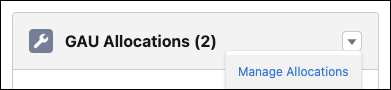
- On the GAU Allocations related list, click
 and Manage Allocations.
 If your administrator enabled default allocations, you'll see the full amount of the donation already in your default GAU.
- The total amount of the Opportunity appears at the top of the page. Enter the name of the GAU.
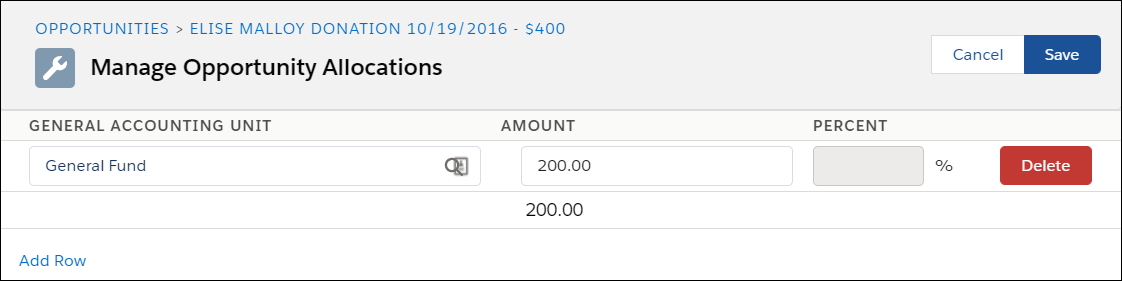
- Enter either the amount or the percent of the donation you want to place in that GAU.
- To allocate the donation into additional GAUs, click Add Row.
- To delete a GAU Allocation, click Delete.
- Save your work.
To modify a GAU Allocation:
- Open the Opportunity that contains the GAU Allocation.
- Click the Related tab.
- In the GAU Allocations related list, click and click Manage Allocations.
- Change the allocation as necessary. You can change the name of the GAU, change the amount being allocated, change from a dollar amount to a percentage of the donation, add additional allocations, or delete allocations.
- Save your work.
For more information about working with Opportunity donations in NPSP, see Manage Donations in Salesforce.
Create Allocations Automatically from a Campaign or Recurring Donation
When you define GAU Allocations on a Campaign or Recurring Donation, NPSP creates the same GAU Allocations for each related Opportunity.
Let's say you have an fundraising appeal where you'd like the gifts that are part of that appeal to share the same GAU Allocations. When you define GAU Allocations on a Campaign or Recurring Donation, NPSP creates the same GAU Allocations for each related Opportunity.
To add GAU Allocations for Campaigns or Recurring Donations:
-
Find the Campaign or Recurring Donation record you want to allocate.
-
Click the Related tab.
-
On the GAU Allocations related list, click
and click Manage Allocations. -
Enter the name of the GAU.
-
Enter either the amount or the percent you want to place in that GAU.
-
To allocate additional GAUs, click Add Row.
-
Save your work.
Now, when you add Opportunity donations to the Campaign or Recurring Donations, those Opportunities receive the GAU Allocations you defined.
If you refund a Recurring Donation installment, the Recurring Donation's fixed-amount GAU Allocations are adjusted to percentages that reflect the proportion of the original allocation amounts. For example: if a Recurring Donation of $50 has two fixed-amount allocations for $25 each, and then you refund an installment by $25, the allocations adjust to a 50% split.
Work with Allocation Rollups
GAU Allocations comes with a series of rollups that help you track the allocations you assign to your GAUs. You can find these GAU rollups by clicking the General Accounting Unit tab in NPSP, then selecting the GAU name.
The rollups come with pre-defined settings that an admin can update as needed. For more information, see Customize Allocation Rollups.
Allocations FAQ
Get answers to common questions about Allocations.
What happens when I modify the Opportunity amount?
When you modify the Opportunity amount, NPSP recalculates the GAU Allocation amounts for that Opportunity.
If the new Opportunity amount is below the total amount of your allocations, you will receive an error and the Opportunity will not be updated. In that case, you should reduce the amount of the allocations before reducing the Opportunity amount.
What order of precedence does NPSP use when you define Allocations in multiple places?
NPSP automatically creates GAU Allocations for Opportunities when default GAUs are enabled in NPSP Settings and when you set a GAU Allocation on a Recurring Donation or a Campaign. You can also manually create Allocations through NPSP Data Import, Gift Entry, and Salesforce.org Elevate.
So when you define GAU Allocations using two or more of these methods, which one "wins"?
Here's the order of precedence NPSP uses to create GAU Allocations:
- Manually created GAU Allocations
- GAU Allocations defined on NPSP Data Import records (during data import, Gift Entry, or Elevate Giving Pages)
- GAU Allocations defined on Recurring Donations
- GAU Allocations defined on Campaigns
- The default GAU Allocation defined in NPSP Settings
How do General Accounting Unit rollups work?
General Accounting Units records aggregate rollup information from Allocations assigned to Closed Won Opportunities.
NPSP automatically updates these rollups nightly, but you can also update them for a General Accounting Unit by clicking the Recalculate Rollups action. To update Allocation rollup data for all General Accounting Units, see Run Rollup Allocations Batch.
Does the Allocations feature support multiple currencies?
Yes, the GAU Allocations feature supports multiple currencies. Allocations inherit the currency of the Opportunity, Campaign, or Recurring Donation with which they are associated. Changing the currency of an Opportunity, Campaign, or Recurring Donation automatically changes each Allocation's currency. You can't change an Allocation's currency individually.
General Accounting Unit rollup fields respect the currency conversion of the aggregated Allocations.
