
You are here:
Create and Manage In-Kind Gifts
An In-Kind Gift is a donation of goods or services, rather than a cash donation, to a nonprofit organization. Learn how to manage these kinds of gifts with Nonprofit Success Pack.

- Overview
An In-Kind Gift is a donation of goods or services, rather than a cash donation, to a nonprofit organization. Examples of In-Kind Gifts include computers, food, clothing, equipment or professional expertise. In Salesforce, In-Kind Gifts should be kept separate from cash donations, as the value of the gift is not reported in the same manner as cash contributions. - Create In-Kind Gifts
Create in-kind gift records with details such as contact or account, close date, in-kind gift type, and fair market value.
Overview
An In-Kind Gift is a donation of goods or services, rather than a cash donation, to a nonprofit organization. Examples of In-Kind Gifts include computers, food, clothing, equipment or professional expertise. In Salesforce, In-Kind Gifts should be kept separate from cash donations, as the value of the gift is not reported in the same manner as cash contributions.
Before you even think about Salesforce, you should understand how your organization views and uses In-Kind Gifts. Do you consider In-Kind Gifts a component of your development program? Do you want to honor the donor's gift in your annual report at the same level as a cash donation? Do you need to track the gift item itself, such as donations of computer equipment that your organization refurbishes and donates to clients?
The answers to these questions will guide you in configuring your setup in Salesforce. Make sure you understand how your organization wants to treat In-Kind Gifts before you start configuring your solution.
Also, when it comes to In-Kind Gifts, it's important to distinguish between a thank-you and a receipt. Check the applicable laws for your country or municipality to be sure you're in compliance with how non-monetary gifts should be recorded and acknowledged.
Create In-Kind Gifts
Create in-kind gift records with details such as contact or account, close date, in-kind gift type, and fair market value.
- Search for the Contact or Account for this gift.
-
On a Contact, click New In-Kind Gift.
Note Depending on how your org is set up, you may need to click the More Actions drop-down ( ) to find the New In-Kind Gift action.
On an Account, click New in the Opportunity related list, and select the In-Kind Gift record type.
-
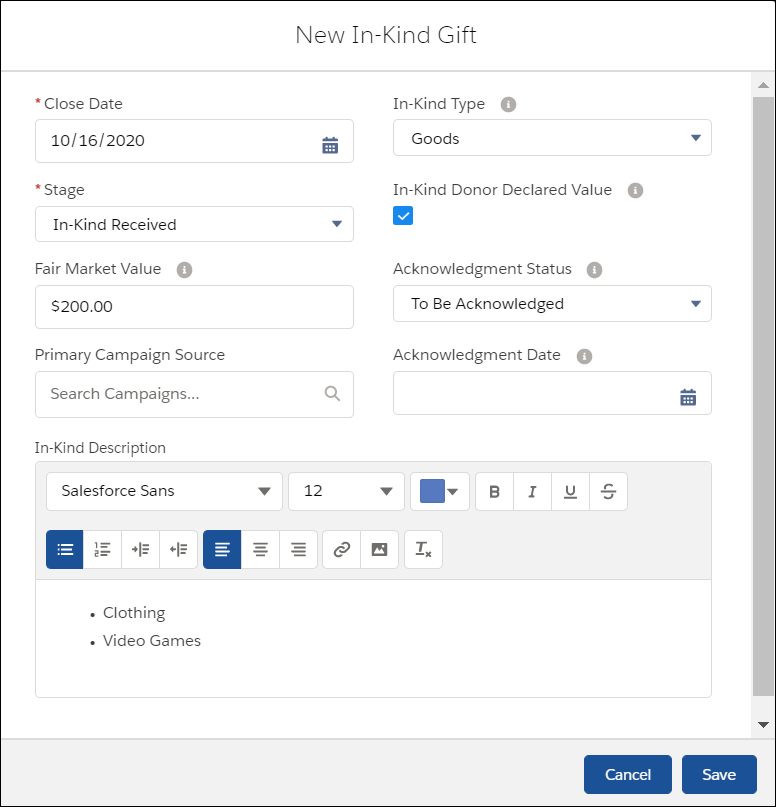
Fill in the information as needed.
- Close Date: The date that you received the gift.
- In-Kind Type: Select Goods or Services.
- Stage: Indicate whether the gift has been Received, Not Yet Received, or Prospecting (the organization is attempting to collect the goods or services). You can also indicate Withdrawn if the donor has decided not to donate the gift after all.
- In-Kind Donor Declared Value: If the Fair Market Value was dictated by the donor, check this box. If unchecked, it's assumed the organization will enter the Fair Market Value based on their own research.
-
Fair Market Value: The value of the In-Kind Gift if it were sold by the organization, or it's the fair market value of the service provided by the donor to your organization at the time of donation.
- In-Kind Description: Enter a description of the gift. You can also insert pictures or links.
-
Click Save.
