
You are here:
Create Deduplicated Mailing Lists from a Campaign
Although we live in the digital age, direct mail remains an important part of fundraising and outreach activities. But sending materials through the mail isn't exactly cheap and you really don't want to send the same piece of mail more than once to a given address. Donors want to see that your organization is effective and streamlined, and doesn't waste dollars on sending unnecessary mailings.

NPSP can provide a deduplicated mailing list so that each address only appears once in the export file. Use the Household Mailing List action on your Campaigns to produce a deduplicated mailing list.
First, double check that the Household Mailing List action is available on Campaigns:
- Find a Campaign record.
- Click Household Mailing List. Note If you don't see Household Mailing List in the action buttons, try clicking
 . If you still don't see it, your administrator may need to add it to the Salesforce Mobile and Lightning Experience Actions section of your Campaign layouts.
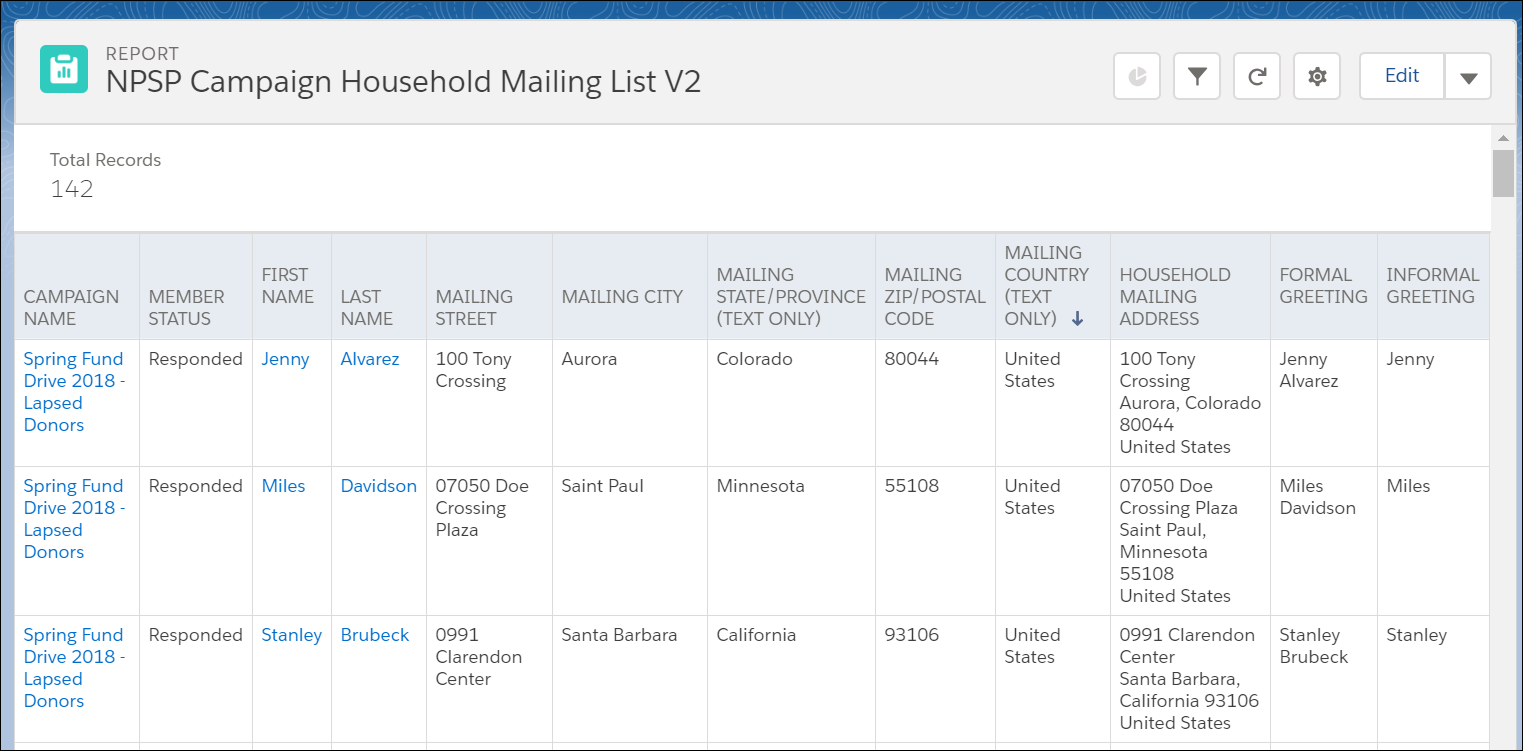
- NPSP runs a special report, called NPSP Campaign Household Mailing List V2, that displays only one row per Household Account.Note The report is V2 because it's built for Lightning Experience.
- Export the results to save a copy of the mailing list.
Here's an example of the report:
The Household Mailing List button appends the phrase "- Household Duplicate" to Campaign Member Status values of members identified as duplicates. For example, "Sent" becomes "Sent- Household Duplicate". As a result, you may need to adjust reports and automation tools that reference Status values.
