
You are here:
How NPSP Data Importer Processes Data
Use NPSP Data Importer for regular data import and custom integrations. It's also the engine that powers Gift Entry and Elevate.
The NPSP Data Importer, along with Advanced Mapping, provides the automation and logic that allows admins, developers, and Salesforce products to import constituent and donation data into the appropriate NPSP and standard Salesforce objects. Use NPSP Data Importer for regular data import and custom integrations. It's also the engine that powers Gift Entry and Elevate.
Here's a high-level summary of the process:
-
Admins, developers, or Salesforce products create NPSP Data Import records that contain constituent and donation data.
-
Admins, developers, or Salesforce products, process the NPSP Data Import records using NPSP Data Importer. The Advanced Mapping configuration determines how fields from the NPSP Data Import records map to the appropriate NPSP and standard Salesforce fields.
-
The NPSP Data Importer updates the NPSP Data Import records to show which records succeeded and which failed to generate the expected NPSP and standard Salesforce records.
-
Admins fix the errors on failed NPSP Data Import records and reprocess them with NPSP Data Importer.
Learn more about NPSP Data Importer in How the Import Process Works and Advanced Mapping in Advanced Mapping Overview.
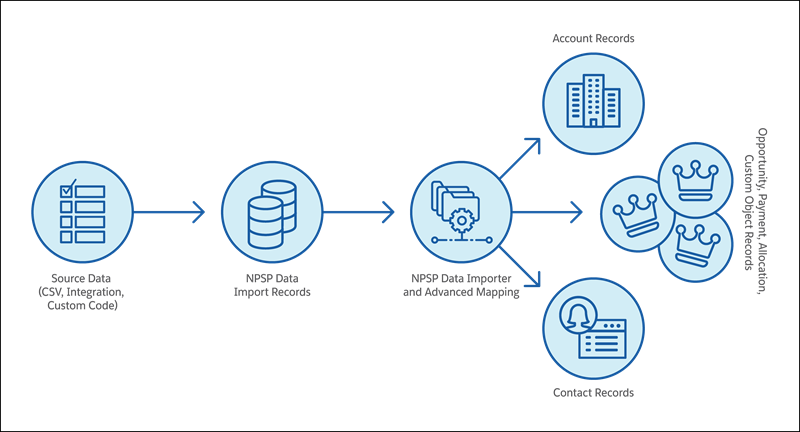
Let's look at an example of the NPSP Data Importer in action.
New Careers, a nonprofit organization, hosts free webinars to promote their job coaching program. New Careers wants to track attendance to measure the connection between webinar attendees and program enrollment.
New Careers uses Campaigns to track webinar details such as event title and date. They use the Attended Status on the Campaign Member object to track attendance.
An admin imports a spreadsheet with the following data into NPSP:
-
Contact First Name
-
Contact Last Name
-
Contact Email
-
Campaign Name (Winter 2021 Career Coaching Webinar)
-
Campaign Member Status (Attended)
NPSP creates one NPSP Data Import record for each spreadsheet row. The admin processes these records using the NPSP Data Importer. During import, NPSP uses data from each NPSP Data Import record to create one Contact and one Campaign Member associated with the webinar Campaign. The Household Account model in NPSP also automatically creates a Household Account for each Contact. Additional NPSP logic prevents the creation of any duplicate records present in the import spreadsheet.

And just like that, the nonprofit admin is all done importing webinar attendees!
The NPSP Data Importer can do this and much more. If the webinar was a paid event, include ticket revenue information and fund allocations. You can even map NPSP Data Import records to your own custom objects with Advanced Mapping.
