
You are here:
Map Recurring Donation Fields to Custom Opportunity Fields
Learn how to map fields from Recurring Donation records to Opportunity records, so that NPSP copies the data to each new installment Opportunity.
- Default Field Mapping
When NPSP creates installment Opportunity records for a Recurring Donation, it copies the values of several fields from the Recurring Donation onto the Opportunity records. This is a big time saver, as it means you don't have to manually enter values for all those fields on each Opportunity record - Custom Field Mapping
Use Recurring Donation Custom Field Mapping to copy custom fields from Recurring Donations to installment Opportunities whenever you create a new Recurring Donation. This ensures that details from the Recurring Donation record appear on the Opportunity records for easy reference.
Default Field Mapping
When NPSP creates installment Opportunity records for a Recurring Donation, it copies the values of several fields from the Recurring Donation onto the Opportunity records. This is a big time saver, as it means you don't have to manually enter values for all those fields on each Opportunity record
The following table describes how NPSP maps fields from the Recurring Donation to its installment Opportunity records when the Recurring Donation is first created.
The default Stage for Opportunities in a Recurring Donation is Pledged. This default can be changed by altering the Recurring Donation Stage Name Custom Label. For more information, see Customize Labels.
Custom Field Mapping
Use Recurring Donation Custom Field Mapping to copy custom fields from Recurring Donations to installment Opportunities whenever you create a new Recurring Donation. This ensures that details from the Recurring Donation record appear on the Opportunity records for easy reference.
Mapping requires that you have two fields (one on the Recurring Donation and one on the Opportunity) of a matching data type in order to create a mapping between them. A matching data type means that you can only map a Date field to a Date field, a Text field to a Text field, and so on.

Let's look at a field mapping example.
Say that your organization sometimes receives Recurring Donations "in honor of" a person of the donor's choosing. There's already an Honoree Contact field on the Opportunity object for tracking that, but if we create an Honoree field on the Recurring Donation, we can map them together. That way you only need to enter the Honoree on the Recurring Donation, and the field data gets copied to all related Opportunities.
Here's how.
- First, make sure you've created the custom fields you want to map. In this example, we created a lookup field (to Contact) on the Recurring Donation object called Honoree.
- Click the NPSP Settings tab.
- Click .
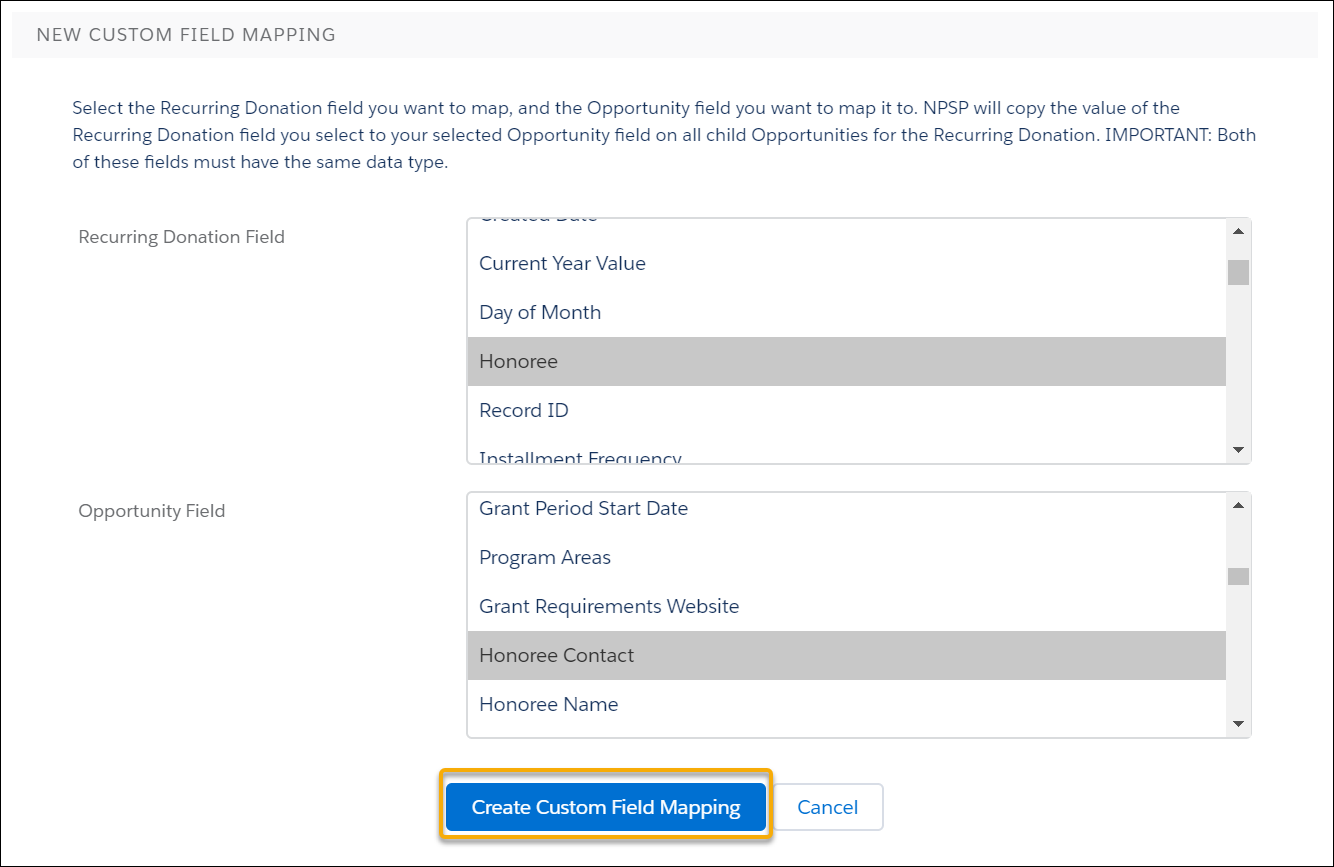
- Click New Custom Field Mapping.
- In Recurring Donation Field, select the custom field you created on the Recurring Donation object.
- In Opportunity Field, select the corresponding field on the Opportunity object.
- Click Create Custom Field Mapping.
The new field mapping appears in the mapped fields list.
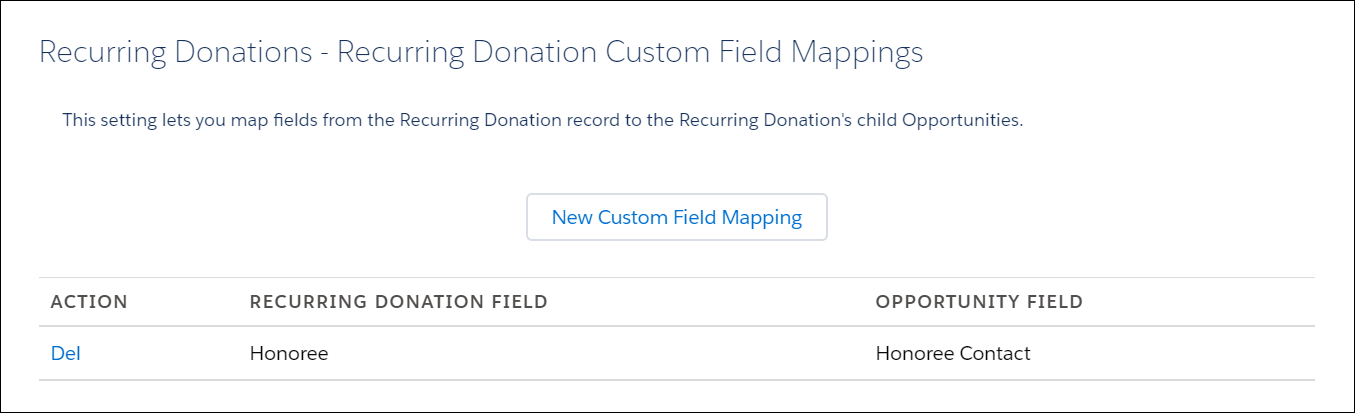
If you need to delete a mapping, click Del under Action in the mapped fields list. When you delete a field mapping, the data that had already been copied to the Opportunity records remains unchanged.
