
You are here:
Soft Credits Overview
Soft credits are a fundraising concept that represent recognition of credit for donations. Soft credits help you to better understand a donor's history and their level of influence.
- What is a Soft Credit?
Soft credits are a fundraising concept that represent recognition of credit for donations. Soft credits help you to better understand a donor's history and their level of influence. - Soft Credits and Opportunity Contact Roles
Most soft credits use an Opportunity Contact Role (OCR). OCRs connect a Contact to an Opportunity and define a role for each Contact. - Types of Soft Credits
NPSP includes both automated and manual soft credits. - Soft Credit Rollups
NPSP aggregates soft credit totals using rollup fields. You can find soft credit rollup fields in the Soft Credit Total section of a Contact record. - A Word About the Nightly Batch
Nonprofit Success Pack calculates soft credit rollups in its nightly batch, so you won't see an immediate change to a Contact's soft credit rollup fields right after you assign them a soft credit Contact Role. If you want to see updates immediately, your administrator can manually recalculate rollups.
What is a Soft Credit?
Soft credits are a fundraising concept that represent recognition of credit for donations. Soft credits help you to better understand a donor's history and their level of influence.
In Nonprofit Success Pack (NPSP), many soft credits are assigned automatically, and you can assign soft credits manually. NPSP summarizes soft credit history using roll up fields.
A common example of a soft credit is a matching gift: Jane Smith gives $100 to your organization, and her company matches the $100, resulting in a $200 donation. In NPSP, you track the first $100 as a hard credit (the actual money that came from Jane), and the matched $100 as a soft credit because Jane influenced, but didn't donate, the money.
Soft credits come in many types and apply to both people (Contacts) and organizations (Accounts).
Soft Credits and Opportunity Contact Roles
Most soft credits use an Opportunity Contact Role (OCR). OCRs connect a Contact to an Opportunity and define a role for each Contact.
For example, Jane might be the Donor on an Opportunity, while John might be an Influencer. You track both Contacts, and their respective roles, with Opportunity Contact Roles because both people helped bring in the donation.
Nonprofit Success Pack comes with the following Opportunity Contact Roles out-of-the-box:
- Donor
- Household Member
- Soft Credit
- Matched Donor
- Honoree
- Notification Recipient
- Grant Manager
- Decision Maker
- Influencer
- Solicitor
- Workplace Giving
- Other

Not all Opportunity Contact Roles count as soft credits.
If your admin designates that an OCR should count as a soft credit, then any Contact assigned that OCR receives a soft credit. Your administrator can help you understand which OCRs are configured to count as soft credits in your org.
So, how do you assign soft credits when entering gift information? Most of the time it happens automatically. Read on to learn more.
Types of Soft Credits
NPSP includes both automated and manual soft credits.
Automated Soft Credits
Automated soft credits are tracked in NPSP using Opportunity Contact Roles (OCRs) and include these types:
- Household Member Soft Credits
- Everyone in a Household receives credit for a donation made by any other Household member. The donor receives a hard credit for the gift and everyone else receives the Household Member soft credit.
- Matching Gift Soft Credits
- Matching Gifts track a donation that a corporation made as a match for a donation from one of their employees. The employee gets automatically assigned a Matched Donor soft credit.
- Tribute Gift Soft Credits
- Tribute Gifts track donations given in honor of or in memory of someone. Depending on the type of Tribute Gift, NPSP assigns either the Honoree or Notification Recipient soft credit.
- Relationship Soft Credits
- NPSP assigns soft credits to Contacts associated with Relationship records. For example, your organization wants to recognize gifts that board members help to bring in by assigning a soft credit each time donors with whom they have a Relationship record in NPSP make donations.
- Affiliation Soft Credits
- NPSP assigns soft credits to Contacts for Organizational donations based on Affiliation records. For example, the members of a family foundation want to receive a soft credit for every donation made by their family foundation.
- Primary Contact Soft Credits on an Organizational Gift
- NPSP assigns soft credits to Contacts that are the Primary Contact on Organizational gifts. For example, the owner of a small business wants to receive soft credit each time their company makes a donation.
Manual Soft Credits
Create manual soft credits when you need to assign partial soft credits, assign soft credits to organizations, or for any special soft credit scenarios that arise.
- Manually Assigned Soft Credits
- Create an Opportunity Contact Role manually to assign a single soft credit. This is useful for unique scenarios that aren't covered by automated soft credits.
- Partial Soft Credits
- Create Partial Soft Credit records to assign portions of a soft credit to one or more Contacts. For example, let's say your board of directors assist with fundraising. If two board members work together to win a large contribution from a major donor, you could use Partial Soft Credits to assign 50% of the soft credit for the major gift to each board member.
- Account Soft Credits
- Create Account Soft Credit records to assign soft credit to a company or organization. Sometimes one company might use another company to manage its corporate philanthropy and giving programs. For example, Universal Containers (UC) owns a philanthropic subsidiary company, called GivePlenty, that disburses corporate grants to nonprofits. When GivePlenty awards grants to nonprofit organizations, the check is written by GivePlenty, so they get the hard credit. In this scenario, you could assign Account Soft Credits to Universal Containers to recognize the involvement of the parent company.
- Account Contact Soft Credit Rollups
- Account Contact Soft Credit rollups aggregate all Household members' soft credits and roll them up to the Household. Your administrator can enable these rollups using Customizable Rollups. Learn more in Manually Create Soft Credits.
Soft Credit Rollups
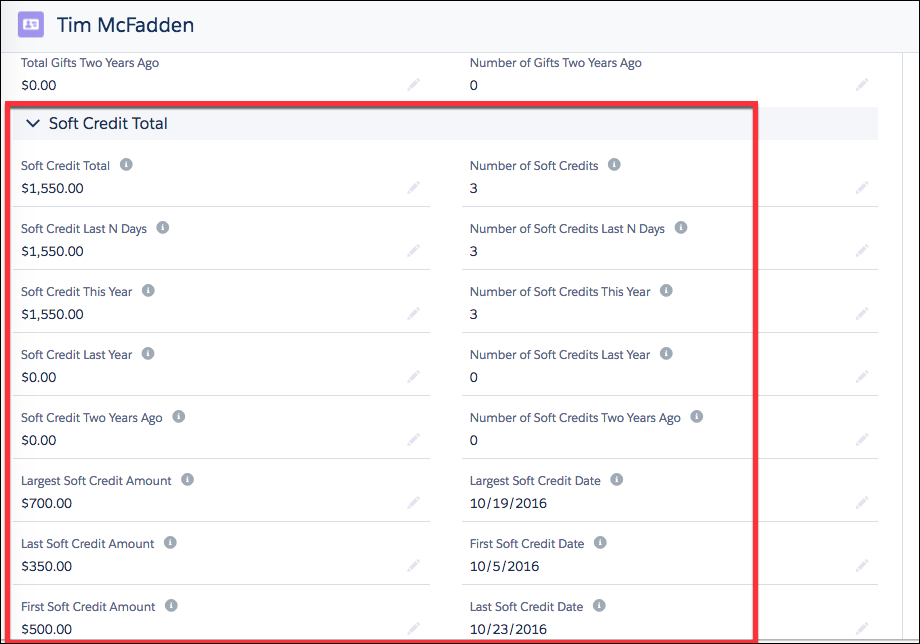
NPSP aggregates soft credit totals using rollup fields. You can find soft credit rollup fields in the Soft Credit Total section of a Contact record.
NPSP aggregates soft credit totals using rollup fields. There are many soft credit rollups for Contacts that come out-of-box in NPSP. If you're using Customizable Rollups, your administrator can add more soft credit rollups, including rollups that aggregate soft credits for all Contacts in a Household and roll them up to the Household Account. Learn more in Customizable Rollups Overview.
You can find soft credit rollup fields in the Soft Credit Total section of a Contact record.
A Word About the Nightly Batch
Nonprofit Success Pack calculates soft credit rollups in its nightly batch, so you won't see an immediate change to a Contact's soft credit rollup fields right after you assign them a soft credit Contact Role. If you want to see updates immediately, your administrator can manually recalculate rollups.
Learn more in Manually Recalculate Rollups.
