
You are here:
Update the Schedule of an Annual Recurring Donation
Learn how to update the schedule of an annual Recurring Donation when your donor asks to change their donation date.
The workflow for changing the schedule of an annual Recurring Donation is slightly different than for monthly Recurring Donations.
-
Change the Effective Date to the date of the following year.
-
Remove the extra installment by pausing it. NPSP removes the extra installment from the schedule, updates the open Opportunity to the new donation date, and updates the Next Donation Date field.
Let's look at an example.
It's the year 2020 and you have have a Recurring Donation that recurs every October 26th. After your donor makes their annual donation, they request that you change the recurring date to November 26th for the following year.
To change the date of an annual Recurring Donation:
-
Locate the Recurring Donation you wish to update.
-
Click Edit.
-
Change the Effective Date to Nov 26, 2021.
-
Click Save.
Now look at the Upcoming Installments. Notice that there's two installments in 2021.
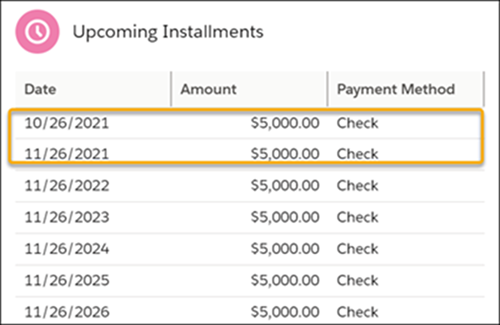
This happens because the new schedule doesn't take effect until Nov 2021, so there's still an Oct 2021 installment from the old schedule. Also notice that the Next Installment Date is 10/26/2021 and there are two schedules in the Active Schedules component.
Your donor probably doesn't want to pay an annual installment in October and then again in November of the same year, so you need to remove the extra installment by pausing it.
To pause the extra installment:When you pause the extra installment, NPSP does the following:
-
Locate the Recurring Donation you wish to update.
-
Click Pause.
-
Select the extra installment, in this case, the 10/26/2021 installment.
-
Select a Paused Reason.
-
Click Save.
-
Removes the extra installment from the schedule
-
Updates the Close Date on the open installment Opportunity to 11/26/2021
-
Updates the Next Installment Date to 11/26/2021
