
You are here:
Enable Public Access
Configure which users can access the fundseeker portal.
- Enable Public Access
After creating the fundseeker portal, decide how visible you want it to be to people who haven’t registered for an account or logged in. These are considered guest users.
Enable Public Access
After creating the fundseeker portal, decide how visible you want it to be to people who haven’t registered for an account or logged in. These are considered guest users.
For example, if you want guest users to see the home page and view Funding Programs without registering for an account, you can enable public access.
-
Click
 , then click Setup.
 -
Enter Digital Experiences in the Quick Find box, then click All Sites.
-
Click Builder next to your new portal.
-
If this is your first time in your fundseeker portal, click Continue to learn more about using Experience Builder. If you are ready to start configuring the template, close out of the Experience Builder introduction pop-up.
-
Click
 , then select Public from Page Access. This allows guest users to view the
Grantee Portal Home Page. When deselected, a guest user is required to register
and log in to view your portal.
, then select Public from Page Access. This allows guest users to view the
Grantee Portal Home Page. When deselected, a guest user is required to register
and log in to view your portal.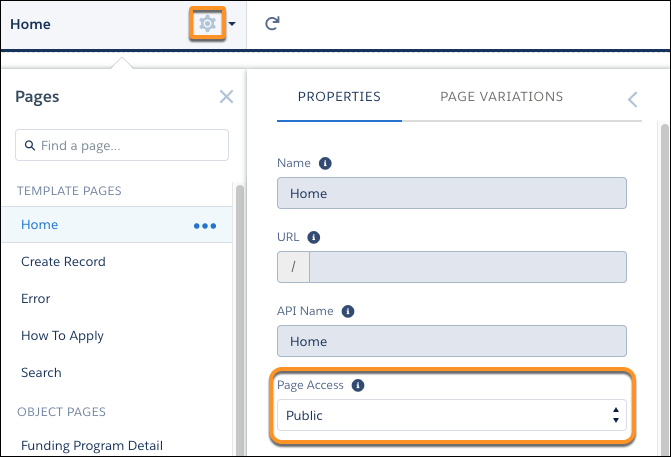
-
Click
 to open Settings.
 -
Select Public can access the site to allow users to view your site based on your guest user profile. This makes pages such as View Funding Programs accessible to guest users.
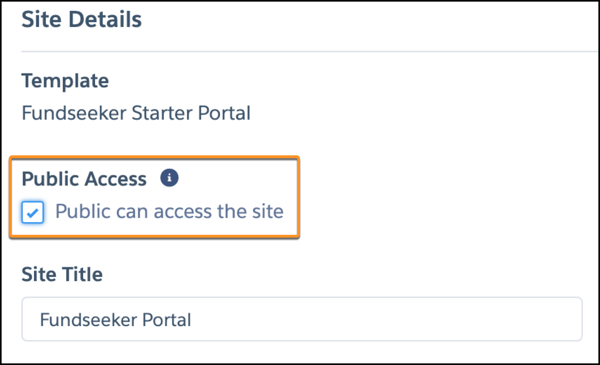
These settings enable guest users' access to your portal. You still need to ensure the appropriate organization-wide defaults and object and field level access are set for the guest user profile based on what you want the guest user to see.
