
You are here:
Manage Email Communications (Support Staff)
Learn how to send and track email using Student Success Hub.
- Learn About Sending and Tracking Email
Emailing students from Student Success Hub is a natural part of managing your student communications. Emails sent from Student Success Hub are text only. They can't include images or attachments. - Email Students from the Cases List View
Send an email to one or more students from the Cases list view.
Learn About Sending and Tracking Email
Emailing students from Student Success Hub is a natural part of managing your student communications. Emails sent from Student Success Hub are text only. They can't include images or attachments.
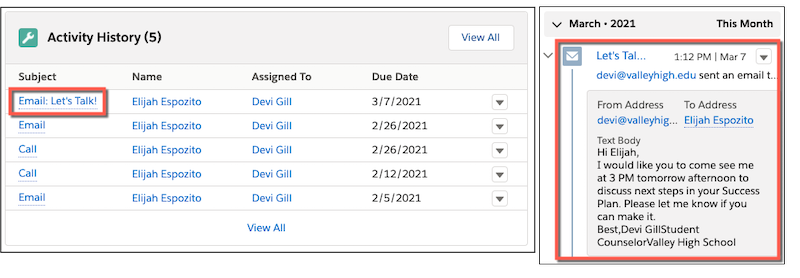
To let you easily refer back to communications, Student Success Hub tracks sent emails to students in two locations on the Case record:
-
In the Activity tab, in the Activity History related list
-
In the Activity feed component
Email Students from the Cases List View
Send an email to one or more students from the Cases list view.
- Select Cases from the app navigation menu and then select a list such as My Students.
-
Select the checkboxes next to the students that you want to email, and then click Email Students.
- Compose and send the email.
