You are here:
Website Integration—A Tag Team Event
Use Salesforce features and tools and streamline working with your web developer to integrate your website.
A lot of folks find website integration intimidating because it touches Visualforce, Apex, and other parts of Salesforce that involve code. While it's more involved than the installation and configuration you've done so far, you don't have to do it alone.
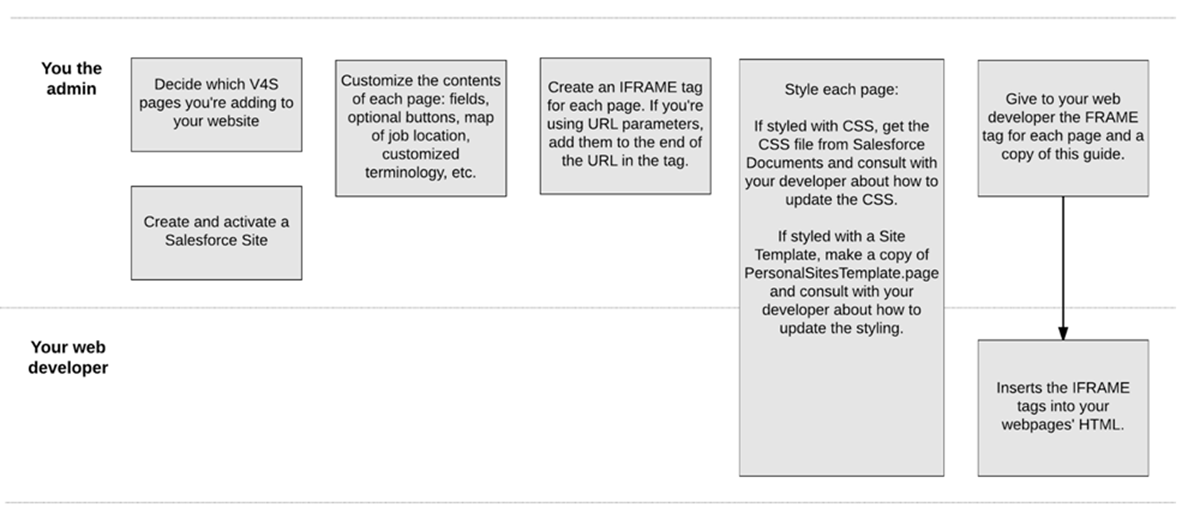
Website integration is a tag team event in which you and your web developer work together, in sequence. You lay the groundwork on the Salesforce side of things by using a Salesforce feature called Sites to create web pages that display the V4S data that you want to make public. The V4S Sites pages contain the content.
How then does the web developer embed the V4S pages into your public website? The answer, friends, is IFRAMEs. They're HTML tags, with each tag representing a page of Volunteers for Salesforce content. You give the IFRAME tags to your developer, who inserts them into the HTML of your organization's webpages—essentially creating a page within a page.
Here's how you and your web developer work together to make the pages go live on your website.