
You are here:
Manage Your Approvals in Slack (Beta)
Use the Salesforce for Slack app to centralize business notifications so that your users can approve or reject them in Slack.
Where: The Salesforce for Slack app is available as a beta service for sandboxes. The app works with Salesforce in Lightning Experience, available in Professional, Enterprise, Performance, Unlimited, and Developer Editions. Slack apps, tools, and services that have been approved and installed by your Slack workspace owner are available for use in Slack desktop, mobile, and web apps.

Who: Users must have the Connect Salesforce with Slack permission.
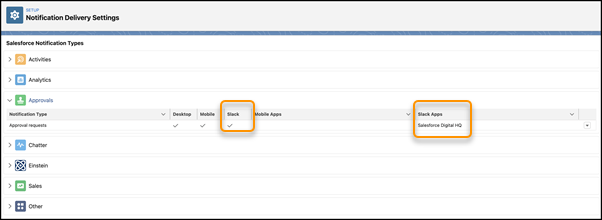
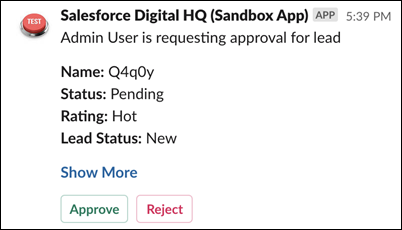
How: Authorize Salesforce for Slack and authenticate it to Salesforce. Then you can edit approvals in your Notification Delivery Settings to enable Slack. Create and activate an Approval Process and configure the approval page layout to include the fields that you want to be visible in the Slack notifications. Your users receive an approval request notification on Slack via the Salesforce for Slack app.
Your users review the request and click Approve or Reject or click Show More to be directed to the Salesforce app to view details.
Users can continue to receive email, Lightning Experience, and mobile notifications about approval requests.
