You are here:
How Legacy Partner Connect Exports, Imports, and Integrates Records Across Orgs
Learn about how Partner Connect lets vendors and partners work on shared leads and opportunities independently while still providing cross-org visibility into how each record is progressing.
| Available in Lightning Experience in Enterprise and Unlimited Editions with Sales or Service. Vendors must purchase a PRM add-on license for the partner admin user and each partner user who exports records. Partners aren’t required to purchase PRM licenses to use Legacy Partner Connect. |
Kicking Off Legacy Partner Connect Across Salesforce Orgs
To get started with Partner Connect, vendor and partner admins work together to set up the product. Admins securely connect their Salesforce orgs, agree on which lead and opportunity fields are integrated, and configure the user experience. When both orgs are ready to roll out the feature, vendor admins assign permission to only the partner users who they want to export records.
During setup, admins kick off an automated connection process in which Partner Connect deploys an external client app and a PRM External Integration User to both orgs. These services work together to securely transfer data during export and import. See Partner Connect Security.
Exporting and Importing Records
After setup is complete, partner users can log in to the vendor’s Experience Cloud partner site (1), select leads or opportunities of interest, and export the records to the partner’s own Salesforce org. If Partner Connect exports the records successfully from the vendor’s org (2), Partner Connect then attempts to import the records to the partner’s org (3).
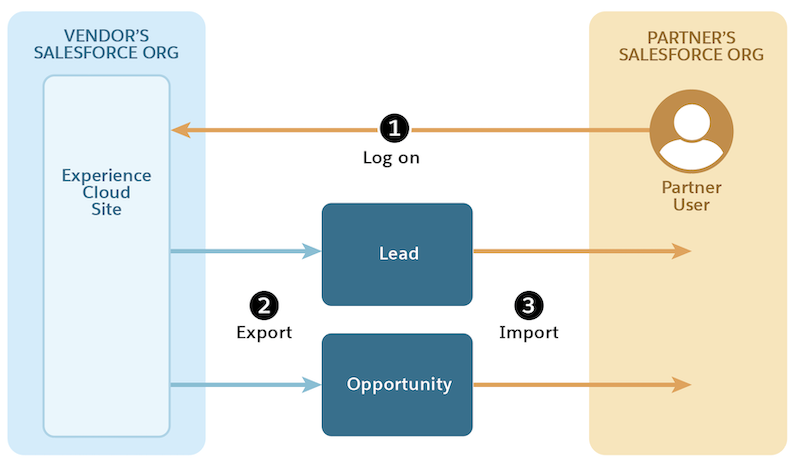
Because Partner Connect doesn’t override the vendor’s sharing settings, partner users can see only the records that vendors want them to see from the Experience Cloud site. Vendor and partner admins can further limit which objects and fields can be exported during Partner Connect setup.
For example, say a vendor admin makes a subset of their accounts, contacts, leads, and opportunities available from the partner site. Vendor and partner admins can then configure Partner Connect to let partner users export leads, opportunities, or both. If the vendor and partner agree to export opportunities only, they can further narrow what data is sent during the export by limiting the opportunity fields that they want to share. So if a vendor has 25 fields on their opportunity, but they want the partner to export the data for only 10 of those fields, the vendor admin proposes that selection during setup. During their own setup, the partner admin can further narrow what’s shared by agreeing to import only a subset of the vendor’s proposed 10 fields. So maybe in the end, only 6 or 7 fields are exported and imported.
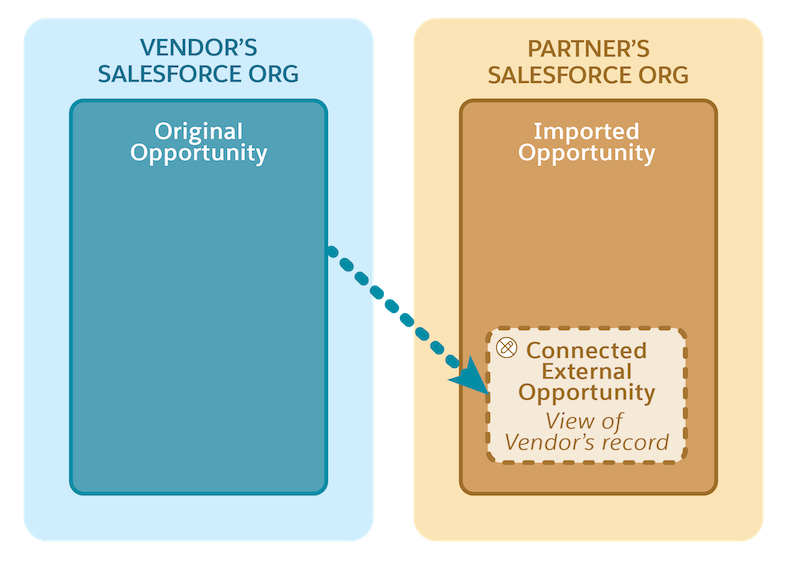
Upon import, a version of each exported vendor record is created in the partner’s org. Now, because a version of each exported record exists in each org, vendor users and partner users can update their own versions, so each version can evolve independently over time.
Sending Record Updates Across Salesforce Orgs
During setup, the vendor admin can also choose whether they want updates between the original vendor record and the new partner record to continue to flow between the two orgs. Doing so can provide vendor and partner users with a glimpse of how their peer’s record is progressing over time. In this way, both companies can track distinct data on shared business by saving unique sales stages, deal size, or deal outcome, and the other org can follow along efficiently.
Vendors can opt to send and receive updates on up to 10 fields for each object that they integrate with a partner. Because vendor admins can choose by field, the vendor has fine-tuned control over what data is exported one time versus what data is shared over time. As a result, the companies can be transparent about their mutual interests while maintaining data privacy where it’s required.
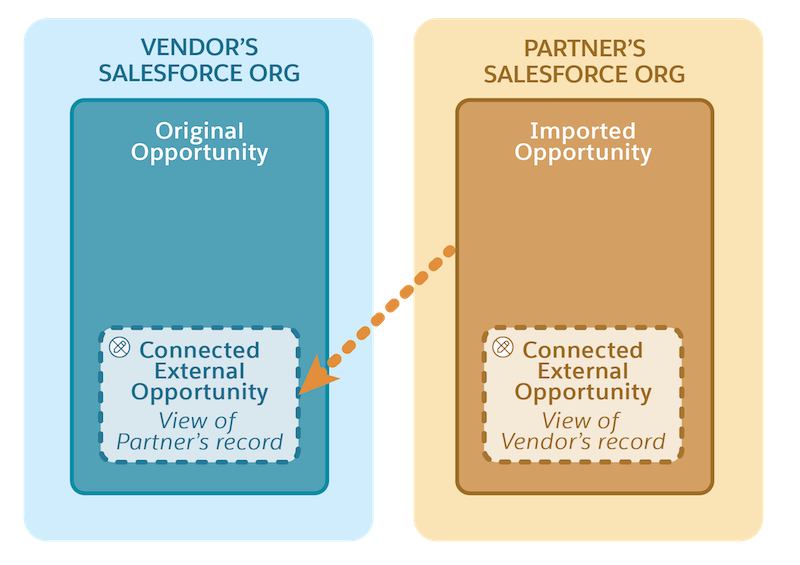
If vendors choose the option to send and receive updates between orgs, a read-only version of the record is also created on the Connected External Lead or Connected External Opportunity object. The original vendor record and the partner’s connected external record are mapped across orgs. Every time a vendor user updates a field that the vendor admin elected to send and receive updates for, that change is shown in the partner’s org on the corresponding connected external record.

After a partner user makes an update to a field for which updates are sent and received, a read-only version of the partner’s imported record is created in the vendor’s org. Every time a partner user updates a field on the imported record, that change is shown in the vendor’s org on the corresponding connected external record.
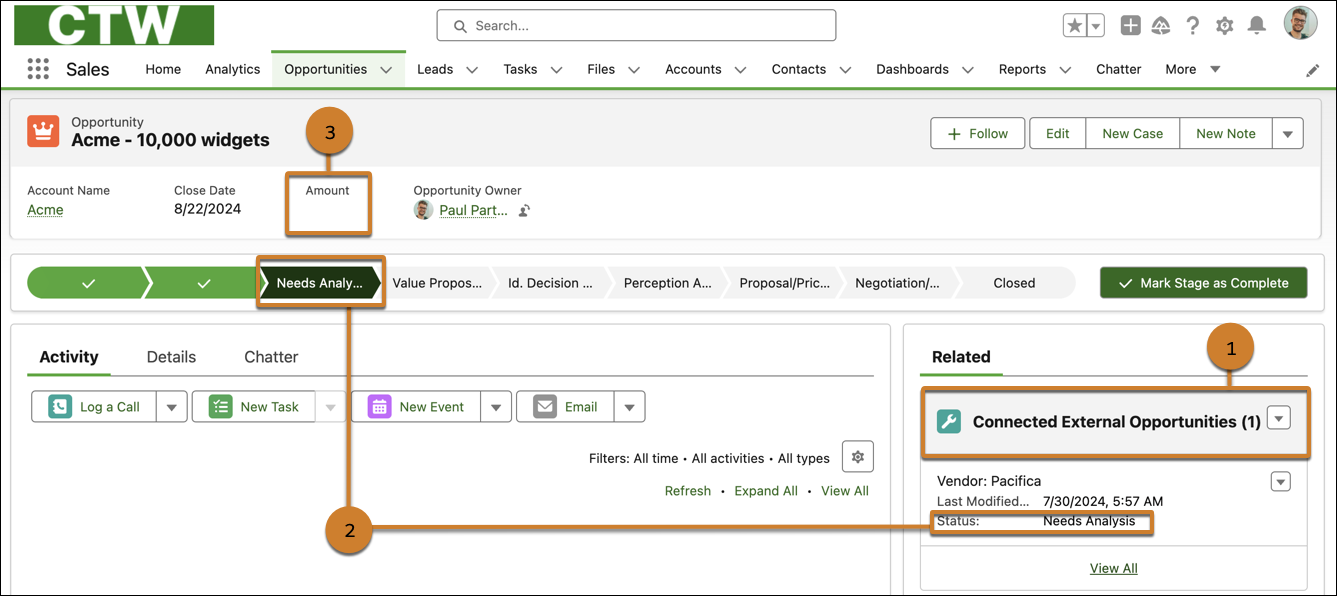
Salesforce admins can add the Connected External Leads and Connected External Opportunities related lists to their Lead and Opportunity records. Doing so lets users see the connected external lead and opportunity records that reflect the latest data saved in the peer’s system (1). In this example, the vendor and partner who shared this opportunity decided to integrate the fields that show their opportunity stages (2) but not the amounts of their opportunities (3).