
You are here:
Privacy Center: Satisfy Customer Requests and Data Privacy Laws
Honor customer requests on how their sensitive data is handled, and manage components of data privacy laws like the General Data Protection Regulation (GDPR). Use the Privacy Center app to create unique policies, manage requests, and monitor the status and results of scheduled jobs.
Required Editions
| Available in: Developer, Enterprise, Performance, and Unlimited Editions with the Privacy Center license. |
| User Permissions Needed | |
|---|---|
| To create and manage Privacy Center policies: | Modify All Data AND Manage Privacy Policies |
Use Privacy Center on the Salesforce platform, released in Winter ‘24. For the managed package version of Privacy Center that uses Heroku for retention, see Legacy Privacy Center: Satisfy Customer Requests and Data Privacy Laws.
The privacy Center was created to meet general privacy law requirements. But it’s also a solution for more specific regulations, like the GDPR. Privacy Center can directly assist with these GDPR principles.
- Data Access: An individual’s right to confirm with a data controller whether the organization is processing their personal data. If it is, the individual has the right to be informed about how and why that information is processed, and what other parties the information has been shared with.
- Restriction of Processing: An individual’s right to request that a controller stop accessing and modifying their personal data.
- Data Portability: An individual’s right to ask a controller to provide their personal data in a structured, commonly used, and machine-readable format. For example, the information can be transmitted to another company in a JSON file.
- Right to Erasure, or the Right to be Forgotten: An individual’s right to request that a data controller delete or remove their personal data. This right applies to situations when the data is no longer needed for the original purpose and when the data subject withdraws consent. Another situation is when the data subject requests to end the processing, and the controller has no overriding legitimate interest in the processing.
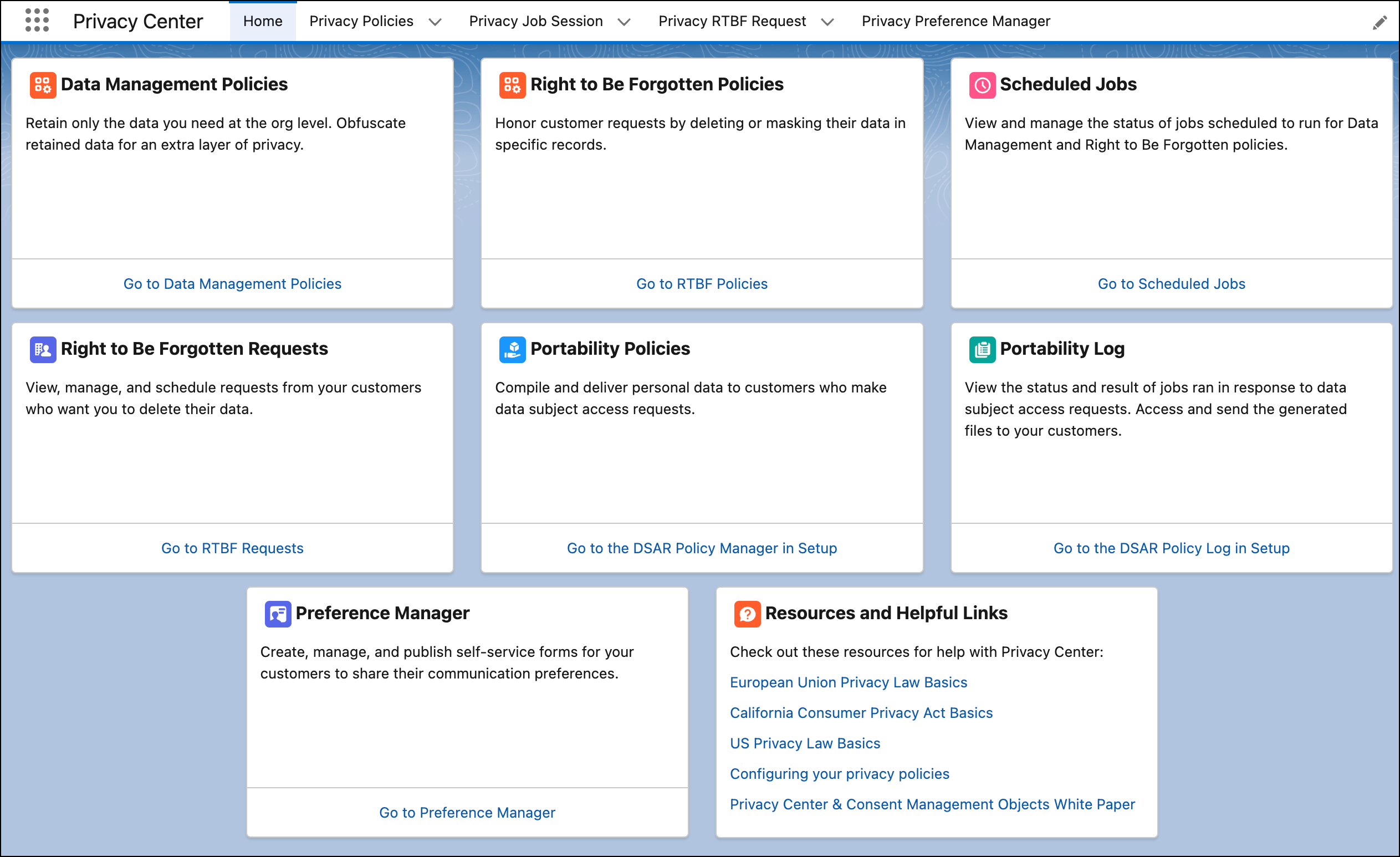
From the App Launcher, enter and select Privacy Center. Access every Privacy Center feature from the app home page, including links to resources on privacy laws.
- Grant Access to Privacy Center
You give users access to Privacy Center through user permissions. Users with the System Administrator profile have access to Salesforce Privacy Center by default. All other profiles require specific permissions. The specific permissions that you define for your users depend on user-access requirements and roles. Depending on your consent-management data model, some Privacy Center users can also require access to Salesforce consent data model objects or any custom objects that you use for consent management. - Privacy Center Considerations and Guidelines
Before using Privacy Center, review these topics. - Mask, Delete, or Retain Data with Data Management Policies
Data privacy laws such as the General Data Protection Regulation (GDPR) requires businesses to minimize the amount of personal data stored. For the data that businesses choose to store, they can be required to pseudo-anonymize or anonymize that data as much as possible. To stay compliant with privacy law, businesses can use the Data Management Policies feature in Privacy Center to automate how data is deleted, masked, or retained. - Delete Data with Right to Be Forgotten Policies
For data subjects who want their data to be erased or masked, create Right to Be Forgotten (RTBF) policies to run on individual customer records. Create policies that capture the objects you want to delete or make anonymous, then manually run the policy on a specific record at any time. - Delete Data with Privacy Requests
Fulfill Right to Be Forgotten (RTBF) requests from your customers using Privacy Requests. Find and delete relevant records in your Salesforce org and in Data 360. - Manage Privacy Request Settings
Configure the search criteria and scope of Privacy Requests. Control which objects are scanned in your Salesforce org and in Data 360 when users execute searches. - Share Data with Portability Policies
Fulfill customer requests to access their data. Create portability policies to compile relevant customer PII in various objects and fields. Or use the Portability API to compile the targeted PII for your customer programmatically. Use the Portability Log to view the history and status of customer requests. - Anonymize Inactive Users
With Data Management and Right to Be Forgotten (RTBF) policies, you can anonymize data for users who no longer access your org or Experience Cloud sites. Understand the unique functionality and limitations that apply when processing data on the User object. - Optimize Privacy Policy Performance
To optimize the performance of your Data Management and Right to Be Forgotten policies, customize your policy settings. - View and Manage Privacy Jobs
See details about the jobs for your Data Management and Right to Be Forgotten policies. You can also cancel, reschedule, or immediately run privacy jobs. - Export Policies Between Sandbox and Production
You can export privacy policies directly between your sandbox and production org. Use this feature to develop, test, and troubleshoot privacy policies while quickly converting them between your Salesforce environments. - Access Data in a Privacy Center Retention Store
To view records in a Privacy Center retention store, use the Salesforce Connect adapter for Privacy Center. - Use Privacy Hold to Preserve Records from Processing
For legal or business purposes, designate a record to be preserved from masking or deletion by Data Management policies in Privacy Center. - Privacy Center Implementation Guide
The implementation guide provides supplemental information on setting up and using Privacy Center.
See Also
- Data Deletion: Delete Personal Data
- Consent Management: Track Customer Consent and Honor Opt-Out Requests
- Restriction of Processing: Restrict How to Process Personal Data
- Data Access and Portability: Give Customers Their Data when They Want It
- Legacy Privacy Center: Satisfy Customer Requests and Data Privacy Laws
- Use Preference Manager to Gather Communication Preferences
- Policy Center: Control Data Security and Management Policies
- Data Export and Portability Across Salesforce
