
You are here:
How Are Rebate Payouts Calculated?
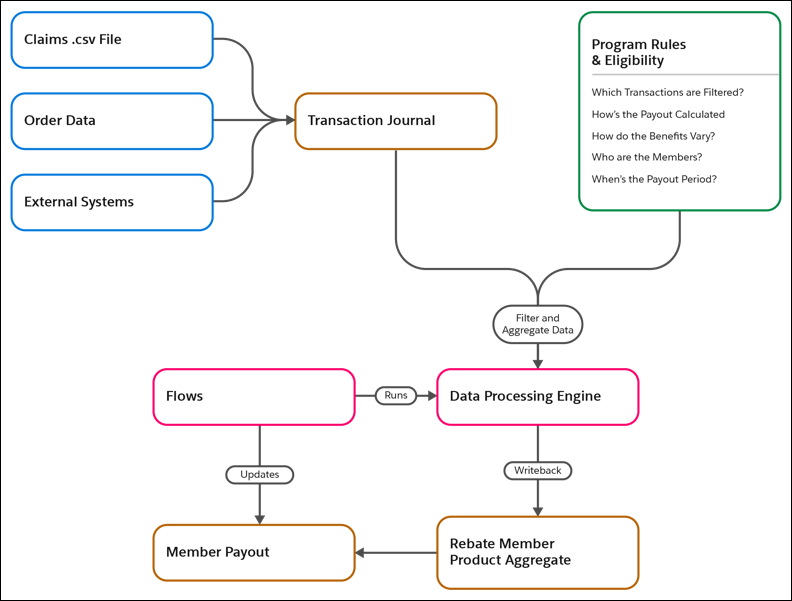
Review the necessary steps to calculate rebate payouts for the members in a rebate program. Transaction Journal records are used as the input for calculation, and the output is stored in Rebate Member Payout records.
Required Editions
| Available in: Enterprise, Unlimited, and Developer Editions that have Rebate Management enabled. |
Get Transaction Journal Records
Populate Transaction Journal records by bringing in data from claims, invoices, or order fulfillment data for partners. When enrolled as members in rebate programs, Rebate Management calculates payout amounts for partners by using the transaction records.
Program Rules and Eligibility
Create a rebate program, and add rebate types, benefit tiers, members, eligibility criteria, and benefit mapping criteria to it. Rebate Management filters, aggregates, and calculates the transactions of a member based on these parameters defined in a rebate program.
To calculate the final payout, Rebate Management uses these rules and parameters.
Which transactions are filtered?
Use rebate type filters to filter eligible transactions for calculation. For example, define the eligibility criteria to only include transactions of a certain product, product category, or minimum product list price.
How’s the payout calculated?
The rebate type definition specifies the calculation parameters. You can offer the rebate based on quantity, revenue, or the year-on-year growth in revenue or quantity. Similarly, the payout can be a percentage amount of the revenue, a fixed amount, or an amount per unit of the total quantity.
How do benefits vary?
The actual rebate amount varies between tiers. The higher the tier, the better the reward. For example, a volume-based rebate can have two tiers. If the transaction quantity is 200 units or fewer, the member gets a $2 rebate per unit. If the transaction quantity is more than 201 units, the member gets a $5 rebate per unit. With benefit mappings, you can add additional criteria for benefits to vary by region or product category.
Who are the qualifying members?
Rebate Management calculates rebates for all members enrolled in an active rebate program. You can create a program targeted for members of a specific region, country, or enrollment status. The member status must be active.
When are payouts settled?
Rebate Managements processes payouts for each payout period and finalizes payouts on the payout calculation date. The duration of a payout period depends on the frequency of the program (monthly, quarterly, and so on) and on the number of payout calculation days. All transactions recorded within a payout period are eligible for calculation.
Data Aggregation
The data processing engine definition associated with a rebate type drives the filter and aggregation rules for rebate calculations. It transforms thousands of transactions of a particular member for a particular period into a single row of aggregate data. The payout is paid on the final aggregate data, not on each transaction record.
Computation Flows
Although payouts are settled at the end of each period, the calculation is an ongoing process. All eligibility rules are applied to new transaction records. For a transaction journal record to be eligible for calculation, always ensure that its activity date falls between the start and end date of a payout period. Finally, the data processing engine aggregates data based on how the definition is customized. The rebate orchestration flow runs at regular intervals to process the data with data processing engine jobs, and refreshes the member payout records with the most current information.
Scheduled Payouts
When the payout calculation date arrives for a period, the payout status is set to Calculated, and the payout period is set to Closed. No further updates are made to payouts for that period. The finance team can then settle payouts using checks or credit notes.
