
About Timesheets and Labor Cost Optimization
Enable mobile workers to input and manage their time, even when they are offline. Enable supervisors, time clerks, and crew leads to bulk edit and approve timesheets. Drive compliance with labor laws and union rules, flag non-compliant timesheet entries and automate meal allocations with Business Rules Engine. Gain insights into operations and costs with a unified view using data from Enterprise Resource Planning systems, fleet management systems, labor union rules, and projects.
Required Editions
| Available in: Lightning Experience |
| Available in: All editions of Field Service Plus for Energy & Utilities, and all editions of Asset Service Lifecycle Management |
Timesheets and Labor Cost Optimization is available as an app for mobile workers in the Field Service Mobile App. The supervisor and crew lead experiences are available in the Salesforce desktop experience.
To use Timesheets and Labor Cost Optimization, you must have the Field Service Mobile app set up. See Set Up Field Service.
Data Model
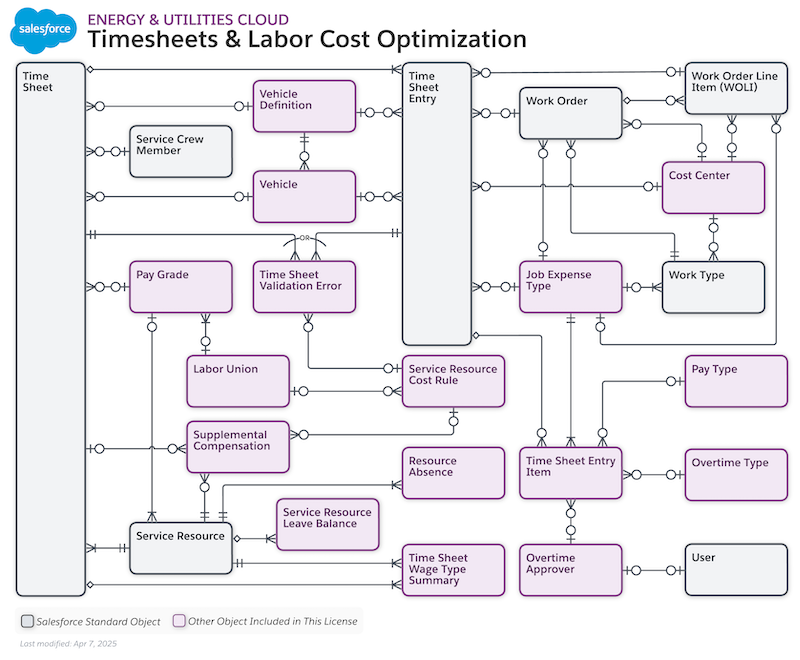
The Timesheets and Labor Cost Optimization datamodel uses the following objects:
- Vehicle Definition
- Vehicle
- Time Sheet (For extended attributes, see Timesheet)
- Time Sheet Entry (For extended attributes, see TimeSheetEntry)
- Time Sheet Entry Item
- Time Sheet Wage Type Summary
- Time Sheet Validation Error
- Work Type
- Work Order
- Work Order Line Item (For extended attributes, see WorkOrderLineItem)
- Service Crew Member
- Service Resource (For extended attributes, see ServiceResource)
- Service Resource Cost Rule
- Cost Center
- Job Expense Type
- Overtime Type
- Overtime Approver
- Pay Type
- Pay Grade
- Supplemental Compensation
- Labor Union
- User
Components in Timesheets and Labor Cost Optimization
Timesheets and Labor Cost Optimization uses easily configurable components available with the Salesforce platform.
For details of the components used in the app, see the Timesheets and Labor Cost Optimization - Bill of Materials.
-
Lightning Web Components
 Note The Lightning Web Components (LWCs) listed in the bill of material are not editable. To know more about creating your own LWCs, see Lightning Web Components Developer Guide.
- Recommendations for Objects
When setting up Timesheets and Labor Cost Optimization objects, understand their purpose and the best practices. - Object Access Levels with User Permissions
Set the access of objects based on the roles of technicians, supervisors, and admins with permission sets for Timesheets and Labor Cost Optimization. - Categorizing Technician Time with Time Sheet Entry Records
The Time Sheet Entry records represent the time that a technician spends on a field service task. To ensure compliance with labor laws, use the Time Sheet Entry record to categorize the time your technician has spent on different tasks in a shift. - Summary View Enhancements with Pay Cycle Filtering
Service Resources and crew leads can now filter the summary view by This Week, Last Week, Current Pay Period or , or Previous Pay Period or Cycle in addition to the existing custom date range option. The backend logic relies on the service resource's assigned Pay Group to determine pay period boundaries. Aggregated totals for regular time, time and a half, and double time update based on the selected filter. Additionally, meal counts and shift differential hours are now displayed in the aggregated summary. - Idle Time Entry Creation
Administrators can configure the automatic time rounding feature to create idle time entries instead of closing gaps between consecutive timesheet entries. When enabled, gaps within the configured threshold generate a new idle time entry rather than extending the previous entry. This capability is useful for tracking breaks or transition time between tasks. The Time Gap Threshold accepts values from 0 to 480 minutes (8 hours), with validation to prevent excessively high values. - Mobile Crew Time Management
Introduces the Enable Crew Management toggle in the Advanced Timesheets and Labor Cost Optimization Settings. When enabled, crew leads can manage crews member’s timesheets in his Mobile App. The crew lead’s mobile timesheets landing screen allows the crew lead to create, edit and manage each service resources’ time including timesheets, timesheet entry, timesheet items and wage type summaries The crew lead may create time for their crewmembers in bulk as well as individually all in their Salesforce Field Service mobile app. A dedicated experience for the crew lead, designed and agitated by crew members. IsLead, is available by turning on the org preference controls in Set Up for the crew lead functionality. - Rejected Timesheet Resubmission and Pull-Down Refresh
Service Resources can now edit and resubmit rejected timesheets as if they were in the Verified state, eliminating the need to create new timesheet records after rejection. Pull-down refresh is implemented across the Timesheet History, Timesheet Details, Work Order, Meals and Gifts, and Time Off pages, providing a consistent mobile experience for viewing updated data. - Pay Period Date Validation
Pay Period is used in the mobile app so that the Service Resource may see their total hours over a day, week and over their personal pay period. Pay period records now include enhanced date validation that prevents saving records where the end date is before the start date. The validation message guides users to select an end date that is on or after the start date, ensuring data integrity in pay period configuration.
