
You are here:
Explore Objects
Object home pages show information for your Salesforce objects, like a list of your accounts.
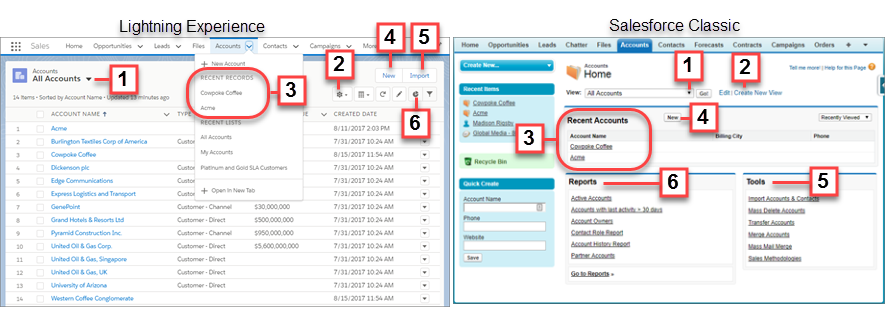
Let’s walk through what you see on the Accounts object home page. From the App Launcher, find and open Sales, and then click Accounts.
The navigation model in Lightning Experience is optimized for efficiency with actions in the navigation bar. However, both Salesforce Classic and Lightning Experience provide similar functionality on object pages:
- A dropdown menu (1) for list views related to Accounts. You can also create list views and edit existing ones (2).
- Recent account records (3). You can also click New (4) to create an account record.
- Tools to import and manage records (5).
- Ways to visualize data with reports and charts (6).
Did this article solve your issue?
Let us know so we can improve!
