Use extensions to add productivity tools to the content editor in an enhanced CMS
workspace. Streamline your content workflow with generative AI tools, spell checkers, and
translation services. Developers can build extensions for specific CMS content
types.
Required Editions
Available in: Lightning Experience
Available in: Enterprise, Performance, Unlimited, and
Developer Editions
User Permissions
Needed
To create, edit, or clone content:
Any CMS workspace contributor role
To publish or unpublish content:
A CMS workspace contributor role of content admin or content manager
To tag or untag content:
View Content Taxonomy
AND
any CMS workspace contributor
role
Developers who can create and deploy Lightning web components can build extensions and add
them to the CMS content editor. To learn how to build an extension, see Extensions in CMS. Salesforce partners can create
extensions and share them on AppExchange.
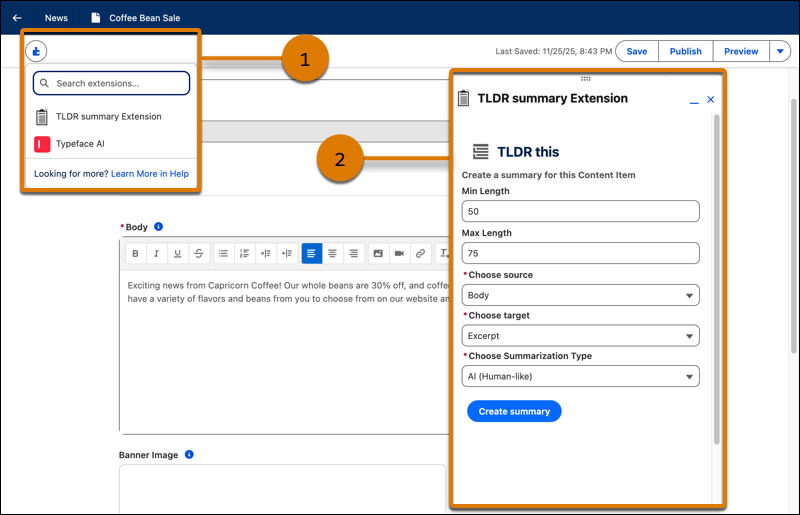
To use an extension in the content editor, find the extensions button in the top left of
the content editor. Content creators can move the floating extension panel around the editor
as they work. Extensions have read and write access to content item properties, so content
creators can see updates in the draft as they work.
In Lightning Experience, from the App Launcher, open the Digital Experiences app.
Open an enhanced CMS workspace, and then open a content item from the workspace.
Click Edit.
In the CMS content editor, click , and then select the extension that you want to use (1).
Only installed extensions that are compatible with the content type that you're
editing appear in the extensions menu.
Complete the task in the extension and apply any changes to your content (2).
We use three kinds of cookies on our websites: required, functional, and advertising. You can choose whether functional and advertising cookies apply. Click on the different cookie categories to find out more about each category and to change the default settings.
Privacy Statement
Required Cookies
Always Active
Required cookies are necessary for basic website functionality. Some examples include: session cookies needed to transmit the website, authentication cookies, and security cookies.
Functional Cookies
Functional cookies enhance functions, performance, and services on the website. Some examples include: cookies used to analyze site traffic, cookies used for market research, and cookies used to display advertising that is not directed to a particular individual.
Advertising Cookies
Advertising cookies track activity across websites in order to understand a viewer’s interests, and direct them specific marketing. Some examples include: cookies used for remarketing, or interest-based advertising.