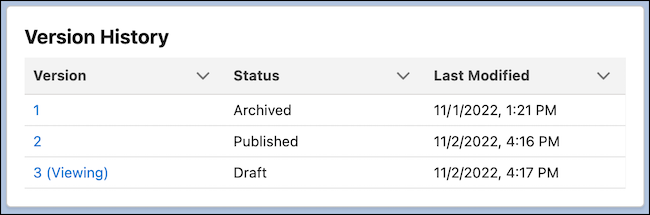
On the content detail page, the Version History list shows all versions of a content
item, its status, and the date and time it was last modified.
Required Editions
Available in: Lightning Experience
Available in: Enterprise, Performance, Unlimited, and
Developer Editions
Version history gives you a point-in-time snapshot of your content, so you can compare versions
and see the date and time they were published. Version History works a bit differently between a
CMS workspace and an enhanced CMS workspace.
Content Version History in a CMS Workspace
The version currently open in
your content preview window is labeled Viewing. Your content can have a status of Draft, Staged,
Published, or Archived.
Draft: Content that hasn’t been published or scheduled for publication
Staged: Content that’s scheduled to publish or unpublish
Published: Content that’s published and available for use in your live sites
Archived: Previously published versions of content that has been unpublished and is no
longer available on your sites
One draft or published version exists at a time, but you can have many archived
versions. To view an iteration of the content, click the version number. Depending on its
status, you can review, copy, edit, publish, or unpublish the content.
To update your view
of the versions, select Refresh Tab in the tab menu.
We use three kinds of cookies on our websites: required, functional, and advertising. You can choose whether functional and advertising cookies apply. Click on the different cookie categories to find out more about each category and to change the default settings.
Privacy Statement
Required Cookies
Always Active
Required cookies are necessary for basic website functionality. Some examples include: session cookies needed to transmit the website, authentication cookies, and security cookies.
Functional Cookies
Functional cookies enhance functions, performance, and services on the website. Some examples include: cookies used to analyze site traffic, cookies used for market research, and cookies used to display advertising that is not directed to a particular individual.
Advertising Cookies
Advertising cookies track activity across websites in order to understand a viewer’s interests, and direct them specific marketing. Some examples include: cookies used for remarketing, or interest-based advertising.