
You are here:
Design Considerations
To take full advantage of the Salesforce Consent Data Model, keep these design considerations in mind. They’re designed to help you access and interpret privacy preferences. They also help you create a durable design that can accommodate changes to consent-related business needs and regulatory requirements.
Prerequisites for Successful Consent Activation
To ensure that consent preferences map to the correct contact, prepare your contact records and duplicate management settings.
Align Contact Records to a Single Contact Point
Cross-cloud data strategy best practice dictates using the Contact ID as the primary key for subscribers in Marketing Cloud Engagement. Take special care when pulling in contact record information that includes more than one contact point for a given channel. For example, if you have two different email addresses on a single contact record, the Subscriber Key is the same in Engagement for each of those email addresses.
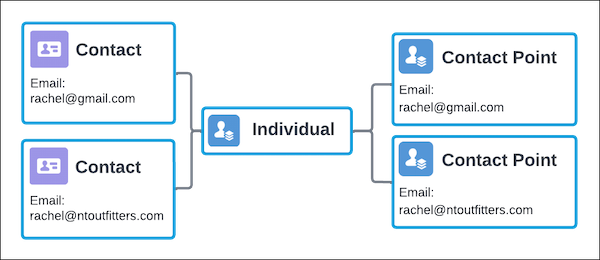
If each contact record doesn’t align to a single contact point for a given channel, such as an email or phone channel, Engagement can activate the wrong contact point.
To mitigate this risk, ensure that only one contact point per channel exists on a given contact. Similarly, you need a separate contact, and associated Contact ID, for each Engagement business unit where consent is independently managed.
Configure Duplicate Management
Managed duplicates can create additional risk when managing consent. This risk is particularly evident when API processes depend on email address as an input and have more than one consent record for a single email address.
To mitigate this risk, a strong duplicate management process ensures that consent discrepancies are accounted for. Use segmenting attributes to resolve which consent records are associated with a given subscriber. For example, exclude duplicates that you don’t want activated, and set up processes that flag discrepancies so that you can correct them before activation.
Consent with Multiple Brands
Brand is a critical component for many customers when it comes to managing consent data. When more than one Brand operates within a single org, privacy preferences can vary for different brands.
Marketing Cloud Connect requires the use of Contact ID as the Subscriber Key. To tie the Contact Point Consent to the appropriate subscriber, a relationship between Brand and the originating Contact must be established. This connection isn’t native. It must be established as an attribute on the contact before you can filter on brands in Engagement.

Consent Signals from Different Levels
Consent can be managed at multiple levels. Take care to ensure that all opt-in and opt-out signals are respected, regardless of which level manages them.
You can configure global consent settings to cascade down, updating dependent Engagement Channel and contact point consent records. Or you can configure them be pulled into Engagement as a top-level consent check before activation.
Similarly, engagement channel consent records can cascade down to update dependent contact point consent records. Or you can pull them into Engagement as a top-level consent check before activation.
Build Consent Management Around Data Use Purpose
If you only want to manage consent at a global level, create a single data use purpose record. It establishes consent management using the full data model and can ensure that the DataUsePurpose object is included in any dependent evaluation criteria required in the future.
In this way, if regulatory requirements evolve to demand finer distinctions between the different reasons for communication, you can implement additional data use purpose records as needed.
Authenticated vs. Unauthenticated Experiences
Subscribers can interact with subscription preferences in multiple ways, including through an authenticated or unauthenticated experience.
The need for an unauthenticated experience is nearly universal. Most organizations want to be able to present subscribers a way to unsubscribe from the communication they receive through a link present on the email. Links must be updated to include all relevant information required, such as tokens. Links then process an unsubscribe request and directly update the Salesforce Consent Data Model. For more information, see Create a Custom Profile Center with AMPscript.
An authenticated experience can be preferable for users within Experience Cloud. Unauthenticated experiences can provide a complete view of a user’s privacy preferences and help them select choices without responding to a particular communication. If an experience page is used with Privacy Center, a Lightning Web Component is included that can be used to facilitate the preference form.
Address Provider Feedback Loop Updates to Engagement via Reply Mail Management
When a subscriber receives an email message, they can unsubscribe without following the unsubscribe link provided in the message. Instead, they can:
- Send a reply email with the word “unsubscribe.”
- Flag the email as spam or junk in the email provider.
- Use an application unsubscribe feature, such as Apple Mail or Gmail, where the provider prompts the user to unsubscribe from an identified mailing list.
In these cases, the unsubscribe request is sent directly to Engagement and bypasses the Salesforce Consent Data Model. These unsubscribe events are captured in Engagement and honored. However, it’s important that consent information is consistent between all systems to ensure that any other dependent processes referencing the Salesforce Consent Data Model have the most timely consent data.
It’s critical to monitor Engagement for these types of unsubscribe events and return that information to the Salesforce Consent Data Model. This solution kit includes a two-step approach:
- Daily updates: Salesforce recommends using a flow to initiate an API call to Engagement and pull back unsubscribe events from the previous day. Flows provide greater flexibility in making updates, and a developer-minded advanced administrator can manage this process.
- Weekly updates: Salesforce recommends a weekly refresh that looks at all subscribers with an unsubscribed status. This step is to ensure that timing delays in unsubscribe event processing don’t result in missed unsubscribe requests being identified and captured in the Salesforce Consent Data Model.
The Future of Consent Management at Salesforce
This solution kit is focused on connecting consent and Engagement in a single org environment. But Salesforce is actively working on a number of enhancements that further evolve the way consent can be managed in a multi-org and cross-cloud environment.
Follow the Privacy Center product site for the latest on consent management.
Related Content

|
Review earlier steps in this solution. |

|
Take the next steps in this implementation. |
