
You are here:
Workflow
Learn how data flows through the configurations when you create a custom preference center.
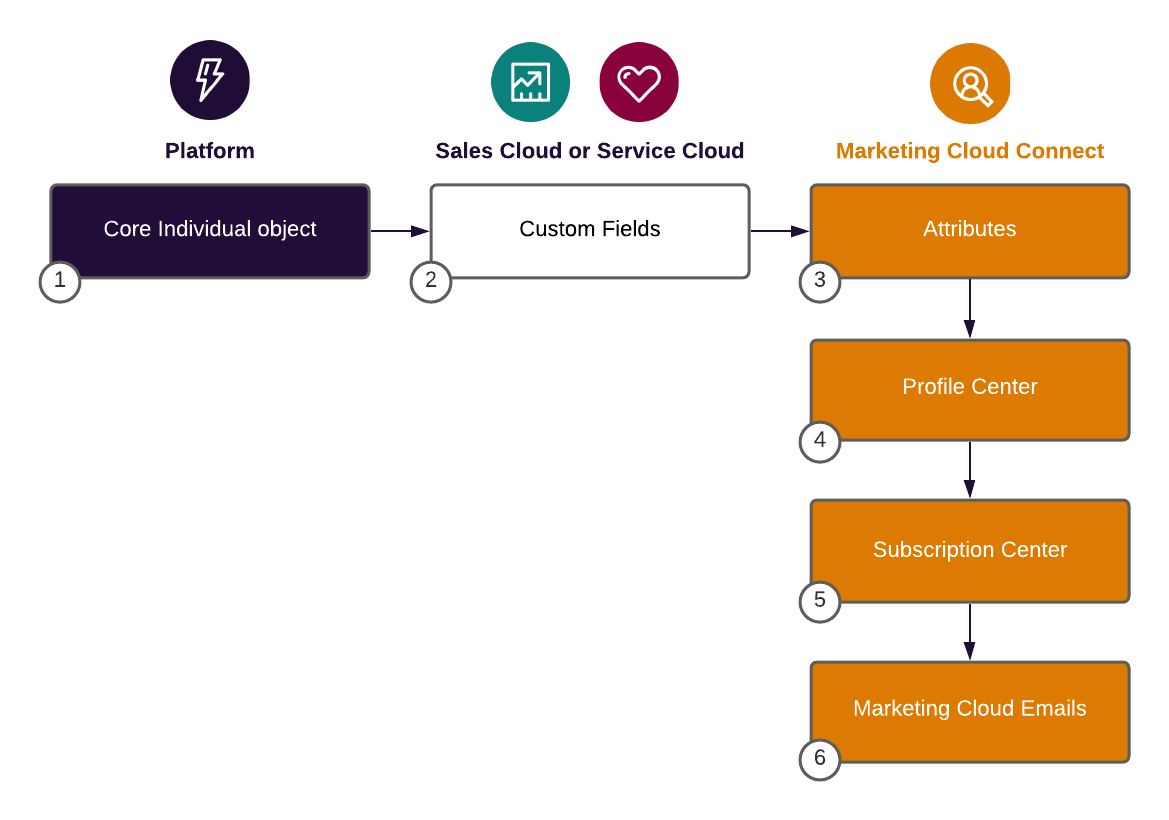
This diagram illustrates the workflow for creating a custom preference center.
- Store data privacy options for leads, contacts, person accounts, and users in the Core Individual object. (1)
- Create custom fields in the Sales or Service Cloud objects. For synchronization purposes, create a record trigger flow (after update) to update Individual objects, or vice versa. (2)
- Map the custom fields to Marketing Cloud Engagement attributes for use in the Profile Center. (3)
- Use the Profile Center webpage with Marketing Cloud Connect. Your subscribers can enter and maintain their personal information that you store. (4)
- Use the Subscription Center web page. Your subscribers can manage the messages that they receive from you. (5)
- Include a link to the Profile Center in every Engagement email to a Salesforce contact, lead, report, or campaign so that customers can manage their attributes and subscription preferences. These changes update Salesforce contact and lead data. (6)
Related Content

|
Take the next steps in this implementation. |
Did this article solve your issue?
Let us know so we can improve!
