
You are here:
Create a Data Stream for the Communication Subscription Consent Object
Map the fields of the Communication Subscription Consent object that you want to ingest into Data 360.
Required Editions
| Available in: Developer, Enterprise, Performance, and Unlimited Editions. Requires the Salesforce Privacy Center license. |
| User Permissions Needed | |
|---|---|
| To use Preference Manager: | Use Preference Manager |
To ingest into Data 360 information about the Communication Subscription Consent object from your Salesforce CRM system, you map the fields that you want to ingest to the Communication Subscription Consent data model object.
- In Data 360, click Data Streams, and then click CommSubscriptionConsent_Home.
-
On the Data Stream detail page for CommSubscriptionConsent_Home, under Data Mapping,
click Start.
The Data 360 field mapping canvas opens.
- Under Data Model Entities, click Select Objects, and then select Communication Subscription Consent.
-
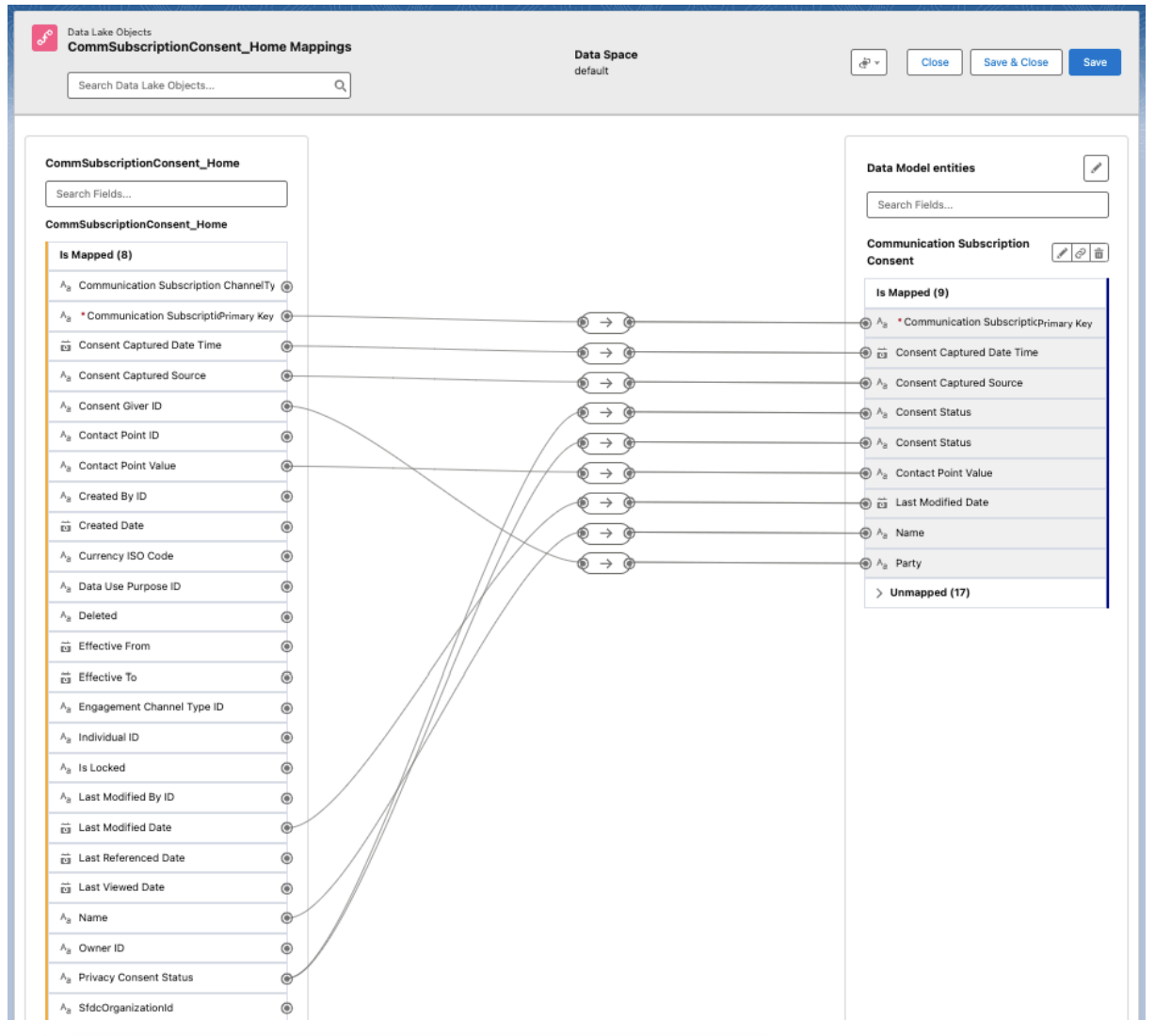
Map the fields.
Some data model object fields might already be mapped to the data lake object fields. Review the existing mappings and map any other fields required for your data stream. At minimum, you must map these fields.
- Communication Subscription Primary Key to Communication Subscription Primary Key
- Name to Name
- Contact Point Value to Contact Point Value
- Privacy Consent Status with the API name ssot__ConsentStatus__c to Consent Status (There is more than one data lake object field for Consent Status. If you aren’t streaming Privacy Consent Status from a source that requires a separate Consent Status Id to be mapped, you can map Privacy Consent Status to both Consent Status DMO fields, for simplicity).
 Note To use Data Governance features, grant permissions to the listed objects according to Assign Data Access. If you have more than one data space, you must grant access to objects in each data space. Object names in non default data spaces follow the convention of <DataSpace Prefix>_<Object Name>.
 - Save your work.
Did this article solve your issue?
Let us know so we can improve!
