Update Your Auth Provider or OpenID Connect IdP Configuration After a Login URL Change
After you deploy a My Domain change that updates your My Domain or site login URL,
OpenID Connect single sign-on (SSO) authentication stops working. OpenID Connect SSO options
include Authentication Providers. To allow your users to use this SSO method again, work with your
identity provider (IdP) to update your configuration.
Required Editions
Available in: both Salesforce Classic and
Lightning Experience
Available in: Group, Essentials, Professional, Enterprise,
Performance, Unlimited, and Developer Editions
Important Before you deploy a change that updates your login URL or you update your
authentication settings, make sure that you can access Salesforce after the change. Double-check
that at least one admin can log in without authentication features such as SSO, built-in
authenticators, or security keys. For more information, see Preserve Login Access During a My Domain Login URL Change.
After you deploy the change that updates your My Domain login URL, work with your identity
provider to update your IdP configuration with the new authentication values.
These steps also apply after your Experience Cloud site URL or Salesforce Site URL changes,
but only if you use the system-managed site URL to authenticate. System-managed site URLs end in
*.my.site.com for Experience Cloud sites and
*.my.salesforce-sites.com for Salesforce Sites. If you authenticate via a
custom domain, such as https://www.example.com, that serves your Experience
Cloud site or Salesforce Site, then your SSO configuration isn’t affected.
In the Quick Find box, enter Auth. Providers, and then select
Auth. Providers.
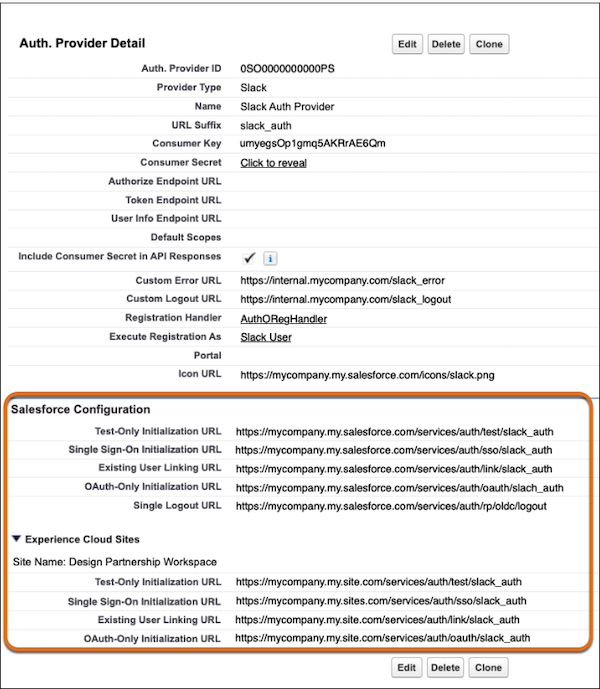
View the details for each Auth. Provider record.
The updated values are shown in the Salesforce Configuration section.
Share the values in these fields with your identity provider.
Test-Only Initialization URL
Single Sign-On Initialization URL
Existing User Linking URL
OAuth-Only Initialization URL
Callback URL
Note Some identity provider configurations don’t use every field.
After your identity provider updates the settings, verify your updated endpoints with the
/.well-known/auth-configuration URL path.
For example, if your login URL is
https://mycompany.my.salesforce.com, visit
https://mycompany.my.salesforce.com/.well-known/auth-configuration.
Note If
your identity provider updated the values but the changes aren’t reflected in Salesforce,
disable the authentication provider in the Authentication Configuration section of the My
Domain screen, then enable it again. For more information, see Add Identity Providers to the My Domain Login Page.
Before you test your new authentication configuration, verify that the value in the
Authentication Service field on the My Domain Setup page matches the authentication service
record.
If needed, edit your Authentication Configuration settings on the My Domain Setup
page. Then in the Authentication Service field, select the correct
record and save your changes.
Verify the authentication method from your login page. If necessary, add authentication
providers to your login page again.
We use three kinds of cookies on our websites: required, functional, and advertising. You can choose whether functional and advertising cookies apply. Click on the different cookie categories to find out more about each category and to change the default settings.
Privacy Statement
Required Cookies
Always Active
Required cookies are necessary for basic website functionality. Some examples include: session cookies needed to transmit the website, authentication cookies, and security cookies.
Functional Cookies
Functional cookies enhance functions, performance, and services on the website. Some examples include: cookies used to analyze site traffic, cookies used for market research, and cookies used to display advertising that is not directed to a particular individual.
Advertising Cookies
Advertising cookies track activity across websites in order to understand a viewer’s interests, and direct them specific marketing. Some examples include: cookies used for remarketing, or interest-based advertising.