
Log My Domain Host Name Redirections
To reduce disruption, Salesforce redirects multiple host names automatically when you deploy a change to your My Domain. To track blocked and successful redirections for your My Domain host names, enable event logging for these redirections.
Required Editions
| Available in: both Salesforce Classic and Lightning Experience |
| Available in: Group, Essentials, Professional, Enterprise, Performance, Unlimited, and Developer Editions |
| User Permissions Needed | |
|---|---|
| To edit My Domain settings: | Customize Application |
| To access and download event log files: | View All Data OR View Event Log Files AND API Enabled |

- From Setup, in the Quick Find box, enter My Domain, and then select My Domain.
- In the Redirections section, click Edit.
- Select Log redirections and save your changes.
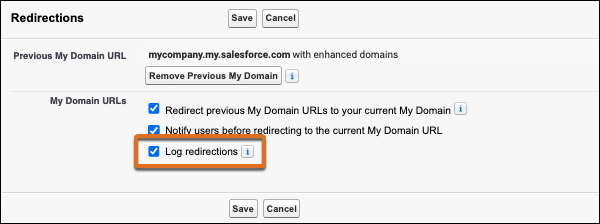
After you save your changes, Salesforce produces a log for the Hostname Redirects event type in the next daily run. Salesforce uploads event log files after they’re generated. Most dataset uploads finish around the same time each day. Exact finish times vary depending on dataset size and content.
You can also download the latest incremental daily Hostname Redirects log by clicking Download Redirections Log from the My Domain Setup page.
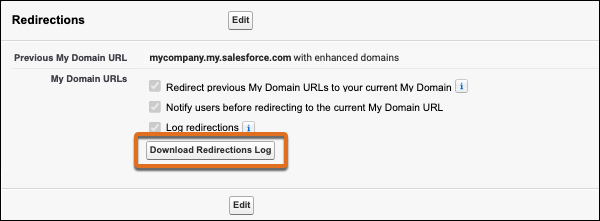
The log file includes a summary of blocked and successful redirections for your previous My Domain host names. It contains that information for the last 24 hours at the time that the background process generates the file. After you enable this feature, the next log file includes only the redirections that occurred after you enabled redirection logging.
If your last My Domain change included enabling and deploying enhanced domains, the log includes blocked and successful redirections of the old host names listed on Prepare for the End of Redirections for Non-Enhanced Domains.
Even though Salesforce no longer redirects those legacy (non-enhanced) host names, the
Hostname Redirects event type still captures blocked attempts to access the host names. For
these events, the REDIRECT_REASON is Redirection was blocked
because redirections for the legacy SOURCE_HOSTNAME are no longer supported.
Only one hostname redirects log file is available at a time. When the daily incremental event log file is generated during the daily background process, the new file replaces the existing file. When you download the redirections log from the My Domain Setup page, you get the latest daily log file in CSV format.
If the log file doesn’t exist, either the log generation process hasn’t run yet or there’s no redirection data to report for that 24-hour window. The log file is generated only when at least one redirection occurred for the day.
For example, if https://MyCompany.my.site.com/shop is redirected at 02:01 PM and https://MyCompany.my.site.com/shop?q=sneakers is redirected for another user at 02:02 PM, only the redirection that occurred at 02:01 PM is captured for MyCompany.my.site.com/shop for that hour. But if https://MyCompany.my.site.com/help is redirected at 2:05 PM, that redirection is captured on a new line because the MyCompany.my.site.com/help host name and path combination differs from MyCompany.my.site.com/shop.
Similarly, if the redirection of https://MyCompany.my.site.com/contactUs is blocked at 07:02 AM and https://MyCompany.my.site.com/contactUs is redirected at 07:11 AM, only the blocked redirection for MyCompany.my.site.com/contactUs is captured in the log for that hour.
To help you identify the locations where your URL is used, the log includes the referrer and origin sent in the corresponding HTTP headers with each request that Salesforce redirects. The requester controls the values passed in these HTTP Headers, so fields can contain a null value. For details about this behavior and about other fields within the log file, see Hostname Redirects in the Object Reference for the Salesforce Platform.
To collect host name redirection logs for multiple days, schedule a daily query of the Hostname Redirects event type via REST API. For example, you can configure a cron job in Unix or a scheduled task in Windows to run the query.
