
Manage My Domain Redirections
Control whether to redirect users who visit your previous My Domain URLs to the current My Domain URL. To help your users adopt the new URLs after a My Domain change, optionally turn on a brief message during My Domain URL redirections. And test the end of support for incorrect instanced URLs in API traffic.
Required Editions
| Available in: both Salesforce Classic and Lightning Experience |
| Available in: Group, Essentials, Professional, Enterprise, Performance, Unlimited, and Developer Editions |
| User Permissions Needed | |
|---|---|
| To edit My Domain settings: | Customize Application |

- From Setup, in the Quick Find box, enter My Domain, and then select My Domain.
- In the Redirections section, click Edit.
-
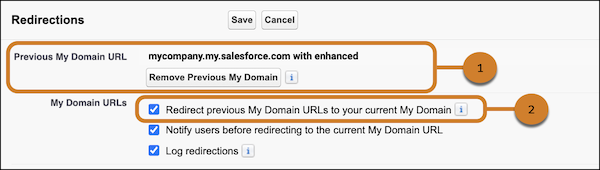
To redirect users who visit your previous My Domain URLs, select Redirect
previous My Domain URLs to your current My Domain. This option is enabled by
default after you deploy a My Domain change.
If a previous My Domain URL (1) isn’t listed, the Redirect previous My Domain URLs to your current My Domain setting (2) is unavailable.
-
To notify users about the updated URL when they visit a previous My Domain URL, select
Notify users before redirecting to the current My Domain
URL.
This setting applies only when redirections for your previous My Domain URLs or redirections for legacy (non-enhanced) My Domain host names are enabled.
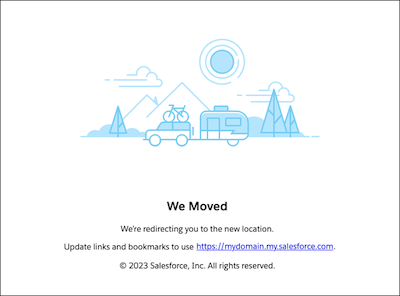
Here’s an example of the message that users see when they visit a previous My Domain URL and both options are enabled.
-
To verify that API traffic to this org uses the recommended URL or the correct
instanced URL, select Block API traffic that uses an incorrect instanced
URL.
Use this setting to disable that traffic before it stops permanently shortly after your org gets Winter ’27.

To prevent disruption after infrastructure updates that change your instance name, use your My Domain URL in all API calls.
 Warning If you enable “Block API traffic that uses an incorrect instanced URL” before the related known issue is resolved, SOAP login URLs via Visualforce pages can return a 400 Bad Request error. Salesforce plans to deploy a fix for that issue June 16–18, 2026, so we recommend that you test this change after June 18, 2026.
For more information, see End-of-Support Schedule for Incorrect Instanced URLs in API Traffic.
- Save your changes.
