
You are here:
Marketing Segments
When you target a group within your audience, we call that a segment. In email campaigns, you can easily build an audience segment with common filters or from a list of campaign members.
Required Editions
| Available in: Lightning Experience |
| Available in: Free, Starter and Pro Suite Editions. |

Targeting the right audience is crucial to any campaign’s success. To send your campaign to the right people, use segments. When you build a segment, you determine what filtering rules to apply to your total available audience so you can deliver your campaign to the right people. Instead of building your segment from scratch, you have options that help you quickly get started.
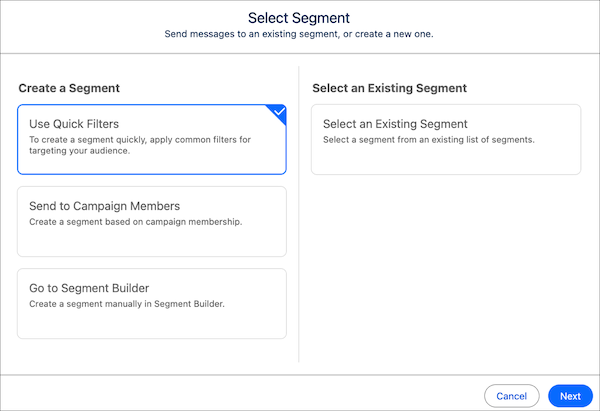
Quick Filters
When you use quick filters to build a segment, you can choose from a list of 11 preconfigured, commonly used attribute filters to apply to your data. After you select at least one filter, use filtering logic to target customers that match any or all of the selected attributes. Easily build your segment without leaving the campaign record.

Erin wants to send an email to contacts who haven’t engaged with any marketing emails from Ursa Major Solar in the last 30 days. She creates an email campaign and selects the quick filters option to create a segment. She selects Contacts and No Email Engagement and uses AND for filtering logic so that the segment pulls in customers that meet both filter criteria.
Send to Campaign Members
When you add high-value leads and contacts as campaign members, you can plan the campaign around that list of people. To add campaign members from the Leads or Contacts list view, select the people you want to add and then select Add to Campaign.You can also add leads or contacts from the Campaign Members tab in a campaign record. To target campaign members, select Send to Campaign Members when you add a segment to a campaign.
Create from Segment Builder
If you need more advanced filter criteria, use Segment Builder. Consider creating a test segment to practice with and review available standard fields on a primary or related object.
Preview a Segment
In Small Business Suites, a segment is automatically published after you activate the related campaign. To preview which customers are going to get your campaign, first publish the segment from the campaign record. The segment is republished after you activate the campaign, so the segment pulls in the latest data.
