
You are here:
Create a Round Robin Lead Assignment Rule
Keep your team's workload even by auto-assigning new leads to each user.
Round robin assignment means that each new lead is assigned to a different user until everyone has been assigned the same amount and the cycle repeats.
For example, if you have three users:
- Lead 1 is assigned to user 1
- Lead 2 is assigned to user 2
- Lead 3 is assigned to user 3, then the cycle repeats
- Lead 4 is assigned to user 1
- Lead 5 is assigned to user 2
- Lead 6 is assigned to user 3, then the cycle repeats.
You can set up round robin lead assignment with a few custom fields and a lead assignment rule.
Create a Lead Number f+Field
Creating a Lead Number f+Field gives each new lead a unique ID.
- Open Setup.
- Search for Object Manager, and open it.
- Click Lead.
- Click Fields & Relationships.
- Click New.
- Select Autonumber, and click Next.
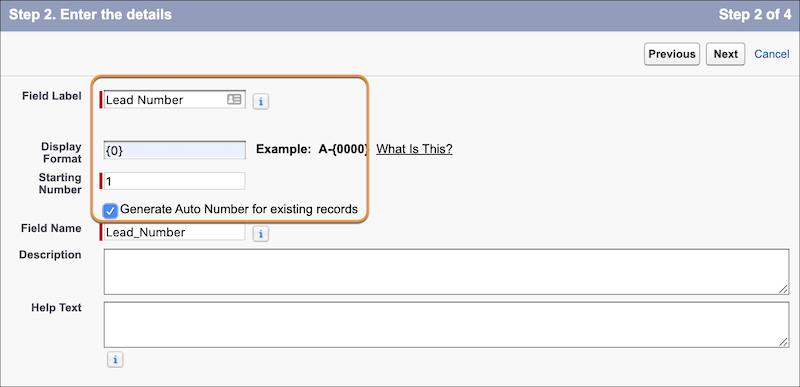
- Name your field Lead Number.
- In Display Format, enter {0}.
- In Starting Format, enter 1.
- Check the box to Set this field as the unique record identifier from an external system, and click Next.
-
Give user permission to the right people, and click
Next.
- Uncheck all Page Layout boxes, and click Save & New.
Create a Round Robin Field
The round robin field tells the system to assign each new lead to the next user in order.
- Select Formula, and click Next.
- Name your field. For example: Round Robin.
- Select Number.
- In the Decimal Places dropdown, choose 0, and click Next.
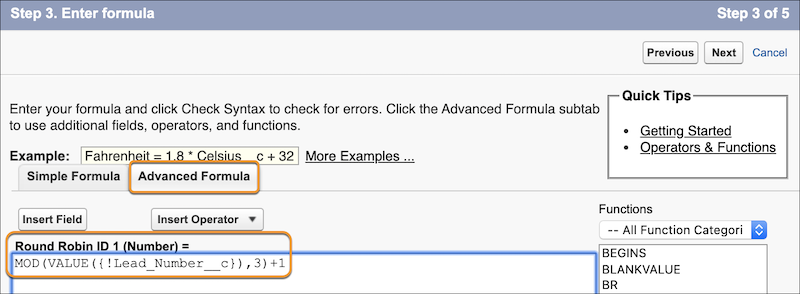
- Select Advanced Formula.
-
In the Test (Number) =field, paste in this formula:
MOD(VALUE({!Lead_Number__c}),3)+1. There are two things to
note: 1) The phrase Lead_Number pulls the name of the field you created in the previous
section. If you gave it a different name, make sure to update it in the formula. 2)
Replace the number 3 with the number of users you want in your round robin rotation.
- Click Next.
- Give user permission to the right people, and click Next.
- Uncheck all Page Layout boxes, and click Save.
Create a Lead Assignment Rule
The lead assignment rule ensures that leads are assigned evenly across users.
- In Setup, search for Lead Assignment Rules, and open it.
- Click New.
- Name your rule Round Robin Assignment Rule, and click Save.
- Click to open Round Robin Assignment Rule.
- In the Rule Entries section, clickNew.
- In Sort Order, enter 1.
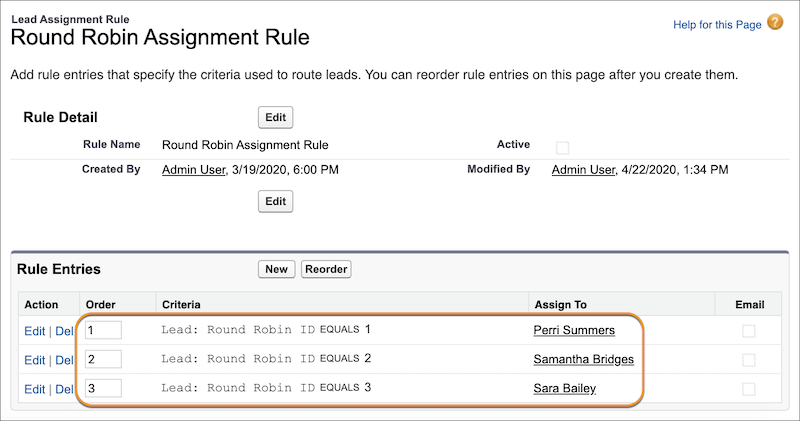
- Set the rule criteria by choosing Round Robin in the Field dropdown, Equals in the Operator dropdown, and 1 in the Value field.
- Select the user this rule applies to.
- Optionally, select an email template to tell the user that the rule has been assigned to them.
-
Repeat steps 5 through 9 for each user in your round robin rotation. Give each user
in your org a number. Every time you add a user to the round robin rotation, change the
sort order and the round robin equals number to the user's number.
Did this article solve your issue?
Let us know so we can improve!
