
You are here:
Add Promotion Limits
To keep the promotion within the approved budget and prevent malicious activities, on the Add Promotion Limits step of the wizard, marketing managers can set promotion limits. For pricing promotions, set limits for the whole promotion and for individual customers. For loyalty promotions, set limits at the promotion level, and only on vouchers and points.
Required Editions
| Available in: Lightning Experience |
| Available in: Enterprise, Performance, Unlimited, and Developer Editions with Loyalty Management |
Promotion Limits
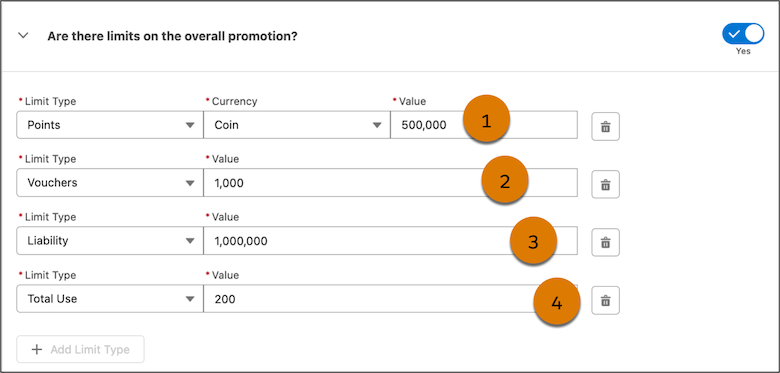
Here are the limits that you can set for the promotion.
| Callout | Limit Type | What It Does | Example |
|---|---|---|---|
| 1 | Points | The maximum number of points that a promotion can credit across all eligible loyalty program members. Marketing managers set limits for non-qualifying currencies and qualifying currencies. |
The promotion can't credit more than 500,000 points across eligible loyalty program members. |
| 2 | Voucher | The maximum vouchers that a promotion can issue. | The promotion can't issue more than 1,000 vouchers to eligible customers. |
| 3 | Liability | The maximum financial liability that the promotion can incur across all the rewards. | The promotion can't incur a liability of more than US$1 million across all the rewards offered by the promotion. |
| 4 | Total Use | The maximum number of times the promotion can be redeemed | The promotion can be used up to 200 times by all customers. |
Customer Limits
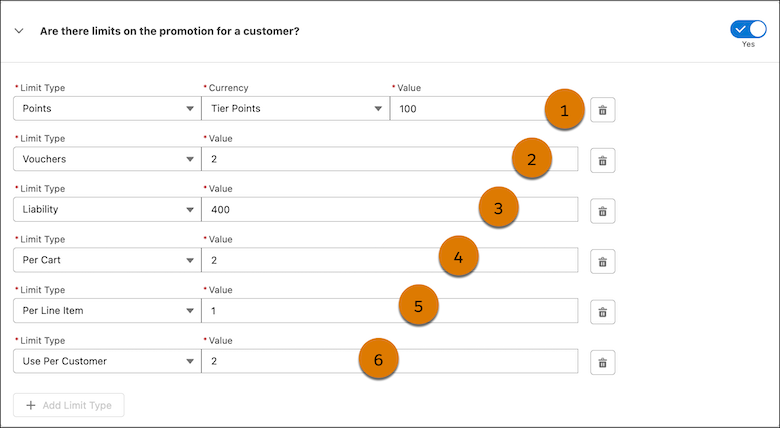
Here are the limits that you can set for each customer.
| Callout | Limit Type | What It Does | Example |
|---|---|---|---|
| 1 | Points | Marketing managers decide the maximum number of points that each loyalty program member gets from the promotion. Marketing managers set limits for non-qualifying currencies and qualifying currencies. |
The promotion can't credit more than 100 tier points to a single customer. |
| 2 | Voucher | Marketing managers decide the maximum number of vouchers that a promotion can issue to each customer and loyalty program member. | The promotion can't issue more than 2 vouchers to a single customer. |
| 3 | Liability | Marketing managers decide the maximum financial liability that the promotion can incur across all the rewards for each customer and loyalty program member. | The promotion can't incur a liability of more than US$400 across all issued rewards for a single customer. |
| 4 | Per Cart | Marketing managers decide the maximum number of times each customer or loyalty program member can apply the promotion to an individual cart. | If a promotion offers a 10% discount with a limit of 3 uses per cart, the discount can be applied to the total cart value up to three times. |
| 5 | Per Line Item | Marketing managers decide the maximum number of times each customer or loyalty program member can apply the promotion on a line item. | If a promotion offers buy one, get one free with a per line item limit of 5, you can apply it up to five times per eligible item. If a customer has 10 eligible items in their cart, the promotion applies to the first five items. |
| 6 | Use per Customer | Marketing managers decide the maximum number of times each customer or loyalty program member can use the promotion. | A customer can use the promotion only 2 times. |

The limits associated with loyalty program promotions use a limit framework designed to handle high-volume concurrent events.
This framework automatically extends LoyaltyPromCnsmpThldCtxt context definition and uses these objects to maintain the imposed limit:
- Business Limit Specification: The business limit instance and its metadata.
- Business Limit Tracker: The current usage of a business limit instance.
- Business Limit Pending Transaction: A transient usage record that reserves a portion of a business limit.If the transaction fails, the reserved portion is available for future use.
The current usage of promotion limits is stored in the PromotionLimitUsage record. For loyalty promotion limits on points and vouchers, the corresponding PromotionLimitUsage record is updated every 30 minutes to reflect the actual usage count.
When you set limits for a promotion, some limits are automatically managed whereas others require you to set up processes to manage them. See Transaction Journal Execution API.
