International Components for Unicode (ICU) locale formats are available as a release
update. To test the International Components for Unicode (ICU) locale formats before they’re
enforced for your organization, enable a test run in the Enable ICU Locale Formats release
update. Then enable the formats for the English (Canada) locale.
Required Editions
Available in: both Salesforce Classic and Lightning Experience
Available in: all editions
User Permissions
Needed
To view release updates:
View Setup and Configuration
To enable or disable release updates
Manage Release Updates
OR
Customize Application
The Enable ICU Locale Formats release update is
available for all Salesforce orgs. Orgs whose Apex Classes, Apex Triggers, and Visualforce
Pages are using API version 44 or earlier may encounter issues.
Salesforce orgs created
in Winter ’20 or later have ICU locale formats enabled by default. Orgs that haven’t already
switched to ICU locale formats are encouraged to manually update.
To get the release update
date for your instance, go to Trust Status, search for your instance, and click the maintenance
tab.
When you enable the ICU locale formats, the appearance and behavior related to
dates, times, and currencies can change. For this reason, we recommend that you test in a
sandbox before activating the new formats in production.
Enable the formats for testing.
From Setup, in the Quick Find Box, enter Release Updates,
and then select Release Updates.
For the Enable ICU Locale Formats release update, click Get
Started.
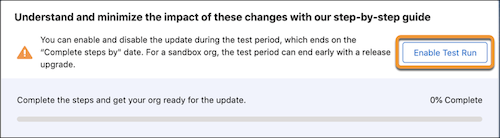
In the “Understand and minimize the impact of these changes with our step-by-step
guide” section, click Enable Test Run.
After you click Enable Test Run, the same section includes the
text, “This update is now enabled for testing.” Your org is using ICU formats.
Activate the ICU formats for the English (Canada) [en_CA] locale.
In the Quick Find box, enter User Interface, and then select
User Interface.
Select Enable ICU formats for en_CA locale, and save your
changes.
We use three kinds of cookies on our websites: required, functional, and advertising. You can choose whether functional and advertising cookies apply. Click on the different cookie categories to find out more about each category and to change the default settings.
Privacy Statement
Required Cookies
Always Active
Required cookies are necessary for basic website functionality. Some examples include: session cookies needed to transmit the website, authentication cookies, and security cookies.
Functional Cookies
Functional cookies enhance functions, performance, and services on the website. Some examples include: cookies used to analyze site traffic, cookies used for market research, and cookies used to display advertising that is not directed to a particular individual.
Advertising Cookies
Advertising cookies track activity across websites in order to understand a viewer’s interests, and direct them specific marketing. Some examples include: cookies used for remarketing, or interest-based advertising.