Keep track of all your activities with the activity timeline in Lightning Experience.
All the key details for each task, meeting, logged call, and sent email are bundled together,
and you can quickly log calls, create tasks, send emails, and more from the handy composer.
Required Editions
Available in: Lightning Experience
Available in: Essentials, Professional, Enterprise,
Performance, Unlimited, and Developer Editions
The activity timeline provides easy-to-scan summaries of past, present, and future activities
on accounts, cases, claims, contacts, contracts, insurance policies, leads, opportunities, and
activity-enabled custom objects.
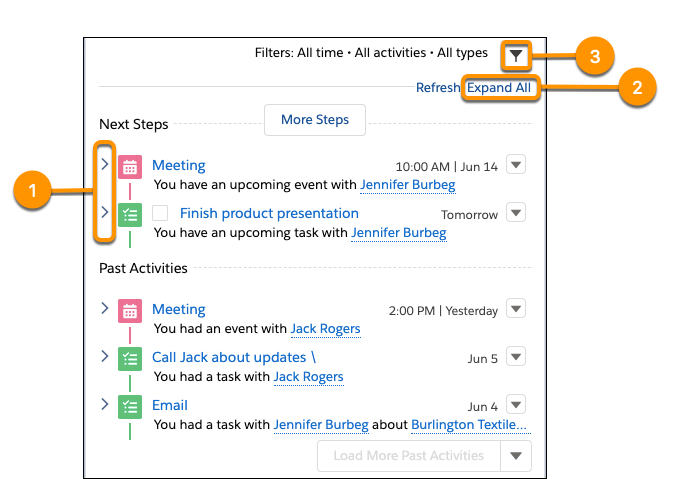
Click the arrow next to an individual activity (1) for a closer look at its description and
comment fields. Or click Expand All (2) to see details for all
activities in the timeline. You can choose to see only the activities that matter by filtering
your timeline (3).
You can’t configure the first two rows of the activity timeline, but they were designed with
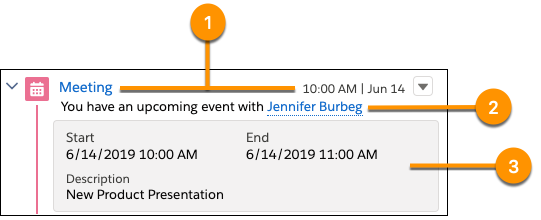
sales rep performance in mind. For tasks, the first row (1) displays the task’s subject and
due date. For events, it shows the subject and start date. And for logged calls and sent
emails, it shows the subject and the logged or sent date. The second row (2) summarizes the
activity. The summary is automatically generated to show the most useful information for the
current context.
Customize the Activity Timeline
Salesforce admins can customize what
users see in the details section (3) by changing the compact layout for the current object.
The details section is visible when an activity is expanded and includes fields from the
activity’s compact layout.
We use three kinds of cookies on our websites: required, functional, and advertising. You can choose whether functional and advertising cookies apply. Click on the different cookie categories to find out more about each category and to change the default settings.
Privacy Statement
Required Cookies
Always Active
Required cookies are necessary for basic website functionality. Some examples include: session cookies needed to transmit the website, authentication cookies, and security cookies.
Functional Cookies
Functional cookies enhance functions, performance, and services on the website. Some examples include: cookies used to analyze site traffic, cookies used for market research, and cookies used to display advertising that is not directed to a particular individual.
Advertising Cookies
Advertising cookies track activity across websites in order to understand a viewer’s interests, and direct them specific marketing. Some examples include: cookies used for remarketing, or interest-based advertising.