You are here:
Understanding How Merging and Unmerging Memberships Work
Learn how merging and unmerging memberships work.
Required Editions
| Available in: Lightning Experience in Enterprise, Performance, Developer, and Unlimited Editions that have Loyalty Management enabled |
How Does Loyalty Management Support Merging and Unmerging Memberships?
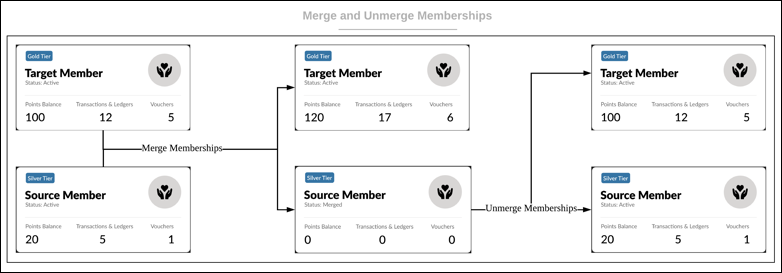
Loyalty Management provides two actions in Flow Builder to merge and unmerge memberships. The Merge Loyalty Program Memberships action merges two loyalty program memberships. The Unmerge Loyalty Program Memberships action unmerges merged memberships.
In the Merge Loyalty Program Memberships action, you can specify a source membership and a target membership. The points of the source membership are transferred to the target membership. You can also transfer the vouchers of the source membership to the target membership. You can assign the merged membership the higher tier between the source and the target membership tiers. After the merge is completed, the status of the source membership changes to Merge. The status of the target membership remains active.
If the source membership’s related tier benefits are already assigned, the related benefits are automatically set to expired.

How Do I View the Details of Points and Vouchers That Are Transferred to the Target Membership?
The transaction journals and vouchers of the source membership are transferred to the target membership. The details of the transferred transaction journals and vouchers are stored in the Loyalty Program Member Merge records.
Can I Merge the Memberships of Three or More Memberships?
Yes, but the memberships are merged in iterations. For example, a member requests you to merge three of their memberships and wants to keep membership 2 as the active membership. First, membership 1 and 2 are merged, and then memberships 2 and 3 are merged. Then, membership 1 and 3 are moved to the Merged status while membership 2 remains active. Membership 2 is transferred the points and vouchers of memberships 1 and 3. As membership 1 held the highest current tier between the three memberships, membership 1’s tier is assigned to membership 2.
Which Membership Do I Select as the Merged Membership When I Unmerge Memberships?
The merged membership is the membership that's moved to the Merged status when a membership is merged with another membership. For example, when membership 1 and 2 are merged, membership 2 remains active and membership 1 is moved to the Merged status. When unmerging, specify membership 1 as the merged membership.
Can I Unmerge Memberships When Three or More Memberships Were Merged?
Yes, but the memberships are unmerged in iterations and in the reverse order in which the memberships were merged. For example, a member's three memberships were merged. Membership 1 and 2 were merged first, and memberships 2 and 3 were merged next. When unmerging these memberships, unmerge membership 3 from membership 2 first, and then unmerge membership 1 from membership 2.
How Can Loyalty Program Managers or Customer Support Reps Merge and Unmerge Memberships?
The Merge Loyalty Program Memberships action and the Unmerge Loyalty Program Memberships action are available to users in your instance by default. Admins can create a Screen flow and use a Screen element in the flow to get the details of the memberships to be merged or unmerged. After adding the screen element, add the actions to merge or unmerge memberships based on the information gathered by the Screen element. You can add the Screen flow to a Loyalty Program Member page or other pages as required.
What Happens If Memberships That Are Merged Are Part of Different Groups?
After memberships are merged, points aren’t moved from the source member’s groups to the target member’s groups. The points that source members and target members contribute to their groups remain with their respective groups.
Which Membership Must Be Merged And Which Membership Must Be Set As The Target?
The membership with lesser number of transaction journals and loyalty ledgers must be merged. The membership with the higher number of transaction journals and loyalty ledgers must be set as the target membership.